
Parse CSV and then filter values to run other script
Hi,
I'm new on the forum and I'm beginner at scripting.
I would like to parse a CSV (excel table) and then display/filter the values inside a popup (with dropdowns).
My goal is to select/isolate values from the csv and then run a script which will use these values
(as for example to create pages with specific dimensions)
I found and I updated this script to parse the CSV :
function csvCheck() {
// check if "data.csv" exist
var open = csv.open ('r')
if(open == false){
alert("You need to create data.csv");
return;
}
csv.encoding = 'UTF8'; // set some encoding
csv.lineFeed = 'Macintosh'; // set the linefeeds
csv.open('r',undefined,undefined); // read the file
var content = csv.read(); // get the text in it
csv.close(); // close it again
var lines = content.split(ret); // split the lines (windows should be '\r')
var data = []; // will hold the data
var keys = lines[0].split(sepa); // get the heads
// loop lines
for(var i = 1; i < lines.length;i++){
var obj = {}; // temp object
var cells = lines.split(sepa);// get the cells
// loop rows
for (var j = 0; j < keys.length; j++){
// assign them to the heads
obj[keys
}
data.push(obj); // add to data
}
$.writeln(data.toSource());
}
csvCheck();
It works fine, but then I would like to display/filter the values
Something similar than the image below :
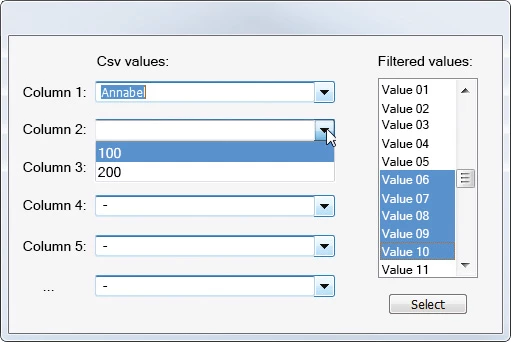
First dropdown = first column of the CSV
Identical values should be merged
"Select" button should run another script
Thanks a lot for your help !
 AdChoices