Participant
August 23, 2022
Answered

Partial File Name Text Variable that updates when you rename the file

  • August 23, 2022
  • 2 replies
  • 857 views

Hi all,

I've seen a couple of old posts related to this topic, but I'm new to scripting and I've not been able to solve my specific issue myself so far. 


I'd like to insert a text variable into an indd document that takes the first 7 characters of the file name and inserts it as a variable. All documents are named as J00XXXX_filename.indd, where J00XXXX is a unique job number. I'm creating a template where we would open it, save it with the new job number (always following the J00XXXX naming convention) and I'd like the text variable to change when you rename the file.


Any help would be much appreciated! Thank you!
This topic has been closed for replies.
Correct answer Kasyan Servetsky

Here is a quick & dirty start-up script:

#targetengine "kasyan"

var eventListener = app.addEventListener("afterOpen", updateTextVar, false);

function updateTextVar(event) {
	try {
		var doc = app.documents[0];
		var textVarName = "My Partial File Name";
		var textVar = doc.textVariables.item(textVarName);
		var m = doc.name.match(/^J00.{4}/);

		if (m != null) {
			var custName = m[0];
			
			if (!textVar.isValid) {
				textVar = doc.textVariables.add({variableType: VariableTypes.CUSTOM_TEXT_TYPE, name: textVarName});
				
			}

			if (textVar.variableOptions.contents != custName) {
				textVar.variableOptions.contents = custName;
			}
		}
	}
	catch(err) {}
} 

If the "My Partial File Name" text variable doesn't exist, it will be created; if exists, it will be updated.

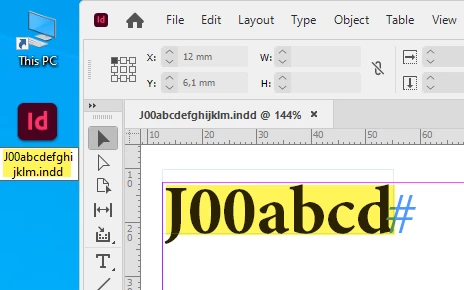
For example, we have a file at the start: J00abcdefghijklm.indd

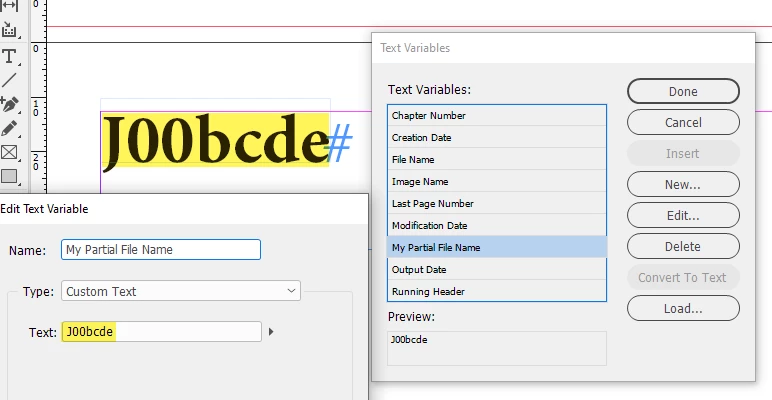
Then we rename the file -- say to J00bcdefghijklm.indd -- and after opening it, the text variable is updated automatically.


2 replies

Community Expert
August 23, 2022

Hi @Emma238317970zju ,

we already had a discussion about this about one year ago:


10 first letters/digits Partial filename
charlieg19576563, Jun 29, 2021
https://community.adobe.com/t5/indesign-discussions/10-first-letters-digits-partial-filename/td-p/12145405


Regards,
Uwe Laubender
( Adobe Community Professional )

Participant
August 24, 2022

Thank you Uwe, I spent a lot of time going through similar older questions and was struggling to get the solution to work for me being a novice, but appreciate the time to show me some new learnings!

Participant
February 7, 2023

Hi! I am trying to implement this script as well but having issues. Can you send me a link to the script please?

thank you so much for your help!


Kasyan Servetsky
Kasyan ServetskyCorrect answer
Legend
August 23, 2022

Here is a quick & dirty start-up script:

#targetengine "kasyan"

var eventListener = app.addEventListener("afterOpen", updateTextVar, false);

function updateTextVar(event) {
	try {
		var doc = app.documents[0];
		var textVarName = "My Partial File Name";
		var textVar = doc.textVariables.item(textVarName);
		var m = doc.name.match(/^J00.{4}/);

		if (m != null) {
			var custName = m[0];
			
			if (!textVar.isValid) {
				textVar = doc.textVariables.add({variableType: VariableTypes.CUSTOM_TEXT_TYPE, name: textVarName});
				
			}

			if (textVar.variableOptions.contents != custName) {
				textVar.variableOptions.contents = custName;
			}
		}
	}
	catch(err) {}
} 

If the "My Partial File Name" text variable doesn't exist, it will be created; if exists, it will be updated.

For example, we have a file at the start: J00abcdefghijklm.indd

Then we rename the file -- say to J00bcdefghijklm.indd -- and after opening it, the text variable is updated automatically.


Participant
August 24, 2022

this worked perfectly for me, thank you for taking the time to explain it so clearly for me, it's very much appreciated!!