
Inspiring
April 22, 2026
Question

Paste in Place Misaligns Text Frames When Copying Between Documents in InDesign 21.2

  • April 22, 2026
  • 2 replies
  • 36 views

Hi folks

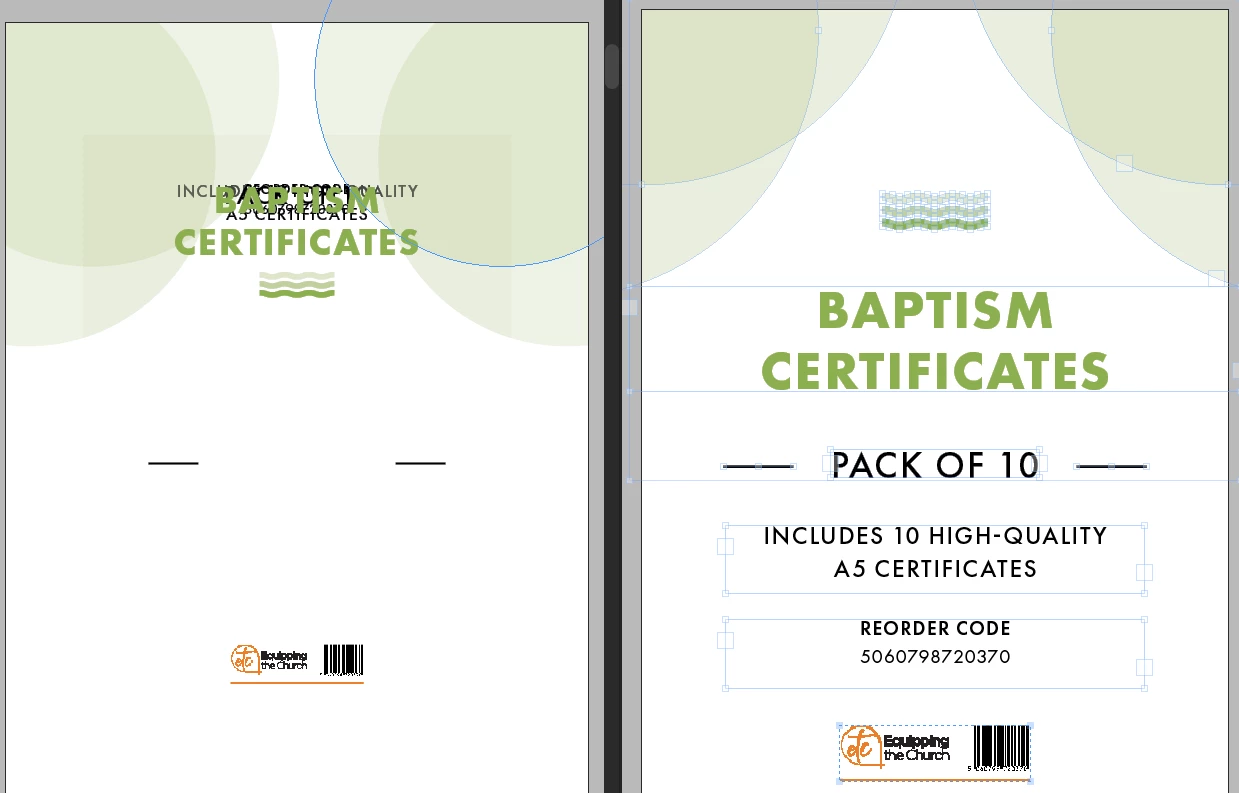
I’ve come across this odd copy/paste bug in InDesign 21.2. Text fields are not located correctly when pasting a group of obejcts. Same thing happens with Paste and Paste in Place.

I am pasting from the right window (A5) into the left window (A5) hence the size difference.

Is this a known bug?

Thanks
Richard
 

2 replies

Peter Spier
Community Expert
Community Expert
April 22, 2026

Any possibility that the y-axis zero point is different b between the two files?

BobLevine
Community Expert
Community Expert
April 22, 2026

Current version is 21.3. Take care of that first. But in the meantime make sure you’re using paste in place.

Inspiring
April 22, 2026

Unfortunately this is not possible, as I have a couple of major projects in production using 21.2 and I never update to latest version mid-project.


I have tried to update to 21.3 while keeping 21.2 installed, but I am not given the option to maintain existing versions, so this is not possible I’m afraid. Recent major or point releases in InDesign have introduced too many major bugs for me to take this risk.

Unless these is a way to force the update to maintain 21.2 as a separate installation?

Also, as mentioned in my original post, this error also occurs with Paste in Place.

BobLevine
Community Expert
Community Expert
April 22, 2026

No and have you tried paste in place? Have you grouped those items first and then copied / pasted them?