Participant
October 8, 2018
Answered

Paste without duplicate color swatches transferring over in InDesign

  • October 8, 2018
  • 7 replies
  • 10054 views

I am looking for a solution for when you paste content from other documents, to allow the duplicate color swatches to not transfer over creating a messy swatch panel. It seems that even though I have the color in the document, it will add a 2nd, 3rd, 4th, etc. version of the same color. I would like to just paste information without having all of the duplicate colors copying over. Is this possible?

Thanks!

    Correct answer Laubender

    I'm not able to recreate it now.  I know what you're saying with the color definitions. I always leave my values as numbers. I just don't understand how pasting from one document can create that many versions... I would have version 1- 18 at times. Mind you, I am working with people who aren't designers so when the get into this program their files are a mess anyway.

    I'm going to have to look into this when it happens again with another project.


    jmcaleese  wrote

    … I always leave my values as numbers. I just don't understand how pasting from one document can create that many versions...

    Hi jmcaleese ,

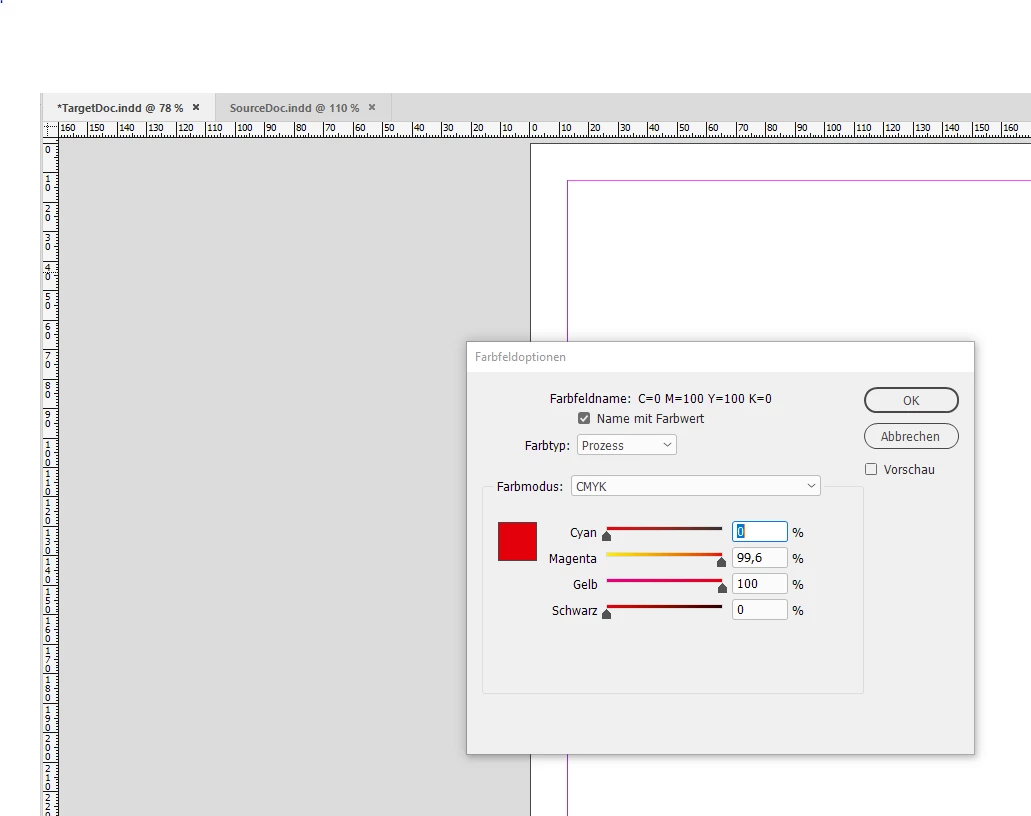
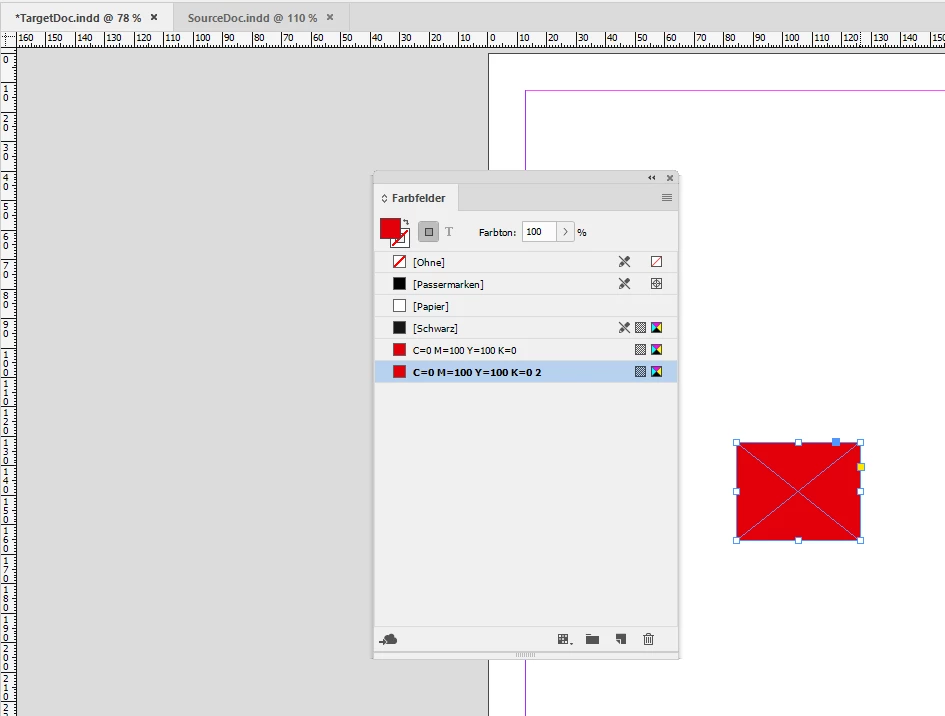
    in case the color definitions are no integers and the values for names are rounded you will see additional swatches if the not rounded numbers are not exactly the same. So check for the exact values, not only exact names.

    Example source document with a swatch named automatically C=0 M=100 Y=100 K=0:
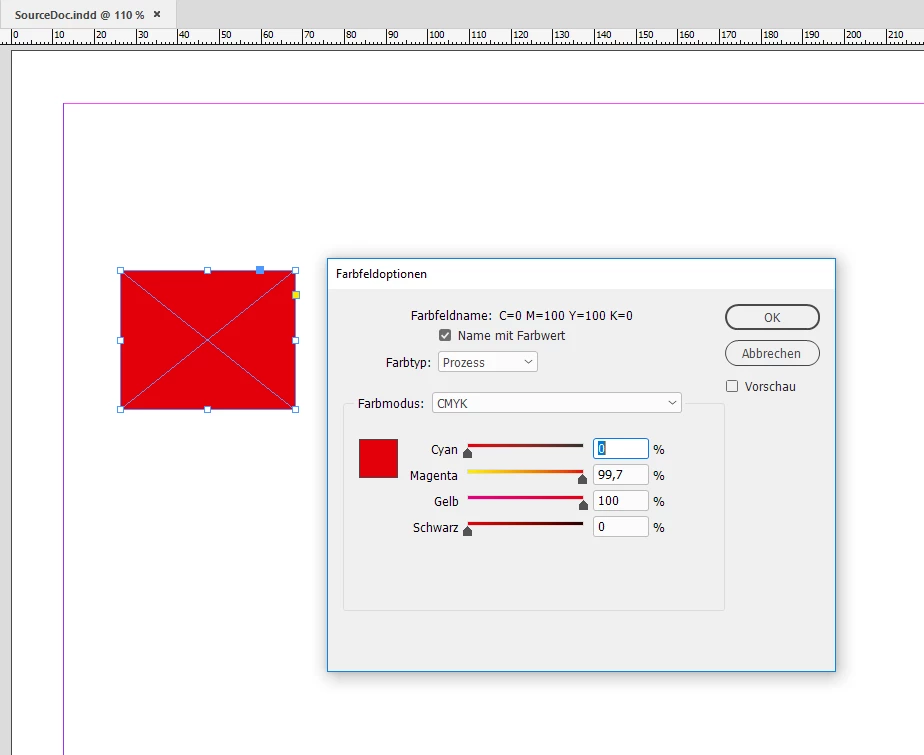
    If the selected rectangle would be copied and pasted to the following target document where a swatch with the same automatic name, but a slightly different definition exists:
    You'll get the result below:
    Regards,
    Uwe

    7 replies

    Mike Witherell
    Community Expert
    Community Expert
    September 13, 2024

    Just wild guessing, but, what effect does turning these Preferences off or on have on the document?

    1. Preferences > General > When Placing or Pasting Content > Allow Incoming Spot Color to Replace Existing Swatch of Same Name

    2. Preferences > Clipboard Handling > Clipboard > Prefer PDF When Pasting as well as Copy PDF to Clipboard (maybe turn both off as a test?)

    And further:

    3. Did any object content that is exhibiting this behavior get copy n pasted from Illustrator originally?

    4. And in the case of the user who was working with templates as originating file: Did the user begin by first Save-As to an InDesign document?

    5. And in the case of the user who was working with swatches in sub-folders: Does the problem persist if the Swatch is not in a grouped subfolder?

    6. What color model was the template versus the color model of the working file?


    These are all just troubleshooting guesses, of course. I don't believe I have ever seen this happen in projects I have operated, so I am just asking rough ideas.

    Mike Witherell
    Participating Frequently
    September 13, 2024

    Hi Mike,


    Thanks for your reply. I'll have to try #1 and #2 and let you know how it goes.


    3 and 4 feel irrelevant as this template was built from scratch within InDD (I should know, I made it). I created all the swatches and styles and built them out organically. the file started out as RGB but I later made a CMYK version by converting the RGB file's profile and all swatch values. the swatch dupe glitch occurs in both versions though. I don't know if this answers #6 or not. Users are told to use RGB for web and digital stuff and CMYK for printed items.


    Per #5, The swatch dupes regardless of if the swatch is in a subfolder or not... however it could be that if a swatch is ever put in a subfolder, even if moved back out, the glitch may have already applied? Much to speculate. 😞


    Mike Witherell
    Community Expert
    Community Expert
    September 13, 2024

    This one has me scratching my head. 

    Mike Witherell
    Participating Frequently
    September 12, 2024

    I've been dealing with this issue even within the same document. I'm not copying or pasting in from another document, I'm copying things between pages and my swatches panel keeps duplicating colors and appending them as 2, 3, 4, etc. It's really annoying and I'd love to know how to stop the madness. Thanks!

    Community Expert
    September 12, 2024

    Hi @jnliao77@CBRE ,

    please attach a sample document where you see this when you answer through the forum's editor.

    What you see is an issue that I did not come accross yet.


    Regards,
    Uwe Laubender
    ( Adobe Community Expert )

    Participating Frequently
    September 12, 2024

    Unfortunately, I'm 99% sure my company won't allow me to share copies of our source files in a public forum but I literally replicated the issue just now as this happens to me on the daily. All of my actions are done IN the same file.

    Method 1: duplicate spread (using right click on layout panel) - swatches don't duplicate

    Method 2: duplicate item on the same page (alt+ctrl+shift+d) - swatches don't duplicate

    Method 3: copy-paste items from one page to another - swatches duplicate

    Method 4: copy-paste items within the same page - swatches duplicate

    Method 5: Drag duplicate (holding down alt key) - swatches don't duplicate


    Additional context: our swatches are organized/grouped into folders but prior to recent CC updates (maybe circle 2021), previous versions of InDD never exhibited this issue and our swatches have always been in folders.

    Inspiring
    March 29, 2023

    I have this exact same problem. I am copying objects with assigned colours, e.g., "Grey_Light" from a client's brand guidelines and adding them to a new artwork project I have created and each time I am doing so the numbering is increasing, i.e., "Grey_Light 1", "Grey_Light 2", "Grey_Light 3", etc. All objects and text are process colours, not spot.


    Additionally, I'm finding that some black tints (30%, 60%, 90%, etc.) with the naming convention are converting to full CMYK breakdown, not just Black.


    If it isn't custom named and has a CMYK colour value, it isn't a problem.


    Known Participant
    July 1, 2019

    I seem to recall this is a setting that you decide on when you first install indesign.

    I can't find where to change this setting after the fact tho.

    Community Expert
    July 1, 2019

    Hi,

    don't think there is a setting for this.

    Whereas I'd like to know what you exactly mean by "this".

    Regards,
    Uwe

    rob day
    Community Expert
    Community Expert
    October 9, 2018

    As Bill suggests if colors in two different docs are named the same, but have different color definitions the color gets duplicated with an appended name when you paste.

    If you are using OSX this AppleScript will paste and prevent the duplication. The incoming color is defined with the destination document's color:

    (*

    Rob Day 2015-2018

    When pasting an object with a conflicting color swatch changes the incoming swatch to match the document swatch

    *)

    tell application "Adobe InDesign CC 2018"


        --get the list of document swatches before the paste

        set currentColors to name of every swatch of active document

        paste


        tell active document

            --get a new list which would include duplicates

            set newColors to name of every swatch


            --find the duplicates and merge with the original

            repeat with i from 1 to number of items in newColors

                set c to item i of newColors

                --the duplicate has a space + 2 added to its name so get its name minus 2 characters

                if c is not in currentColors then

                    set mergename to characters 1 thru ((count of characters of c) - 2) of c as string

                    --merge with the original swatch

                    try

                        merge swatch mergename with swatch c

                    end try

                end if

            end repeat

        end tell

    end tell

    Known Participant
    February 5, 2021

    I'm having this same issue. At the company I work at, we use templates for proposals but recently changed the value of two of our brand colors and frequently we copy/paste from old documents and the old color (with the same name but different values) come in as separate swatches. See attached file. Is there any way to bring colors in and have them automatically default to the colors in the main file without adding all of the separate swatches? I'm on a PC by the way. Thanks in advance for any help!

    Participant
    January 23, 2024

    If you want a copy and pasted object with an applied swatch from a different file to inherit the characteristics of the swatch in the new document, make sure both new and old swatches have the exact same case-sensitive name and are BOTH set to SPOT colors.

    Bill Silbert
    Community Expert
    Community Expert
    October 9, 2018

    Are the colors you're using PANTONE colors taken from the same color libraries? Are the color settings used for each document the same (Edit>Color Settings...)? If the colors are ones that you've created have you checked to see if their CMYK or RGB breakdowns are identical?

    Srishti Bali
    Community Manager
    Community Manager
    October 9, 2018

    Hi Jim,

    Sorry to hear about this. I tried the same thing at my end but I was unable to replicate this issue. Would you mind sharing the exact workflow?

    In addition to this, I would also suggest you to reset preferences for InDesign: Set preferences in Adobe InDesign

    Regards,

    Srishti

    jmcaleeseAuthor
    Participant
    October 10, 2018

    Well, I am copying from someone else's document, so I really don't know why this is happening. It's hard to tell and it's probably from their funky file.  I tried to recreate this from a document from scratch and it doesn't happen.  I don't know if it's something they have going on in their settings or what. #Frustrating

    rob day
    Community Expert
    Community Expert
    October 10, 2018

    Have you checked the swatch color definitions?

    Here the doc on the right has a swatch named Red that is defined as CMYK 0|100|100|0

    The doc on the left also has a swatch named Red, but it is defined as CMYK 0|100|60|0

    If I copy the Red frame from the right doc to the left doc, a new swatch Red 2 is made because of the definition mismatch:

