
Participating Frequently
December 16, 2025
Question

pasting text from word results in weird character showing up

  • December 16, 2025
  • 2 replies
  • 364 views

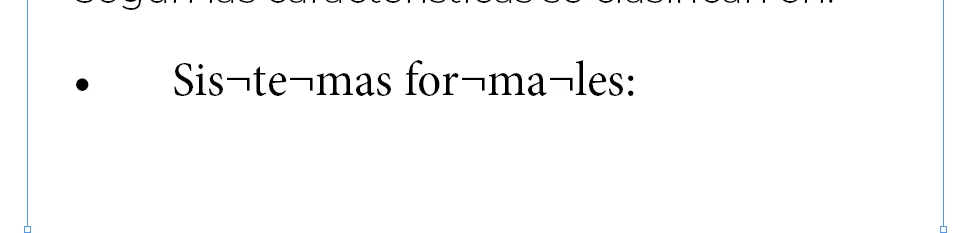
It didn't happen before with the same files, but now every time I copy paste something from Word to Indesign, this shows up between the letters
cream__soda_1-1765913931128.png


I wish I knew the name of this character so I could search this up.

2 replies

Willi Adelberger
Community Expert
Community Expert
December 18, 2025

What happens, if you don't copy paste but use the recommended File > Pla e?

Peter Kahrel
Community Expert
Community Expert
December 16, 2025

Its name is 'not sign', its unicode value is 00AC. On many keyboards (UK English e.g.) it's the top-left character (left of the !1 key). To find it, either enter it in the Find what field in the Find/Change window, or, if your keyboard doesn't have the character, copy it and paste it into the Find What field.

Community Expert
December 18, 2025

Thanks for the information @Peter Kahrel. Find change would fix the issue but would you know or could guess why the character would be pasted in the first place if the OP mentions it did not happen before? This seems strange behavior

@cream__soda which version of InDesign and OS are you using? When you say it did not happen before did you mean copying the same text from the same file and pasting it in the same version of InDesign?

-Manan

-Manan
Peter Kahrel
Community Expert
Community Expert
December 18, 2025

The only thing I can think of is possible word breaks. Those symbols are in places where hyphens can be placed.