I wrote a few scripts that update, change path, relink links. Here is one of them, which, I think, is suits best to what you ask.
I called it 'Change paths of links'.
BTW, question to native English speakers: which of the following is gramatically correct?
- Change paths of links
- Change paths of the links
- Change the paths of the links
- Change links' paths
- Change the links' paths
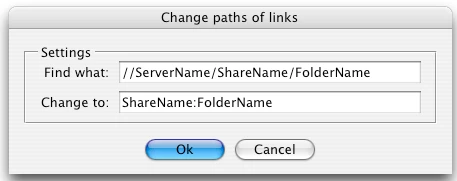
When you run the script a dialog box appears with two text fields, where you specify a platform-specific path name, or a path in a platform-independent format known as universal resource identifier (URI) notation, or Mac OS 9 path name (for Mac).
For example any of the following notations are valid:
Windows
c:\dir\file(Windows path name)
/c/dir/file(URI path name)
//10.44.54.70/Test/images(uniform naming convention (UNC) path name of the form //servername/sharename)
//Apple/Test/images
\\10.44.54.70\Test\images (Windows path name)
\\Apple\Test\images (Windows path name)
where 10.44.54.70 IP address of the server, Apple -- DNS name of the server, Test -- share name
Mac
Thefollowing examples assume that the startup volume is MacOSX, and that there isa mounted volume Remote.
/dir/file (Mac OS X path name)
/MacOSX/dir/file(URI path name)
MacOSX:dir:file(Mac OS 9 path name)
/Remote/dir/file (URI path name)
Remote:dir:file (Mac OS 9 path name)
Remote/dir/file (Mac OS X path name)
You can just copy a part of the path in Links panel and paste it to the script's dialog. In CS4, make sure to choose "Copy Platform Style Path" in context menu.
The caseof the characters doesn’t matter: you can type both in upper and lowercase inthe script's dialog. For example — Test, test, TEST, TeSt — are all the samefor the script.
// Change paths of links.jsx
// Script for InDesign CS3 and CS4 -- changes paths of links in the active document.
// Version 1.0
// May 13 2010
// Written by Kasyan Servetsky
// http://www.kasyan.ho.com.ua
// e-mail: askoldich@yahoo.com
//--------------------------------------------------------------------------------------------------------------
var gScriptName = "Change paths of links";
var gScriptVer = 1;
var gOsIsMac = (File.fs == "Macintosh") ? true : false;
var gSet = GetSettings();

if (app.documents.length == 0) {
     ErrorExit("No open document. Please open a document and try again.", true);
}

var gDoc = app.activeDocument;
var gLinks = gDoc.links;
var gCounter = 0;

if (gLinks.length == 0) {
     ErrorExit("This document doesn't contain any links.", true);
}

CreateDialog();

//======================= FUNCTIONS =============================
function CreateDialog() {
     var dialog = new Window("dialog", gScriptName);
     dialog.orientation = "column";
     dialog.alignChildren = "fill";

     var panel = dialog.add("panel", undefined, "Settings");
     panel.orientation = "column";
     panel.alignChildren = "right";

     var group1 = panel.add("group");
     group1.orientation = "row";
     var findWhatStTxt = group1.add("statictext", undefined, "Find what:");
     var findWhatEdTxt = group1.add("edittext", undefined, gSet.findWhatEdTxt);
     findWhatEdTxt.minimumSize.width = 300;

     var group2 = panel.add("group");
     group2.orientation = "row";
     var changeToStTxt = group2.add("statictext", undefined, "Change to:");
     var changeToEdTxt = group2.add("edittext", undefined, gSet.changeToEdTxt);
     changeToEdTxt.minimumSize.width = 300;

     var btnGroup = dialog.add("group");
     btnGroup.orientation = "row";
     btnGroup.alignment = "center";
     var okBtn = btnGroup.add("button", undefined, "Ok");
     var cancelBtn = btnGroup.add("button", undefined, "Cancel");

     var showDialog = dialog.show();
     if (showDialog== 1) {
          gSet.findWhatEdTxt = findWhatEdTxt.text;
          gSet.changeToEdTxt = changeToEdTxt.text;
          app.insertLabel("Kas_" + gScriptName + "_ver_" + gScriptVer, gSet.toSource());
          Main();
     }
}
//--------------------------------------------------------------------------------------------------------------
function Main() {
     WriteToFile("\r--------------------- Script started -- " + GetDate() + " ---------------------\n");

     for (var i = gLinks.length-1; i >= 0 ; i--) {
          var currentLink = gLinks;
          var oldPath = currentLink.filePath;
          oldPath = oldPath.replace(/:|\\/g, "\/");
          oldPath = oldPath.toLowerCase();

          gSet.findWhatEdTxt = gSet.findWhatEdTxt.replace(/:|\\/g, "\/");
          gSet.changeToEdTxt = gSet.changeToEdTxt.replace(/:|\\/g, "\/");

          gSet.findWhatEdTxt = gSet.findWhatEdTxt.replace(/([A-Z])(\/\/)/i, "/$1/");
          gSet.changeToEdTxt = gSet.changeToEdTxt.replace(/([A-Z])(\/\/)/i, "/$1/");

          gSet.findWhatEdTxt = gSet.findWhatEdTxt.toLowerCase();
          gSet.changeToEdTxt = gSet.changeToEdTxt.toLowerCase();

          if (File.fs == "Windows") oldPath = oldPath.replace(/([A-Z])(\/\/)/i, "/$1/");

          var newPath = oldPath.replace(gSet.findWhatEdTxt, gSet.changeToEdTxt);

          if (File.fs == "Windows") {
               newPath = newPath.replace(/([A-Z])(\/\/)/, "/$1/");
          }
          else if (File.fs == "Macintosh") {
               newPath = "/Volumes/" + newPath;
          }

          var newFile = new File(newPath);

          if (newFile.exists) {
               currentLink.relink(newFile);
               gCounter++;
               WriteToFile("Relinked \"" + newPath + "\"\n");
          }
          else {
               WriteToFile("Can't relink \"" + newPath + "\" because the file doesn't exist\n");
          }
     }

     WriteToFile("\r--------------------- Script finished -- " + GetDate() + " ---------------------\r\r");

     if (gCounter == 1) {
          alert("One file has been relinked.", "Finished");
     }
     else if  (gCounter > 1) {
          alert(gCounter + " files have been relinked.", "Finished");
     }
     else {
          alert("Nothing has been relinked.", "Finished");
     }
}
//--------------------------------------------------------------------------------------------------------------
function GetSettings() {
     var settings = eval(app.extractLabel("Kas_" + gScriptName + "_ver_" + gScriptVer));
     if (settings == undefined) {
          if (gOsIsMac) {
               settings = { findWhatEdTxt:"//ServerName/ShareName/FolderName", changeToEdTxt:"ShareName:FolderName" };
          }
          else {
               settings = { findWhatEdTxt:"ShareName:FolderName", changeToEdTxt:"//ServerName/ShareName/FolderName" };
          }
     }
     return settings;
}
//--------------------------------------------------------------------------------------------------------------
function ErrorExit(myMessage, myIcon) {
     alert(myMessage, gScriptName, myIcon);
     exit();
}
//--------------------------------------------------------------------------------------------------------------
function WriteToFile(myText) {
     var myFile = new File("~/Desktop/" + gScriptName + ".txt");
     if ( myFile.exists ) {
          myFile.open("e");
          myFile.seek(0, 2);
     }
     else {
          myFile.open("w");
     }
     myFile.write(myText);
     myFile.close();
}
//--------------------------------------------------------------------------------------------------------------
function GetDate() {
     var myDate = new Date();
     if ((myDate.getYear() - 100) < 10) {
          var myYear = "0" + new String((myDate.getYear() - 100));
     } else {
          var myYear = new String ((myDate.getYear() - 100));
     }
     var myDateString = (myDate.getMonth() + 1) + "/" + myDate.getDate() + "/" + myYear + " " + myDate.getHours() + ":" + myDate.getMinutes() + ":" + myDate.getSeconds();
     return myDateString;
 }
//--------------------------------------------------------------------------------------------------------------

 AdChoices