



pavel_4861
Participant
June 25, 2026
Question

PDF Comments Panel Corrupts Czech Diacritics in InDesign 2026 on Windows 11

  • June 25, 2026
  • 1 reply
  • 37 views

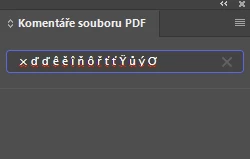
PDF Comments panel corrupts Czech diacritics

InDesign 2026 on Windows 11 displays corrupted Czech characters in the Window → PDF Comments panel.

The corruption affects:

  • imported PDF comments,
  • the search edit box while typing!

The same INDD and PDF display correctly on other machines - but not all. Rest of UI has no problems.

Verified:

  • identical InDesign installation (hash comparison of files),
  • identical PDF,
  • different Acrobat versions tested,
  • Czech and English UI tested,
  • reinstallation of InDesign tested 
  • identical UI fonts (Segoe family)

Therefore the issue appears to be specific to the PDF Comments panel text rendering/input subsystem rather than PDF parsing.

This should be á č ď é ě í ň ó ř š ť ú ů ý ž, the same changes appears in comments 
 

    1 reply

    Abhishek Rao
    Community Manager
    Community Manager
    June 25, 2026

    Hi ​@pavel_4861,


    Thank you for the detailed information. I tested the workflow you described on InDesign 21.4.1 running on Windows 11, using both the Czech and English (North America) UI, but I was unable to reproduce the issue.

    Could you please confirm the exact InDesign 2026 build number (Help > About InDesign)? Also, please try resetting your InDesign preferences by following the video at the bottom of this page: https://helpx.adobe.com/indesign/using/setting-preferences.html, and check whether the issue persists in a new Windows user profile: https://support.microsoft.com/en-us/windows/manage-user-accounts-in-windows-104dc19f-6430-4b49-6a2b-e4dbd1dcdf32.

    If the issue still occurs, please share a sample INDD file, the corresponding PDF, and a few screenshots or a short screen recording so we can try to reproduce and investigate the issue further. If the files are confidential, feel free to share them with us via DM using a cloud storage service such as Google Drive or Dropbox.


    Looking forward to your update.

    Abhishek

    Abhishek Rao
    Community Manager
    Community Manager
    July 10, 2026

    Hi ​@pavel_4861,


    Just checking in to see if you had a chance to try the suggested steps. Could you let us know if the issue has been resolved or if you're still experiencing it?

    If it still persists, please share the requested sample INDD file, the corresponding PDF, and a short screen recording or a few screenshots so we can investigate further.


    Looking forward to your update.

    Abhishek

    pavel_4861
    Participant
    July 13, 2026

    Back from vacation, back to work.

    The issue does not appear to depend on the INDD or PDF file. On the affected machines, it occurs consistently with any document. I've uploaded a simple test INDD file, its exported PDF with comment, and screenshots showing both the incorrect and the expected behavior of the panel.

    InDesign 21.4.1 x64

    Preferences reset, new user profile created… nothing change on those machines. 

    Files for testing