Participant
March 9, 2021
Answered

PDF custom presets not automatically loading .joboptions ~Library>Application Support>Adobe>Settings

  • March 9, 2021
  • 2 replies
  • 831 views

I'm trying to simply send some presets and .joboptions to a coworker and the custom preset I created (a while back) is not showing up in the ~Library>Application Support>Adobe>Settings. I have 2 custom PDF preset .joboption files showing, but not the 3rd one I'm looking for. It should say "DPI - 11x17 crops & bleeds", but I'm only getting the iGen versions (a different printer).


Am I completely missing something or has something changed recently? I just need the missing "DPI - 11x17 crops & bleeds.joboptions" file! I have this preset loaded in InDesign already, so it's there, but it seem to be missing in my ~Library>Application Support>Adobe>Settings.


Help please!?!
This topic has been closed for replies.
Correct answer Loic.Aigon

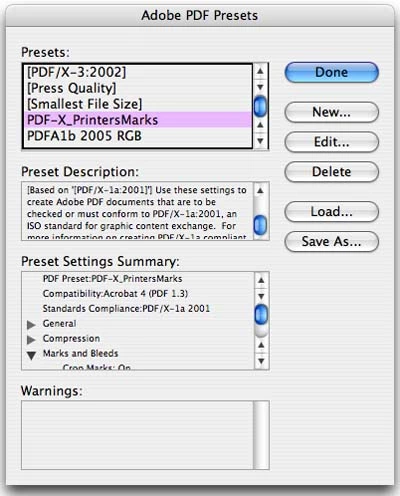
What about exporting the joboptions from the PDF Exports preset window (see Save As) ?

2 replies

Participating Frequently
March 9, 2021
If you end up having to recreate the preset, I suggest you remove the & from the name. In my experience Acrobat still has a problem with old style illegal characters such as
\ / : * ? " < > | ~ # % & + { } -


Get Outlook for iOS
[CONFIDENTIALITY AND PRIVACY NOTICE] Information transmitted by this email is proprietary to Medtronic and is intended for use only by the individual or entity to which it is addressed, and may contain information that is private, privileged, confidential or exempt from disclosure under applicable law. If you are not the intended recipient or it appears that this mail has been forwarded to you without proper authority, you are notified that any use or dissemination of this information in any manner is strictly prohibited. In such cases, please delete this mail from your records. To view this notice in other languages you can either select the following link or manually copy and paste the link into the address bar of a web browser: http://emaildisclaimer.medtronic.com
Participant
March 9, 2021

Oops uploaded a wrong screenshot of some PPD stuff lolol.


Here is the screenshot of the ~Library>Application Support>Adobe>Settings I'm seeing for my custom .joboption files.


Loic.Aigon
Loic.AigonCorrect answer
Legend
March 9, 2021

What about exporting the joboptions from the PDF Exports preset window (see Save As) ?