dmsduco
Inspiring
November 16, 2018
Answered

PDF has different layers than the imported version

  • November 16, 2018
  • 2 replies
  • 5570 views

Please see these PDF files: layered pdfs.zip

These files are placed into an InDesign document with some layers turned off using the Object Layer Options.

When replacing one file with another, InDesign tell’s me the PDF has different layers than the imported version, and then makes all layers visible.

However, in Acrobat, I cannot see any difference in layers for these two files.
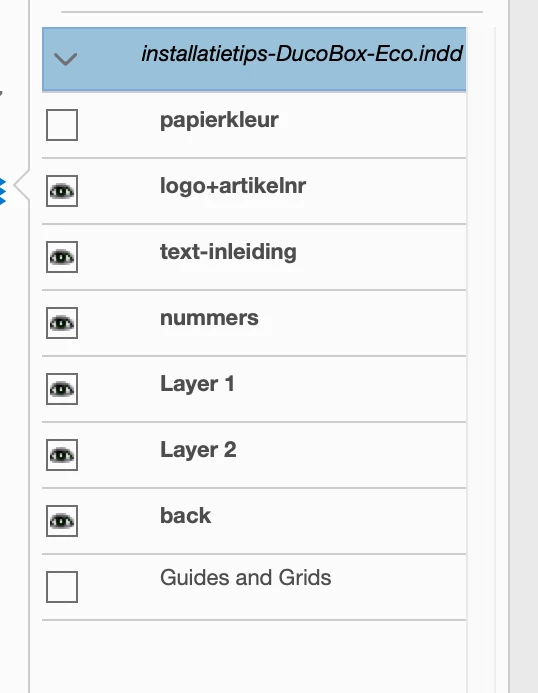
These PDF’s are generated using another InDesign document. I have the source INDD for these, but not the export settings which have been used to generate the original PDF.

There is surely a difference between the two PDF files (different filesize and probably different color settings), but nothing that seems to be related to the layers. The PDF version also the same (PDF 1.5 / Acrobat 6.x)

Any ideas why InDesign is seeing a difference?

I have a lot of similar linked PDF files. I want to have peace of mind to update the source document and have InDesign retain object visibility of the original links.

    This topic has been closed for replies.
    Correct answer dmsduco

    You found the cause, Uwe!

    Laubender  schreef

    The difference I can see is the name of the "layer folder".

    The original has the word "-DRAFT" added. That's missing in the "updated link.pdf".

    Hm. Yes, that could be the cause of the issue.

    I renamed the 'layer folder' to the same as the original PDF, and InDesign recognizes them as being the same layers! Luckily, Acrobat let's you edit that name by (sort of) double clicking on it. Would be nice if InDesign would be smart enough to map both layer structures though (or let the user decide if it should be mapped).

    Thanks for all help!

    2 replies

    Community Expert
    November 16, 2018

    Hi dmsduco ,

    tested your two PDFs with my German InDesign CC 2019 14.0.1.209 on Windows 10.

    This is a prerelease version of a bugfix.

    1. Placed original link.pdf from InDesign 13.1 ( Macintosh )

    2. Went to the Links panel and did a relink to updated link.pdf from InDesign 14.0 ( Macintosh )

    I tested that with:

    Preferences > When Updating Link: Keep Layer Visibility Overrides

    Preferences > When Updating Link: Use PDF's Layer Visibility

    Found no difference in layer visibility after relinking.

    What's your exact version of InDesign? I think it's CC 2019 14.0.0.130, but I'm not sure.
    What's your operating system?

    Did you change layer visibility after placing your original link.pdf ?

    Maybe only on/off with one of the layers?

    Regards,
    Uwe

    cinziamarotta
    Participating Frequently
    November 16, 2018

    Hi,

    in InDesign the visibility affects the difference in layers. The InDesign behavior depends on the options you choose in Object Layer options panel:

    Community Expert
    November 16, 2018

    Hi cinziamarotta ,

    can you see a difference in layer visibility of the two PDFs?

    I just opened both with Acrobat Pro DC and cannot see a difference there.

    All layer names are the same*. Visibility is the same.

    Original:

    Updated:

    * Maybe I should verify this by scripting…

    The difference I can see is the name of the "layer folder".

    The original has the word "-DRAFT" added. That's missing in the "updated link.pdf".

    Hm. Yes, that could be the cause of the issue.

    Regards,
    Uwe

    dmsduco
    dmsducoAuthorCorrect answer
    Inspiring
    November 16, 2018

    You found the cause, Uwe!

    Laubender  schreef

    The difference I can see is the name of the "layer folder".

    The original has the word "-DRAFT" added. That's missing in the "updated link.pdf".

    Hm. Yes, that could be the cause of the issue.

    I renamed the 'layer folder' to the same as the original PDF, and InDesign recognizes them as being the same layers! Luckily, Acrobat let's you edit that name by (sort of) double clicking on it. Would be nice if InDesign would be smart enough to map both layer structures though (or let the user decide if it should be mapped).

    Thanks for all help!