
Inspiring
April 29, 2026
Answered

PDF interactive button not working

  • April 29, 2026
  • 4 replies
  • 63 views

Hello community.


Ive made a document with some buttons to navigate to certain pages, when I export as interactive PDF I get the following warning. 
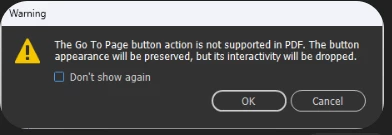


But then I export as Epub, and view it in Thorium and the buttons are working fine.
I asked ChatGTP and it's telling me Indesign can export Interactive PDFs, but I'm doing something incorrect. So do interactive buttons function in exported PDF interactive, or this function is only for Epubs?

Thank you.

PS: I view the interactive PDF in my adobe acrobat reader, where I can see a little hand hovering over my buttons, but nothing happens, if this information helps to solve my problem.
    Correct answer BobLevine

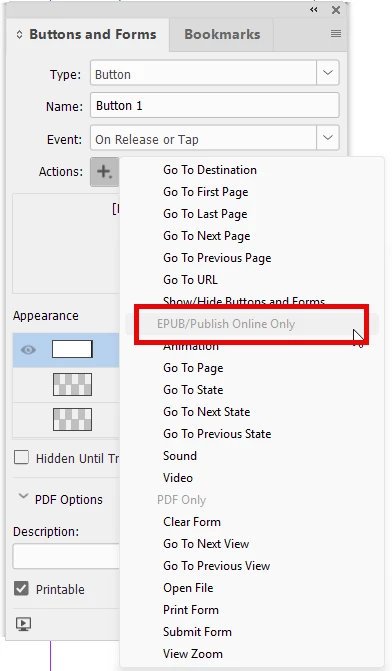
    That message is very clear. The action you’ve assigned to that button won’t work in PDF. Look at the actions choices when you assign it:

    Screenshot of InDesign button options


    And FWIW, buttons in PDF are nothing but a crapshoot anyway. Stick to bookmarks and hyperlinks for this kind of thing.

    4 replies

    Inspiring
    May 1, 2026

    I recommend giving up on buttons, as most browsers don’t support them. Use hyperlinks if you can.

    Inspiring
    May 1, 2026

    I went with the hyperlink destination to navigate to page six, and on page six I made a button, when took me to the first page again.

    Kind regards.

    BobLevine
    Community Expert
    BobLevineCommunity ExpertCorrect answer
    Community Expert
    April 30, 2026

    That message is very clear. The action you’ve assigned to that button won’t work in PDF. Look at the actions choices when you assign it:

    Screenshot of InDesign button options


    And FWIW, buttons in PDF are nothing but a crapshoot anyway. Stick to bookmarks and hyperlinks for this kind of thing.

    Inspiring
    April 30, 2026

    I viewed my interactive PDF online using Xodo.com and the buttons are working. Just my Adobe reader is having issues. 

    Dave Creamer of IDEAS
    Community Expert
    Community Expert
    April 30, 2026

    I just installed the free Xodo reader and it did not work. 

    What you can do is edit the button(s) in Acrobat Pro:

    Why one can’t do this in InDesign is beyond me...

    David Creamer: Community Expert (ACI and ACE 1995-2023)
    leo.r
    Community Expert
    Community Expert
    April 30, 2026

    First, try to export as a normal PDF (not Interactive); it supports interactive elements, too. I don’t know if this will address your error, but it’s the first step to try.

    Inspiring
    April 30, 2026

    I tried that, but didnt work.

    I just did a print screen of the interactive elements to make sure they're visible when exported. But they do not respond.