
ubishere
Inspiring
January 31, 2019
Answered

PDF Output within InDesign does not produce the same file as using Acrobat

  • January 31, 2019
  • 3 replies
  • 3356 views

I have had issues with a large format display panel that did not print out the background correctly due to the transparency not flattening correctly.

I have done some tests and found that when Exporting a PDF file from InDesign using the PDF Preset PDF/X-1a it does not actually flatten the image correctly.

However, when I open the saved PDF file in Acrobat and then save the PDF again using > File > Save as other > Press Ready PDF/X-1a this then flattens the background correctly.

Can someone explain why InDesign doesn't use the same conversion/fix-ups when producing a PDF/X-1a file?

I am currently producing 36 large format panels for an indoor exhibition and I would rather not have to export each PDF and then have to resave them all again.
This topic has been closed for replies.
Correct answer ubishere

the file output is supposed to adhere to the generic PDF/X-1a printing standard.

But PDF/X-1a is an offset press standard, if you are using the default color settings the export would be to  US Web Coated SWOP, which definitely is not the profile of any composite inkjet printer. If I were exporting for an unknown inkjet printer I would export with the Destination set as Document RGB and make sure all profiles are included.

PDF/X-1a does not have a lot of options -

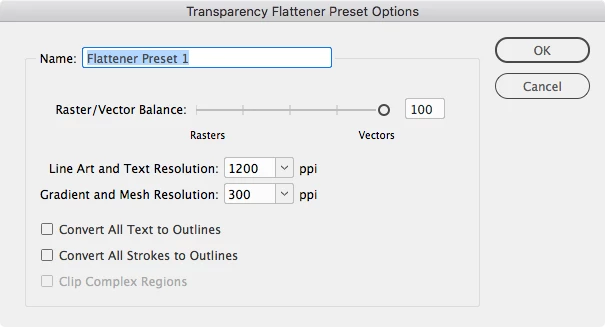
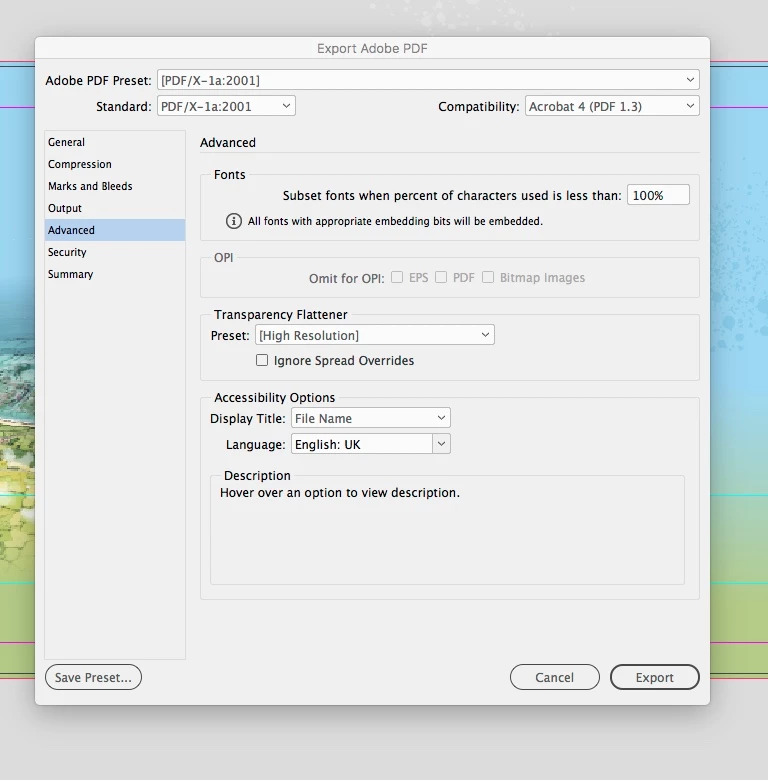
The Flattener preset you choose in the Advanced tab does.


Rob - I believe you are showing the Acrobat Panel again and not the InDesign Panel which I have shown below.

As I have already mentioned, this is not about Acrobat, I do not have a problem with Acrobat, it's about how the flattener preset for PDF/X-1a works directly out of InDesign.

Also the RGB vs CMYK output argument has nothing to do with what I am talking about.

The way InDesign flattens artwork using PDF/X-1a does not work the same way that Adobe Acrobat does, even though it is supposed to be using the same PDF Standard.

I would recommend to anyone creating complex large format graphics using transparency in InDesign to either....

1. Flatten complex backgrounds within Photoshop and re-import into InDesign before outputting the final PDF.

OR

2. Open the PDF file you have exported from InDesign and resave using Adobe Acrobat with the following settings File > Save as other > Press Ready PDF/X-1a

3 replies

rob day
Community Expert
Community Expert
January 31, 2019

However, when I open the saved PDF file in Acrobat and then save the PDF again using > File > Save as other > Press Ready PDF/X-1a this then flattens the background correctly.

Can you post a screen capture showing the differences? The Flattener Preset you use in the PDF/X-1a Advanced tab, or the document’s Transparency Blend Space might have an affect.

Steve Werner
Community Expert
Community Expert
January 31, 2019

>I have had issues with a large format display panel that did not print out the background correctly due to the transparency not flattening correctly.

Can you be more specific about kind of flattening "problems" you encountered? I've not heard of this.

>Can someone explain why InDesign doesn't use the same conversion/fix-ups when producing a PDF/X-1a file?

When you converted in Acrobat using File > Save As Other > Press Ready, you actually have quite a few settings which can apply to the way the file is made. These are designed in the Settings dialog. So  the results you get would depend on all the settings here which may affect the flattening produced.

If you need to finesse flattening, I'd suggest doing it in Acrobat using a combination of Preflight fixes and profiles, and creating Droplets so you can drag multiple PDF files to process them at the same time.

This forum isn't the place to discuss the details but I'd ask in the Printing and Press Forum in the Acrobat forums for a start:

Printing & prepress

ubishere
ubishereAuthor
Inspiring
January 31, 2019

Thanks for the replies.

Derek - PDF/X-4 won't automatically flatten the artwork whereas PDF/X-1a does not support transparency so it will automatically flatten the artwork.

Steve - the panel you have shown is from the Acrobat settings which I don't have an issue with. It is the way InDesign exports PDF/X-1a which is the problem.

The large format panel which did not print correctly was quite complex and had large graduated colour box with a bitmap image placed over the top which had a basic feather applied. The background colour box failed to print at all.

My tests have shown that when exporting as a PDF/X-1a directly from InDesign (PDF looks fine on-screen), and then opened in Illustrator the background fails to show up. However, when the PDF file is resaved within Acrobat with settings as previously shown it will show correctly within Illustrator.

BobLevine
Community Expert
Community Expert
January 31, 2019

Opened in Illustrator? Why would you do that?

Derek Cross
Community Expert
Community Expert
January 31, 2019

Have you tried PDF/X-4?