
mallokw
Known Participant
December 14, 2020
Answered

pdf resolution

  • December 14, 2020
  • 4 replies
  • 2385 views

Hello,

I am working in an indesign document that will be printed. In that document I have a pdf file image (that contains only this image). From what I know, there is no resolution in a pdf (or there can be as many as the number of files contained in the pdf).

- But How do I check if my pdf image has a sufficient ppi for my printed document ? 

- Is it ok to convert the pdf file into a psd file with the right ppi ?

Thanks for your help

MK
This topic has been closed for replies.
Correct answer Laubender

MK said:

"Ok but if the image inside the pdf is just pixels (photography or drawing without text nor vector file) ?"


Hi MK,

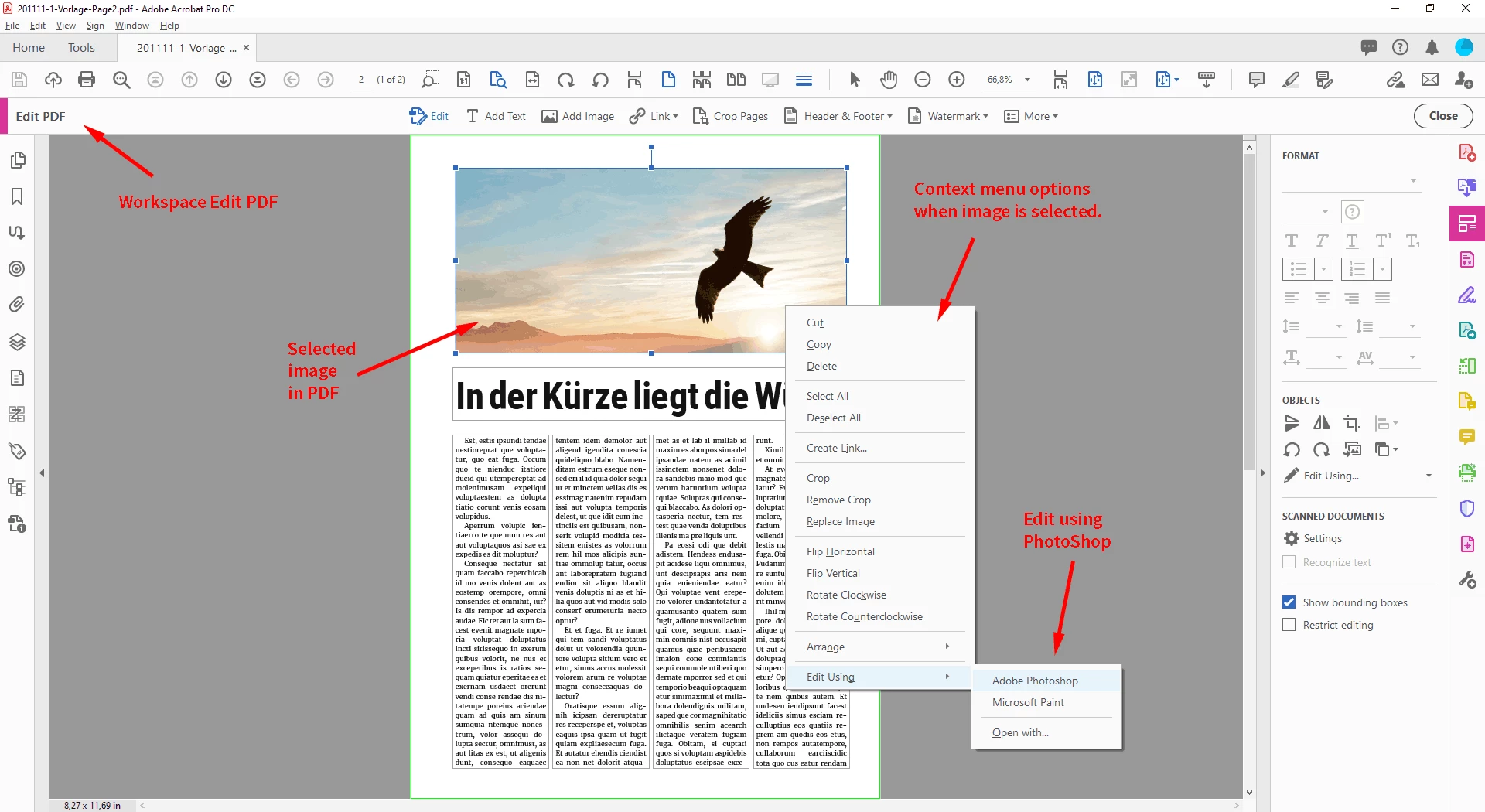
then you also could open the PDF in Acrobat Pro DC, select the image and open it with PhotoShop.

From there you could save it to a new file and place that file in your layout in InDesign.


Workspace in Acrobat Pro DC: Edit PDF

Image is selected.

The context menu is showing option:

Edit Using > PhotoShop


Regards,
Uwe Laubender

( ACP )

4 replies

LaubenderCommunity ExpertCorrect answer
Community Expert
December 15, 2020

MK said:

"Ok but if the image inside the pdf is just pixels (photography or drawing without text nor vector file) ?"


Hi MK,

then you also could open the PDF in Acrobat Pro DC, select the image and open it with PhotoShop.

From there you could save it to a new file and place that file in your layout in InDesign.


Workspace in Acrobat Pro DC: Edit PDF

Image is selected.

The context menu is showing option:

Edit Using > PhotoShop


Regards,
Uwe Laubender

( ACP )

mallokw
mallokwAuthor
Known Participant
December 17, 2020

Hello Uwe,


Thanks a lot for this explaination. This is exactly what I what looking for... I think this is more convenient to isolate the file and then to be able to check the size directly in Info Panel or % size in Indesign.

Thanks again.

Regards,

MK

Bevi Chagnon - PubCom.com
Legend
December 14, 2020

Yes, check the InDesign document before making the PDF.

Adobe's online help manual for InDesign is at https://helpx.adobe.com/indesign/user-guide.html   See these sections:


There are 2 ways to check the resolution of graphics in InDesign: 1) Individually, graphic by graphic, or 2) globally through Preflight.


Method #1: Individual graphics.

  • Select the graphic and locate it in the Links Panel.
  • In the lower portion of the panel, you'll see the information about the graphic.
  • Effective Resolution is what matters; it's the resolution that it will be printed at.
  • Usually for press/print, you'll want at least 300 ppi: 400 ppi is preferred for modern printers and quality jobs.
  • Note: This method does not check images inside placed PDFs.


Method #2: Globally.

  • Select a Preflight Profile and either check its options re: resolution, or create a new profile.
  • Under the IMAGES and OBJECTS section of the profile, select the option Image Resolution, and set the minimum resolution to 300 ppi for color and grayscale images.
  • See Rob Day's screen capture, above.
  • Preflight does check the graphics inside placed PDFs.


|    Bevi Chagnon   |  Designer, Trainer, & Technologist for Accessible Documents ||    PubCom |    Classes & Books for Accessible InDesign, PDFs & MS Office |
mallokw
mallokwAuthor
Known Participant
December 14, 2020

Bevi,

Thanks for this detailled solution ! It's so clear now on pdf resolution checking methods.

All the best.

MK

Bevi Chagnon - PubCom.com
Legend
December 14, 2020

You're welcome!

One more idea: since InDesign treates PDFs as graphics, then check the PDF's resolution before placing it in InDesign. See @BobLevine's comment above.


Use Acrobat's Preflight Tool to check each graphic's resolution, one-by-one. Click each raster/bitmap graphic and check the resolution in the dialogue box.


See this thread for more background details: https://community.adobe.com/t5/acrobat/how-to-verify-the-resolution-of-a-pdf/td-p/9226360?page=1


|    Bevi Chagnon   |  Designer, Trainer, & Technologist for Accessible Documents ||    PubCom |    Classes & Books for Accessible InDesign, PDFs & MS Office |
rob day
Community Expert
Community Expert
December 14, 2020

Also, InDesign’s Preflight will check images inside of placed PDFs:


mallokw
mallokwAuthor
Known Participant
December 14, 2020

Dear Bob,


Thanks for your answers.

According to what you say, it means that we cannot check the image resolution in Indesign unless it is under the ppi minimum requirement ?

Thanks.

MK

rob day
Community Expert
Community Expert
December 14, 2020

Right, but you can set any minimum.


If you want to see the actual resolution(s) inside of the placed PDF you would have to inspect it in AcrobatPro, or preflight the final PDF in Acrobat, which would list all of the image resolutions.

BobLevine
Community Expert
Community Expert
December 14, 2020

Open the PDF in Acrobat and do a flightcheck there.