Known Participant
September 12, 2023
Question

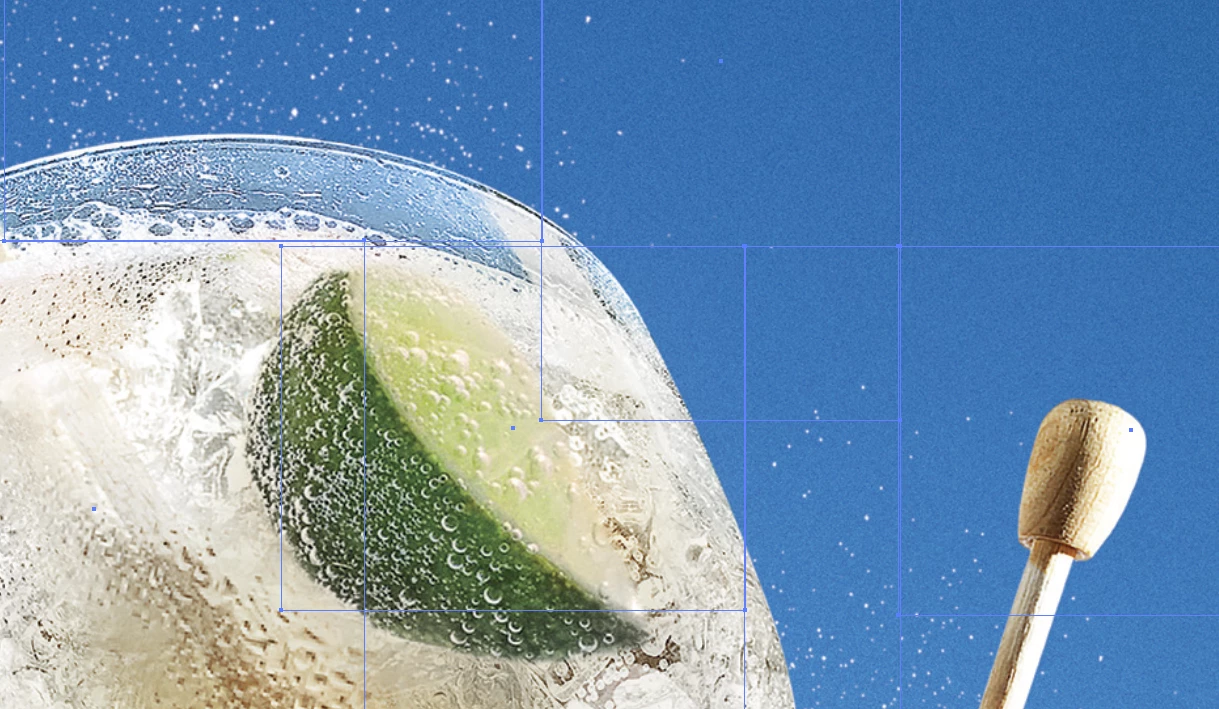
PDF's files from a client splits the artwork into boxes

  • September 12, 2023
  • 5 replies
  • 1887 views

I'm recieving some making it difficult to edit. They making the PDF in Indesign and I bring them in Illustrator, its just this one client that I have this issue with.

See attached

This topic has been closed for replies.

5 replies

Lukas Engqvist
Community Expert
Community Expert
September 12, 2023

As others have said it is not a problem in indesign but the settings used when exporting the PDF. 

Known Participant
September 13, 2023

Yeah, its how they're exporting it.

Community Expert
September 13, 2023

No way should you edit files supplied.

If you can't make the changes in Acrobat (if you must)

Then request the changes from them.

Or request they package the files  and send them.


In no way is opening a PDF created in InDesign in Illustrator a good workflow at all.


Community Expert
September 12, 2023

Hi @Jim Clifford287709343sza ,

what you are seeing is the flattening of transparent elements at work when exporting to e.g. PDF/X-1a and not to PDF/X-4.

If you need one single image and not a tiled one, you have two options, I think:


[1] Open the PDF as Smart Object in PhotoShop and save a psd file or a tiff file from it. Place that in Adobe Illustrator.

Do not do that if the PDF contains vector graphic elements and text.


Do something Bob already suggested:

[2] Ask your customer to export the page content from InDesign to PDF/X-4 with no downsampling and color conversion.

You may edit the PDF with Acrobat Pro using PhotoShop for the image contents and Illustrator for the vector graphic contents. In case the PDF contains text: work on a duplicate of the PDF in Acrobat Pro and convert text to outlines before you begin to edit things with Illustrator.


Regards,
Uwe Laubender
( Adobe Community Expert )

Known Participant
September 13, 2023

Thanks Uwe, I couldn't figure out how they were getting they're file to end up like this. So am I understanding this correctly, they are saving it as an PDF/X-4 and this is causing all the stiching? 

Known Participant
September 13, 2023

I'm using this for packaging so I am working with Vectors and images. If the vextor have a soft drop shadow/glow they embed into the image behind it so this makes it impossable to move elements around.


BobLevine
Community Expert
Community Expert
September 12, 2023

Nothing but questionable methods here. Why are they sending an InDesign-generated PDF when you need Illustrator? Why are you opening PDFs in Illustrator? Why aren't you requesting the InDesign files if you need to edit them? And finally, why are they flattening PDFs instead of using PDF/X-4 which will avoid all of that stitching?

Known Participant
September 13, 2023

Hi Bob, most of our clients supply in print ready PDF's and they are fine. This client doesn''t want the hassle of packaging everything so they can be difficult when we request them to do this(as silly as this sounds).  I know they are creating the artwork in Indesign but I can't figure out how they are getting the file to split up all the images and if the type has a soft drop shadow it flattens to the image behind it. I was hoping to be able to have a solution on what way to save they're PDF's from Indesign

BobLevine
Community Expert
Community Expert
September 13, 2023

I gave you the solution. They must export as PDF/X-4. They are using a method that is flattening the PDFs and they're the ones that have to change.

James Gifford—NitroPress
Legend
September 12, 2023

Are you sure they are using ID + Acrobat to export, or is this another case where a secondary or "company wide" PDF tool is in use?

Known Participant
September 13, 2023

Hi James, most of our clients supply in print ready PDF's and they are fine.  I know they are creating the artwork in Indesign but I can't figure out how they are getting the file to split up all the images and if the type has a soft drop shadow it flattens to the image behind it. I was hoping to be able to have a solution on what way to save they're PDF's from Indesign

Inspiring
September 12, 2023

why not open it with PS?

Known Participant
September 13, 2023

It's artwork with images/graphics and I need to be able to move the elements around.