maxineh79041630
Participant
September 5, 2017
Answered

PDF security settings

  • September 5, 2017
  • 2 replies
  • 1523 views

Hi, I'm new to the forum. I create a lot of clients' adverts in InDesign and send the PDFs to various magazines. However, recently one of my clients has started to open my PDFs in Illustrator (probably using a hooky copy) and edit them for additional adverts. Thereby avoiding paying me to create additional adverts. I've explained that this isn't ethical but it's still happening. My question is... is there any way of 'locking' my PDFs so that the magazines can still place them into their publications but so they can't be edited by my client?
This topic has been closed for replies.
Correct answer Bill Silbert

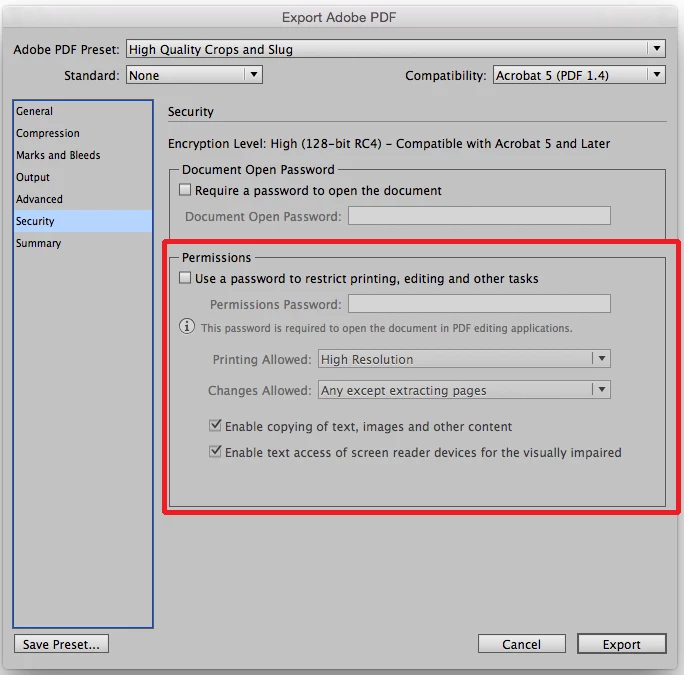
When you make your pdf through InDesign's Export to pdf set the security section as needed to prohibit editing. They will be able to open it in Acrobat but unable to even open it in Illustrator without a password. See screen shot:

2 replies

maxineh79041630
Participant
September 5, 2017

It's difficult, they've been a reliable, local, well-paying client for the past 5 years but their budget got whittled down earlier this year. Sadly, it seems to have whittled down their ethics too. I'll be having a discussion with them about their account next week but I also wondered if I could do anything via the files we provide to flush the issue. Unfortunately the client has to approve the adverts and they also send the print-ready PDFs to the publications themselves. I'll try Bill's method and see how that works out. Thanks both for your help!

BobLevine
Community Expert
Community Expert
September 5, 2017

To be fair, if you haven’t spoken to them yet, they may well think what they’re doing is okay.

Bill Silbert
Community Expert
Bill SilbertCommunity ExpertCorrect answer
Community Expert
September 5, 2017

When you make your pdf through InDesign's Export to pdf set the security section as needed to prohibit editing. They will be able to open it in Acrobat but unable to even open it in Illustrator without a password. See screen shot:

maxineh79041630
Participant
September 5, 2017

Hi Bill,

Will the magazines still be able to 'Place' (Ctrl D) the PDF within their own publishing software using this method?

Thanks,

Max

Bill Silbert
Community Expert
Community Expert
September 5, 2017

I just tried to add to my initial reply without success. What I wanted to add was that if you provide a password in both places in the dialog window I showed in my screen shot then they will need a password to even open it in Acrobat. I checked into this for you because recent versions of Acrobat do allow editing of the pdfs. If all they need to do is place it as a graphic then they should not need to even open the pdf in Acrobat and no editing weill be possible with either program.