Participant
November 6, 2018
Answered

PDFX4 in Indesign 2019 on Mojave

  • November 6, 2018
  • 4 replies
  • 407 views

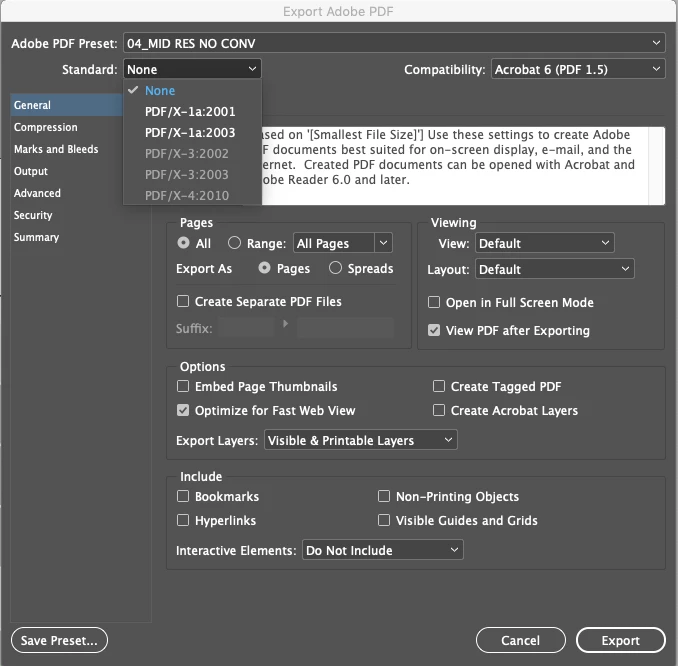
I have recently upgraded my OS to Mojave and updated my Creative Suite. When I go to export PDF the only options I get in the dropdown menu is PDFx1a. PDFX4 is no greyed out. I have searched but can't seem to find away to get these setting back active. Help anyone?
    This topic has been closed for replies.
    Correct answer Laubender

    Hi Neal,

    check your color management under Color Settings.

    That the PDF/X-3 and PDF/X-4 options are grayed out is a clear sign, that color management is turned off.

    Regards,
    Uwe

    4 replies

    Participant
    November 7, 2018

    No entiendo pueden traducir al español gracias

    LaubenderCommunity ExpertCorrect answer
    Community Expert
    November 6, 2018

    Hi Neal,

    check your color management under Color Settings.

    That the PDF/X-3 and PDF/X-4 options are grayed out is a clear sign, that color management is turned off.

    Regards,
    Uwe

    nealmcgAuthor
    Participant
    November 6, 2018

    I'm so stupid. Can't believe I didn't notice that had been switched off. Thank you.

    Willi Adelberger
    Community Expert
    Community Expert
    November 6, 2018

    Reinstall it. It is an incomplete installation.

    There are 2 ways to complete an installation:

    1. Change the language of the CC application, install in that other language, change back to the original language or
    2. uninstall and install again.