
Inspiring
April 11, 2025
Answered

Pencil tool always "dents" a curve

  • April 11, 2025
  • 3 replies
  • 537 views

Hey there,

I have tried to draw simple, sloppy cirles in ID today and no matter what setting in fidelity and smooth, it always came out with that unwanted "dent":
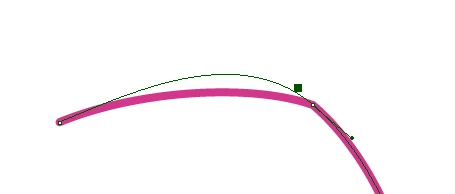
 

The curve is round, but the stroke just won't follow. Every single time. How can I get this curved in  a "straight" manner?


Wind 10, 128 GB RAM, Quadro M5000, Dual Xeon somethingsomething.
Correct answer Barb Binder

Hi @Corniger :


My take is that the Pencil tool is that it is an imprecise way of drawing—but familiar to all of us from pencil and paper—and I frame it to my students as a way of delaying mastering the Pen tool. Taking time to learn the Pen tool will allow you to place the anchor points correctly from the get-go. That said...


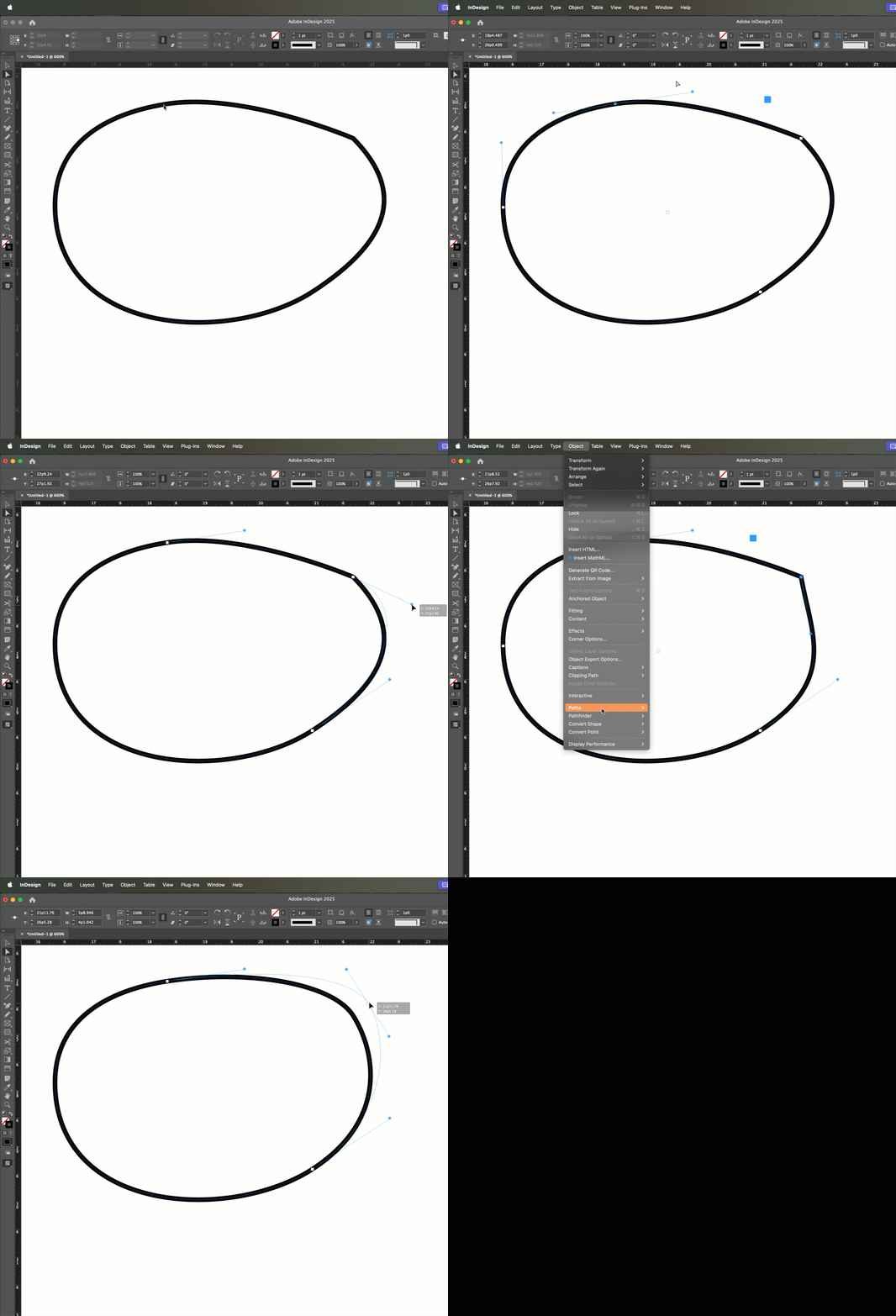
A curve requires smooth anchor points and yours shows a line coming in and a curve going out (or the other direction, depending on whether you drew the shape clockwise or counterclockwise). And is that dent where you closed the shape? 


Converting the anchor point to a symmetrical curve (with the control handles on both sides) should take care of it for you post-drawing. Does it?


~Barb

3 replies

Barb Binder
Community Expert
Barb BinderCommunity ExpertCorrect answer
Community Expert
April 11, 2025

Hi @Corniger :


My take is that the Pencil tool is that it is an imprecise way of drawing—but familiar to all of us from pencil and paper—and I frame it to my students as a way of delaying mastering the Pen tool. Taking time to learn the Pen tool will allow you to place the anchor points correctly from the get-go. That said...


A curve requires smooth anchor points and yours shows a line coming in and a curve going out (or the other direction, depending on whether you drew the shape clockwise or counterclockwise). And is that dent where you closed the shape? 


Converting the anchor point to a symmetrical curve (with the control handles on both sides) should take care of it for you post-drawing. Does it?


~Barb

~Barb at Rocky Mountain Training
CornigerAuthor
Inspiring
April 13, 2025

Hi Barb,


this clearly was a software issue and has been resolved with an update (which only showed upon reboot, otherwise I wouldn't have bothered posting).
You can see in my screenshot the curve runs smoothly, but the stroke breaks off at said anchor point. I never before used the pencil in ID, only in Illustrator and I'm familiar with it - just wanted to avoid having to use Illustrator for once.

But yes (Edit) - that might have been a workaround. The stroke's behaviour just threw me off completely. Thank you for going through all the trouble  with the screen recording!

Abhishek Rao
Community Manager
Community Manager
April 11, 2025

Hi @Corniger,


Could you let me know which version of InDesign you’re currently using? And does this dent happen consistently with all shapes you try to draw using the Pencil tool, or only in specific files or situations?

It would also really help if you could share a short screen recording of your drawing process and the settings you’re using. That way, I can try to reproduce it and check in with the team if needed.


Looking forward to your update!  
Abhishek

CornigerAuthor
Inspiring
April 11, 2025

Hi Abishek,

I rebooted, since the PDF export was hanging and canceling didn't do a thing since hours. I checked for updates before rebooting.

After rebooting, 3 updates were available, one of then ID. It works now.  In the file I was working on and also in any new file. Sorry!

Mike Witherell
Community Expert
Community Expert
April 11, 2025

Hi Corniger,

Have you tried double-clicking the Pencil tool in the toolbox and setting the Smoothness slider to the right in order to get smoother curves? Also, set the Fidelity slider to the right.

Mike Witherell
CornigerAuthor
Inspiring
April 11, 2025

Hi Mike,


as stated above, these settings have no effect on said phenomenon. I can do whatever I want with them, the outcome won't get straight.