Participating Frequently
January 27, 2024
Answered

Performance problem with variable font script

  • January 27, 2024
  • 5 replies
  • 2375 views

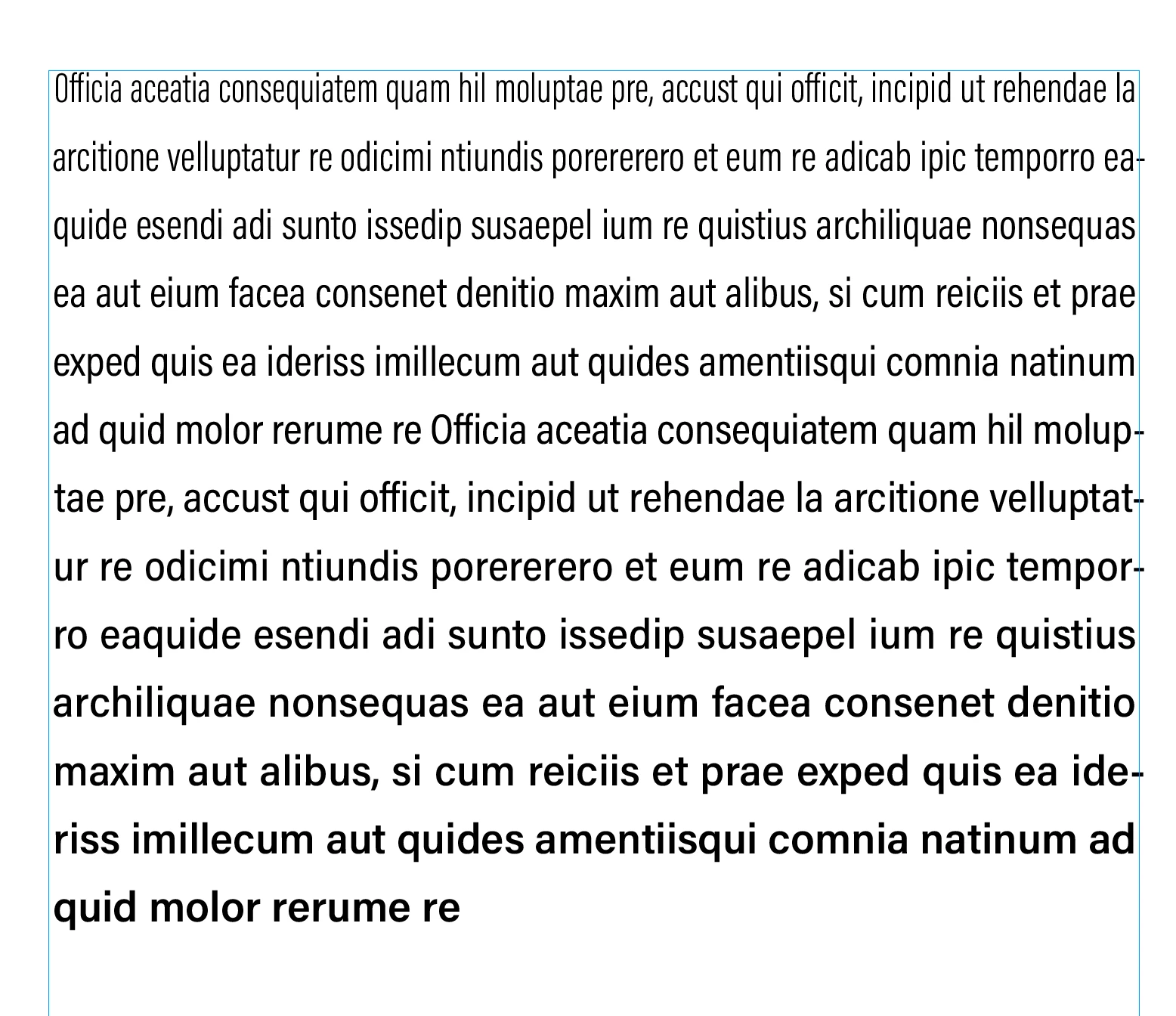
Hey there, I've been playing around with variable fonts and extend script and wrote a script that makes each character in a text block slowly go from sans to serif, I have attached the result as a screenshot. This works fine in theory but I have found that the processing time scales up exponentially. So 20 characters take 1,4 seconds to process while 120 characters already take 1 minute to process. My inital goal was to do this on whole pages or even on books and I understand that this is gonna take some time but it seems weird that its gonna increase drastically with more characters


This is my code so far: 

app.scriptPreferences.enableRedraw = false;
app.doScript(variable_transition, ScriptLanguage.javascript, undefined, UndoModes.FAST_ENTIRE_SCRIPT, "Script Action");
app.scriptPreferences.enableRedraw = true;

function variable_transition() {
    var doc = app.activeDocument;

    var text = doc.textFrames.item(0).characters;

    for (var x = 0; x < text.length; x++) {
        text.item(x).setNthDesignAxis(2, map_range(x, 0, text.length, 0, 1));
    }

    function map_range(value, low1, high1, low2, high2) {
        return low2 + (high2 - low2) * (value - low1) / (high1 - low1);
    }
}


Any help on this would be greatly appreciated
This topic has been closed for replies.
Correct answer Robert at ID-Tasker

Hi @Christoph5C7F , Not sure if this helps, but I think setting the axis values to an integer rather than a real number helps with speed. This takes around 6 secs for 900 characters:


app.scriptPreferences.enableRedraw = false;
app.doScript(characterBlend, ScriptLanguage.javascript, undefined, UndoModes.FAST_ENTIRE_SCRIPT, "Script Action");
app.scriptPreferences.enableRedraw = true;


function characterBlend(){
    app.selection[0].appliedFont = "Acumin Variable Concept	Regular"
    var txt = app.selection[0].characters.everyItem().getElements();
    var t = txt[0];
    var myDesignAxesValues = t.appliedFont.designAxesValues;
    
    //the beginning and end of the 1st axis
    var a1s = 300;
    var a1e = 600;
    
    //the beginning and end of the 2nd axis
    var a2s = 50;
    var a2e = 100;

    var wstep = (a1e-a1s)/txt.length;
    var cstep = (a2e-a2s)/txt.length;

    for (s=0; s<txt.length; s++){
        myDesignAxesValues[0]=(Math.round(a1s+wstep*s));
        myDesignAxesValues[1]=(Math.round(a2s+cstep*s));
        txt[s].designAxes=myDesignAxesValues;
    } 
}


@rob day


Just found your older take on this problem:


https://community.adobe.com/t5/indesign-discussions/variable-font-progression/m-p/10960543#M177624


@Christoph5C7F, you should take a look at it - there are few extra bits.


5 replies

Peter Kahrel
Community Expert
Community Expert
January 28, 2024

Converting collections to arrays almost always speeds up a script, especially if that arrey is used in a loop. Instead of

var text = doc.textFrames.item(0).characters;

use

var text = doc.textFrames.item(0).characters.everyItem().getElements();


Participating Frequently
January 28, 2024

Thank you SO MUCH! After all these answers I really thought that the problem was just in the nature of inDesign but that is the right solution. My script went from 20 minutes for around 300 characters to 30 seconds for 3000 characters. 

rob day
Community Expert
Community Expert
January 28, 2024

Hi @Christoph5C7F , Not sure if this helps, but I think setting the axis values to an integer rather than a real number helps with speed. This takes around 6 secs for 900 characters:


app.scriptPreferences.enableRedraw = false;
app.doScript(characterBlend, ScriptLanguage.javascript, undefined, UndoModes.FAST_ENTIRE_SCRIPT, "Script Action");
app.scriptPreferences.enableRedraw = true;


function characterBlend(){
    app.selection[0].appliedFont = "Acumin Variable Concept	Regular"
    var txt = app.selection[0].characters.everyItem().getElements();
    var t = txt[0];
    var myDesignAxesValues = t.appliedFont.designAxesValues;
    
    //the beginning and end of the 1st axis
    var a1s = 300;
    var a1e = 600;
    
    //the beginning and end of the 2nd axis
    var a2s = 50;
    var a2e = 100;

    var wstep = (a1e-a1s)/txt.length;
    var cstep = (a2e-a2s)/txt.length;

    for (s=0; s<txt.length; s++){
        myDesignAxesValues[0]=(Math.round(a1s+wstep*s));
        myDesignAxesValues[1]=(Math.round(a2s+cstep*s));
        txt[s].designAxes=myDesignAxesValues;
    } 
}


brian_p_dts
Community Expert
Community Expert
January 28, 2024

One thing that might marginally improve performance is defining your for loop variables outside the for loop. Calling .length each time can slow things down.

m1b
Community Expert
Community Expert
January 27, 2024

Hi @Christoph5C7F, this is my understanding:


1. You aren't really doing anything wrong in your code that I can see.


2. Every time you "set" a design axis value, you actually cause a new font to be generated, and in Indesign this can often be *very* slow. My guess is that this is what is causing your performance issue.


A partial solution, depending on your exact requirements, could be to limit the number of variable instances created—rather than creating one for each character, you could create N instances and spread those amongst the characters. My guess is that this would at least manage the performance issue, because you could specify as high a number of variable font instances created as your machine could handle in a reasonable time and it would have nothing to do with the selected text.


Another possible advantage to this approach is that Indesign *might* cache the instances, so that if the same axis values were used again, on another script execution on different text, it might be much faster the second time.


Of course this approach would mean that you wouldn't have a perfect gradient of values—if you made 10 font instances and had 20 characters, the axis would only increment every 2 characters, which may well be a deal breaker.


If it was me I would at least try that approach, and find an acceptable number of instances to create.


Another approach—and I'm not sure if this is feasible but it I think it should work—is to use a good font editor to generate N numbers of non-variable fonts from the variable font axis you are interested in, load them all (myInstanceFont001, myInstanceFont002, myInstanceFont003 ... myInstanceFont100) and use the script to apply that particular font. What this would do (maybe!) is to move the heavy performance required to a pre-process, and the final script would be as fast as setting each character in a different font. I realise that this experiment would be a significant undertaking (you would want to automate it via your font editor) but I'm just brainstorming.

- Mark

Participating Frequently
January 27, 2024

Oh wow, that was a very insightful answer. Luckily I'm only trying to solve an idea that came up in a talk I watched so I can just drop this for now. I didn't know that using .setNthDesignAxis() generated a new font each time. I have been looking for a good reason to pick up Glyphs as you can script in it so now I have a reason to do so.


Thanks again for your long and friendly answer, I learned a lot here.

-Christoph

Robert at ID-Tasker
Legend
January 27, 2024

I'm not JS guy but I'm pretty sure it should work much faster - if you calculate percentage once - and then use it - instead of constantly doing the whole math?


Also, I don't understand why JS coders ALWAYS declare new variable(s) instead of just working directly on the collection(s) available directly from the InDesign?!? 


Participating Frequently
January 27, 2024

yeah I also thought about something like what you said, calculating all the percentages first. this is my approach at it, is that what you meant?

    var text = doc.textFrames.item(0).characters;
    var percentages = [];

    for (var i = 0; i < text.length; i++) {
        percentages.push(map_range(i, 0, text.length, 0, 1));
        text.item(i).setNthDesignAxis(2, map_range(i, 0, text.length, 0, 1));
    }

    for (var j = 0; j < text.length; j++) {
        text.item(j).setNthDesignAxis(2, percentages[j]);
    }

for your question about me declaring new variables: is it bad to do that with extendscript or is it just a bad habit? maybe I'm understanding you wrong but wouldn't the alternative writing for setting the nth axis be something like this:

doc.textFrames.item(0).characters.item(i).setNthDesignAxis()


Participating Frequently
January 27, 2024

Offcourse theres a mistake in my answer, I obviously wouldn't set the design axes twice. however, this approach didn't improve the performance still

Participating Frequently
January 27, 2024

The more I look into it, the more it seems as if its mostly a problem on indesigns site (I'd love for someone to proof me wrong) as not only the creation of such texts takes more time but they also impact the performance of indesign, moving them around causes lag.