

Chris Tammar
Participating Frequently
January 23, 2024
Answered

Persistent Error in Adobe InDesign: ‘There Was an Error Updating the Artifact

  • January 23, 2024
  • 34 replies
  • 26733 views

When I go to update a review link in InDesign, I keep getting this error message "there was an error updating the artifact". After that, the link does not work for most people. I am signed in to Adobe. Everything is up-to-date.... But this issue still persists. Can Adobe please fix this issue? It's emarassing when I go to send the review link to my leaders and they just get an error message when they try opening it.
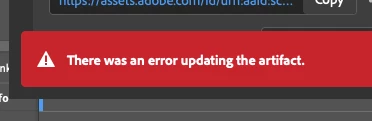
 

<Title renamed by moderator>

Correct answer NOcreationsBE

@Rishabh_Tiwari They originally opened with Chrome. Which did not work. But they just refreshed the link, and it now works. So i think what is happening, is that there's some sort of lag or delay with the file updating, creating an error message. It must be some sort of Adobe server issue. Other's have noticed this too.... The link won't work right away, but when they try again, it works.


I would like to add that my clients usually do not experience any problems opening the file with the link (even if I get the error message), but sometimes they do. Refreshing the page does do the trick in most cases if that happens. Now usually they are 'slow' in reacting on my update messages, so it is possible that they only experience problems opening the file when they react right away. I will keep an eye on that now, to be sure. So I support the idea of a lag/delay in the update process.

34 replies

Participant
November 7, 2025

I have this bug for several years now, happening randomly.
Now again in v21.0
Sometimes it even kills the app.
Happens with or without unmapped comments (which happen if the object related to the comment is moved outside the visible board)
I'm trying to guess what happens with the background task panel, and it seems to break at 99%. Not sure why it breaks at that moment.
What would be helpful, before a fix is eventually published, would be to display logs in this background task panel.
At least, we could understand what works, and what breaks in our file...
@Abhishek Rao ?

Participant
October 30, 2025

Getting this issue a lot. I've found if I only have one file open at a time then it doesn't error. Maybe that will help others get around the bug until Adobe gets around to fixing it (seems like its been years and years).

NOcreationsBE
Inspiring
October 30, 2025

@sungkhum don't bother: I hardly ever have more than one document open in InDesign and I get the error anyway. It is quite random, but usually happens only after multiple updates of the Share for Review file and after that the error usually persists.

Participating Frequently
November 4, 2025

I am unable to update the content in Share for Review. It keeps giving me an error message: There was an error updating the artifact.

Also, it says that I last updated 4 days ago. So it is not pushing the updated content to the cloud.


I have tried closing the application and restarting. 


I am on OS 15.5 and the latest Indesign 2026.


Abhishek Rao
Community Manager
Community Manager
October 14, 2025

Hi everyone,


Thanks for your continued patience while we looked into this. I checked with the product team, and they've tested multiple files (including those shared by some of you) but weren’t able to reproduce the issue on their end, even after several tries. It seems to be intermittent, and in many cases, retrying the Update Content option works successfully on subsequent attempts.

The team also noticed in one of the shared recordings that unmapped comments were present, which might be contributing to the error. They're reviewing this further, but for now, please try updating the content again and let us know if it works. If the error persists, kindly check if you notice any unmapped comments and share your observations so we can dig deeper.


Looking forward to your updates.

Abhishek

NOcreationsBE
Inspiring
October 14, 2025

@Abhishek Rao we already established that this error is not related to unmapped comments. See my comment on July 31 2024. 

Abhishek Rao
Community Manager
Community Manager
May 19, 2025

Hello everyone,


Thanks for sharing the details. I've escalated this to the product team, and they are currently investigating the issue. I'll keep you posted and share an update as soon as I hear back.


Thanks for your patience. 

Abhishek

SteveU65
Participating Frequently
October 11, 2025

Seems to me havign experienced this issue on a regular basis and having read the Adobe replies where they test user documents and cannot replicate the error... HAVE they thought of leaving the Adobe building and Intranet and tried testing it as if they were a subscriber and not an Adobe employee - maybe then it might be reproducible?

2020 - 2025 and it still happens to many, many users it is an ADOBE end issue not the users as this period will cover mulititudes of hardware, software versions etc. BUT all into the same Adobe network so the common factor is...

NOcreationsBE
Inspiring
October 11, 2025

Exactly what I was thinking @SteveU65! It happens so often that they say they cannot reproduce the problem/error, also with other issues, while seemingly every user outside Adobe is experiencing the same issue on multiple platforms and multiple versions. How do they work??

Participating Frequently
May 16, 2025

Yes, we're all still getting these errors, we're just tired of reporting them. The links typically do work (not always) even when the error is present which took me a long time to figure out. If you do a lot of back and forth edits with clients on a particular document though, you will eventually have to create a new share since it will stop working. This sucks because it erases all of your history. 

Participating Frequently
May 16, 2025

Also, "It probably updated correctly even though it says it didn't" just doesn't cut it when you're sharing complicated documents for review and final approval.

NOcreationsBE
Inspiring
May 16, 2025

@tom_cog, I completely understand! You can't check 100+ updates in large or complicated documents when you are working with deadlines. The only thing I can tell you, is that I never noticed any changes not updating, even after getting the error. You just have to refresh the page or come back a little later (and refresh the page). It is not a guarantee, but maybe a minor assurance if you have no choice but to work this way and no time to check all upates online.


  • I would love to hear from others if they ever experienced that a change in the document was not visible after updating the online version, getting the error message and refreshing the page.
Abhishek Rao
Community Manager
Community Manager
May 16, 2025

Hi Henrik Engedal Nissen, 


I'm really sorry to hear that you're still experiencing this issue. I completely understand how frustrating this must be.

To help us investigate further and report this to the product team, could you please share the following:

 - A screen recording of the issue you're encountering on version 20.3.1. 

 - A sample InDesign file where this problem occurs.

This will help us reproduce the issue on our end and work toward a resolution more efficiently.


Thanks so much for your patience and cooperation, I really appreciate it!

Abhishek 


Henrik Engedal Nissen
Known Participant
May 16, 2025

The screenshot is exactly the same as several people have posted in the thread already.

It's just a normal indesign file with text and images like most indesign files.

Abhishek Rao
Community Manager
Community Manager
May 16, 2025

Hi @Henrik Engedal Nissen,


Thanks for the update. Could you confirm if this issue happens consistently every time you try to update the Share for Review link, or is it more random and intermittent? 

I know it might feel repetitive, but any extra detail you can share helps us bring more clarity to the product team. I'm here and following up with them closely, so please feel free to share whatever you observe.


Looking forward to hearing from you.

Abhishek

Henrik Engedal Nissen
Known Participant
May 15, 2025

I have exactly this error. Is there still no solution? 


MAC OS 15.4.1

Indesign 20.3.1

Participating Frequently
May 15, 2025

I think it's fair to say that Adobe is not concerned with this problem and is not working to fix it.

It's simply not possible that a company with Adobe's resources would be unable to fix a bug in its software over this length of time if they were actually trying.

About a year ago, some dude from Adobe popped in to say, "Well it just worked for us so are you SURE it's actually happening and also maybe you're all just doing it wrong" then disappeared back into the mist...never to be heard from again.

This suggests to me that Adobe does not even officially recognize the issue, isn't tracking it, and certainly isn't trying to fix it.

Adobe made like $5.5 billion (with a b) in profit last year. Which is apparently not quite enough profit to devote any more of it to making its products work correctly.

But please, keep using that cash to develop more tools to put artists and designers out of work.

I just paid for the full Affinity suite, and will transition away from Adobe as quickly as possible. I recommend anyone who can avoid using Adobe products, do so, until they realize they have to actually provide value for the money they collect (rather than rely on lack of other viable options).

https://affinity.serif.com/en-us/

Oh, for fun, here's *another bug* related to this apparently totally unimportant feature (screenshot attached).

Participating Frequently
May 15, 2025

Oh and also...

Participant
March 24, 2025

In case this helps anyone else: I get this error when I update the content before saving the file. Once I save the file, it seems to update the content automatically. I got the error, saved my file and jumped online to figure out a solve. I found this thread, gave up and went back to my file and was about to try one more time when I noticed it said 'Updated 3 minutes ago' (while I was looking for answers). I tried this a few times and the same thing happened. 

NOcreationsBE
Inspiring
March 24, 2025

@lydiao2438454Interesting, I thought I always saved before updating, but I am not sure. I am going to try that out!

Participant
February 17, 2025

Is there any solution for this? I just tried this reveiw feature for the first time and - bam - it doesn't work.

I get the Artifact Error as well.


Indesign 20.1 x64


I mean, isn't this a core functionality that teams rely on? 

Or how do you out there let others review the current state of documents?

Participating Frequently
February 18, 2025

And it's an actual problem (you listening, Adobe?) because it's not feasible, or even possible, in most settings to send around native InDesign files for others to review. PDF is the way to go. Y'all invented the damned format, yet you can't figure out how to properly handle them now?

Look, if you're simply never going to fix this feature just remove it. Stop being a bunch of jerks about it.

Sure, we'll have to get accustomed to exporting PDFs and sharing them via other methods, but at least we'll have a reliable process folks can get accustomed to.

NOcreationsBE
Inspiring
February 19, 2025

@tom_cog I understand your frustration (let's hope Adobe will have more meaningful competition in the near future)! In the meantime, would you check to see if it works despite the error message? Because I noticed that the document actually always updates, just a little later sometimes. If a customer does not see the update, it is often because they react very quickly. Refreshing the screen usually helps so far.

Participating Frequently
January 31, 2025

This is STILL broken.

Participating Frequently
February 3, 2025

Yeah, but you can ask Photoshop to put a santa hat on a photo of a chipmunk!

So cute!