
Participant
December 10, 2023
Question

Phantom Tab appearing on arbitrary headings, but not on others.

  • December 10, 2023
  • 2 replies
  • 139 views

Hi everyone, 

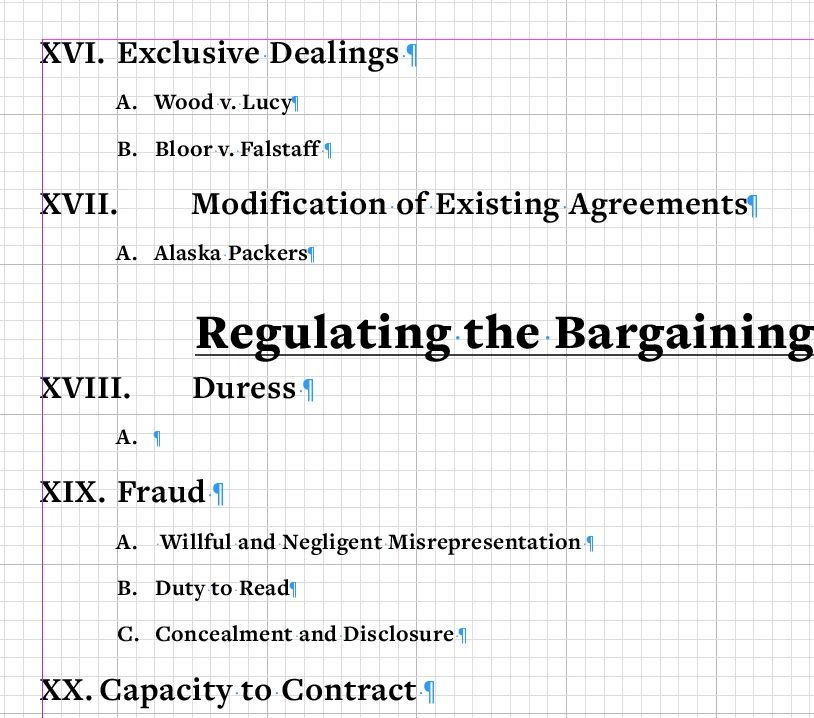
I am a designer turned law student and using InDesign to create an outline and all of my paragraph styles are set and for the most part have functioned as they are supposed to. Randomly on some lines there is a tab, when I turned on the hidden characters there is no tab. There are no special character style on the lines it chooses to indent. I just want to get rid of it so the lines are uniform, but I don't know how. I attached a screenshot so you can see what I mean. It should all be like the XVI. Please help!! Thank you!!
This topic has been closed for replies.

2 replies

Willi Adelberger
Community Expert
Community Expert
December 10, 2023

You have to work on your paragraph styles:

  1. Increase left intent 
  2. Increase first line negative intent. 

    But be aware, roman numbers will cause problems with that kind of TOCs and lists. Consider a different number system. 
Scott Falkner
Community Expert
Community Expert
December 10, 2023

It looks like XVII and XVIII are too long to fit in the space you have allocated for that numbering style. You either need to increase the indent for all paragraphs using tht style or change the numbering to Arabic numerals.