
dzgnr89
Inspiring
May 2, 2017
Question

Photoshop missing in "edit with" context menu for images

  • May 2, 2017
  • 5 replies
  • 12142 views

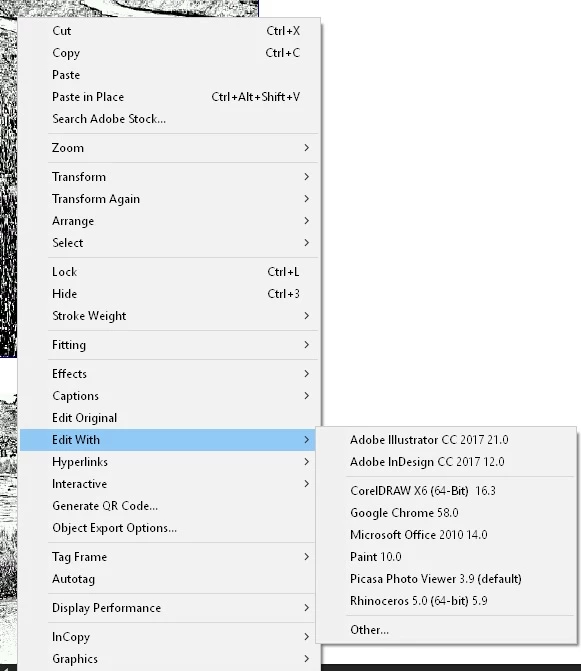
I am using Indesign cc 2017. My "edit with" right click menu does not have Photoshop listed. I have to click "other" and then locate photoshop.exe everytime I want to edit my image in photoshop. What should I do so that photoshop is always listed in my "edit with" context menu?
    This topic has been closed for replies.

    5 replies

    Inspiring
    September 25, 2023

    Came across this today as I am encountering the same issue in InDesign recently. I frequently import JPGs (survey photos) into InDesign for client proofs. I often want to open those JPGs with Photoshop from InDesign (default app = Photos, because I want to keep the ability to open the originals quickly w/o having to wait for PS to launch each time) to create separate mockup files (I do a Save As to create a separate mockup file from the original survey photo). The problem is that there are no other options for "Edit With" other than InDesign in the contextual menu.


    Yes, I can reassign all JPGs to open with Photoshop, but I don't want that to be my default. I just want to be able to override that and choose "Open With -> Photoshop" on an as-needed basis. But, the option is not there.


    I tried the below -- changing the default JPG "open with" app to Photoshop (which works as expected in the InDesign "Edit With" menu) and then changing the association back to Photos -- but as soon as I change the association back to Photos, the Photoshop option in InDesign's "Edit With" menu goes away again. It doesn't keep the Photoshop option, as described above (see @admirabl 's last comment above -- I'm encountering the same exact thing).


    I mean, yes, I can select "Other..." at the bottom and navigate to Photoshop each and every time I want to open a JPG in Photoshop, but this is pretty tedious/annoying.

    Participant
    October 7, 2023

    same problem, pleae help, I'm using Windows 11, new, clear install

    BobLevine
    Community Expert
    Community Expert
    October 8, 2023

    What happens when you hit "Other..."

    Klaas vT
    Inspiring
    June 4, 2019

    Hi, I've just had the same issue with InDesign CC 2019 (no "open with Photoshop" option) and wanted to log my solution. (BobLevine was right)

    I fixed it by setting Photoshop as the default application in Windows Explorer for .jpg files:

    Then started indesign, and the Photoshop option was back:

    Then I set the default .jpg app back to Photos as it was before, and the option still shows in InDesign.

    Hope that helps someone.

    Participant
    September 16, 2019
    I've just had the same issue, i did what you said, it worked!! thank you!
    Steve Werner
    Community Expert
    Community Expert
    May 6, 2017

    You can delete Bridge preferences by holding down Cmd/Ctrl + Option/Alt + Shift immediately after launching.

    jane-e
    Community Expert
    Community Expert
    May 6, 2017

    Also, (yay!) if you launch an application first you can hold down the keys and then go to File > Browse in Bridge (even if you are in Windows which usually doesn't let you hold down the keys first.)

    joet082964
    Inspiring
    May 2, 2017

    Wild guess - but maybe Windows Default Programs manages this?

    dzgnr89
    dzgnr89Author
    Inspiring
    May 6, 2017

    No it does not.

    Eric Dumas
    Community Expert
    Community Expert
    May 2, 2017

    I noticed in the past, that if I start Adobe Bridge it starts the connectors and links all the applications together. It might be easier to try that first, then you will have to move to purging your cache and preferences before considering reinstalling Photoshop

    dzgnr89
    dzgnr89Author
    Inspiring
    May 2, 2017

    Thanks a lot. I started Adobe Bridge. Then fiddled with opening some psd files and indd files through it. Indesign was still missing the photoshop option. I restarted InDesign and got what I wanted. But this is true for only pdf files linked in Indesign. I am still missing photoshop for jpegs and png files. The following screenshot is for a pdf file page. I trashed my preferences but still have the issue. How do I purge my cache? I regularly use Ccleaner to clean temp files and system cache. That hasn't helped me ever for this issue.

    jane-e
    Community Expert
    Community Expert
    May 2, 2017

    In Bridge > Preferences > File Type Associations, what do you have for PS, JPEG, and PNG? Change it in Bridge Preferences and it should work.