
Known Participant
January 30, 2017
Answered

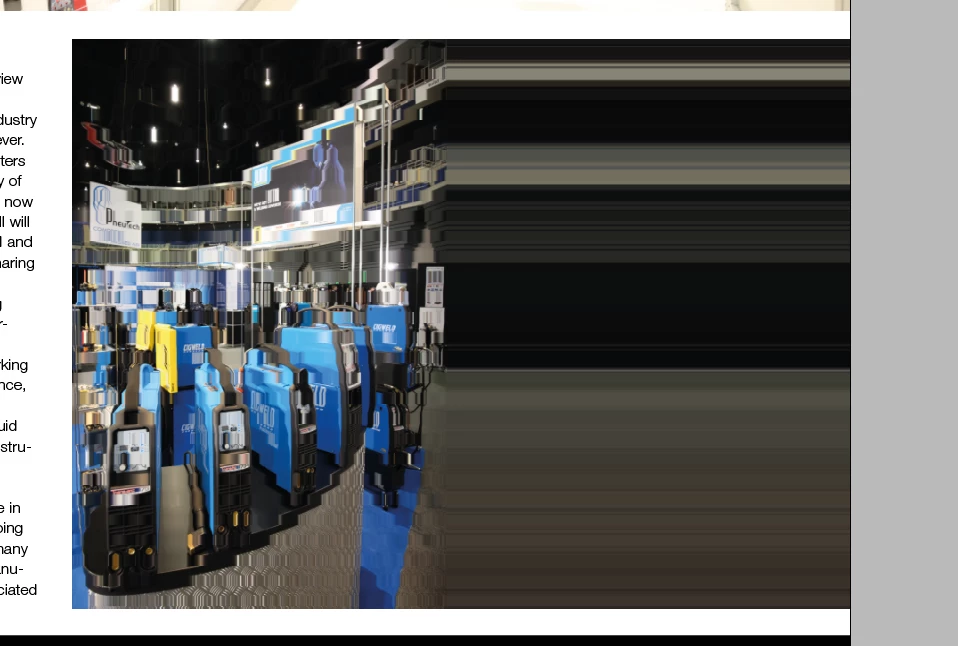
pictures display pixelated sometimes.
  • January 30, 2017
  • 2 replies
  • 458 views

I am trying to find out about the issue I am having with indesign displaying the pics as corrupt or pixelated. when it occurs If I switch between views

one view will display it properly and the other as pixelated and corrupt. To fix it all i have to do is move it slightly. But I shouldn't have to do that.

Does anyone know why this is occurring if it is a software glitch or maybe a hardware memory related problem. Im using Indesign CC 2017 version, and the latest Macbook Pro touch bar, Sierra 10.12.2

attached is an example of the image preview corrupting. There is nothing wrong with the image, just the way it displays is not good.

thanks

RIcky

[Here is the list of all Adobe forums... https://forums.adobe.com/welcome]

[Moved from Comments forum to specific Program forum... Mod]

This topic has been closed for replies.
Correct answer Steve Werner

Someone else posted an image like that recently.

I'd bet that you have a Retina Display Mac and the GPU feature is turned on (Preferences > GPU Performance) or use the "rocket" icon in the Application Bar. Try choosing View > Preview on CPU.

I believe it was posted as a bug, but you could also report it here:

Feature Requests/Bug Reports

2 replies

ricdaAuthor
Known Participant
January 30, 2017

Thank you so much Steve that worked for me : )

Steve Werner
Community Expert
Steve WernerCommunity ExpertCorrect answer
Community Expert
January 30, 2017

Someone else posted an image like that recently.

I'd bet that you have a Retina Display Mac and the GPU feature is turned on (Preferences > GPU Performance) or use the "rocket" icon in the Application Bar. Try choosing View > Preview on CPU.

I believe it was posted as a bug, but you could also report it here:

Feature Requests/Bug Reports