

rob day
Community Expert
Community Expert
May 14, 2022
Question

Placed Photoshop Layer Mask Bug?

  • May 14, 2022
  • 3 replies
  • 1627 views

A recent post in this thread:

https://community.adobe.com/t5/indesign-discussions/why-white-lines-on-pdf/td-p/8823035

seems to be showing a possible bug with placed PSDs containing layer masks producing white lines in PDF/X-4 exports.


At first glance the poster @Mara R, seems to be describing garden variety display stitching caused by PDF/X-1a flattening, but there is no flattening in the workflow.


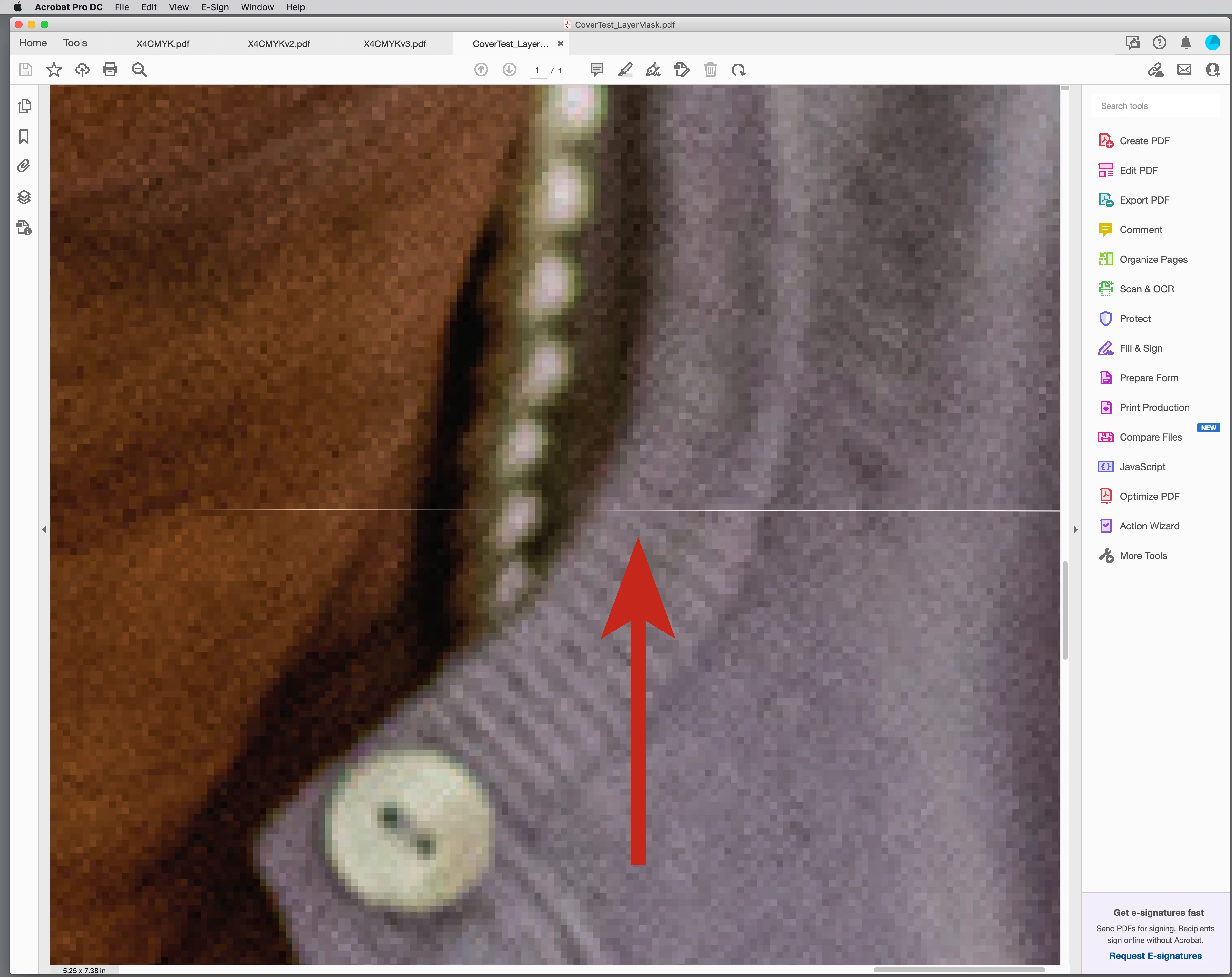
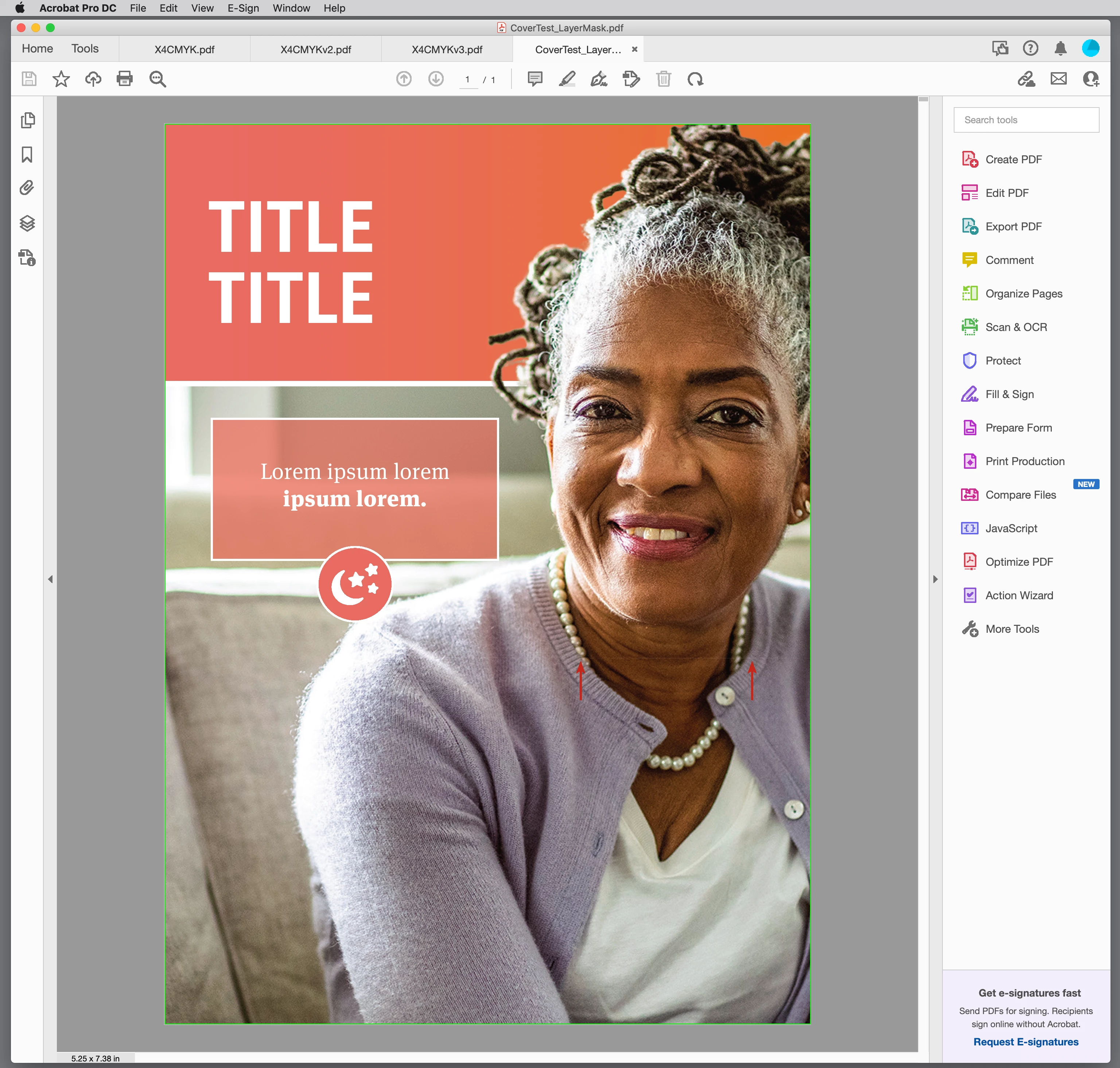
@Mara R provided InDesign and placed Photoshop files as attachments in the above thread. I’ve packaged the ID document so that it is easier to see the problem—a white line showing in a PDF/X-4 export at high magnification (800%+), but not a PDF/X-1a export.


https://shared-assets.adobe.com/link/9ea29064-1331-4469-63ff-3df6efc07698


The line does not show in either the ID or Photoshop file at any magnification, but corresponds with the Photoshop mask’s bottom edge. The ID file has the PSD placed twice and uses Object Layer Options to place the InDesign text panel behind the model’s head. AcrobatPro’s Output Preview Separations reads the line as white. The white line also shows if the PDF/X-4 is rasterized back into Photoshop.
 

This topic has been closed for replies.

3 replies

Community Expert
May 16, 2022

Hi Rob,

well, of course this edge of the pixel image exists in the exported PDF/X-4.

One could move the image on top with "Edit Object" in Print Production:


So I would also blame the visibility of the white line on hardware differences or differences in the viewing preferences in Acrobat Pro perhaps. My settings in Acrobat Pro:


Display resolution on my laptop monitor is only 1920 x 1080 px.


Regards,
Uwe Laubender
( Adobe Community Professional )

rob day
Community Expert
rob dayCommunity ExpertAuthor
Community Expert
May 16, 2022

I’m surprised that I can’t reproduce it building new documents. This has similar dimensions resolutions, and color spaces, and there are no hints of lines in the ID, PDF/X4, or PS docs:


https://shared-assets.adobe.com/link/f442b702-dabd-4b4d-616f-b4d72fa10893


Community Expert
May 16, 2022

Hi Mara and Rob,

let me share my experience with Mara's document CoverTest.indd where 1355067036_Senior_Woman_Couch_wMask.psd is placed twice, one time with PhotoShop layer "Masked" enabled and a second time, stacked below, with "Layer 0" enabled.


With Overprint Preview disabled and Normal view enabled I can see the issue with InDesign version 17.2.1 on Windows 10. Zoom is 115%. or 116%.  I cannot see it with zoom set to 100% or 200%. Or even 114%, 117% or 118%.


Not visible with zoom set to 200%:


If I export the page to PDF/X-4 without downsampling placed images or converting colors, I cannot see the issue in Acrobat Pro. Not at all. Zoomed in and out. No, the issue is not visible there:


File preview of my exported PDF on Windows 10 is showing a white line:


Also when I render the PDF to 100 ppi in PhotoShop:


But there is no white line when I render the PDF with e.g. 200ppi, 600 ppi or 1200 ppi.

Download my exported PDF from my Dropbox:

https://www.dropbox.com/s/bav4h8cp9o2prqt/CoverTest-UL-PDF-X-4-NoDownsampling.pdf?dl=1


NOTE:
Also opened Rob's sample PDF file CoverTest_LayerMask.pdf in Acrobat Pro. That's the PDF/X-4 one.

No white line visible at all (zoom 800% )


No white line visible at all (zoom 1600% )


Regards,
Uwe Laubender

( ACP )

rob day
Community Expert
rob dayCommunity ExpertAuthor
Community Expert
May 16, 2022

If I export the page to PDF/X-4 without downsampling placed images or converting colors, I cannot see the issue in Acrobat Pro. Not at all. Zoomed in and out. No, the issue is not visible there:


Hi Uwe, I see the white line in your CoverTest-UL-PDF-X-4-NoDownsampling.PDF on my iMac Retina display running at 3200x1800 at 1200% and higher—CC2021 on OSX Mojave.


I would blame it on hardware differences, but I also get the line rasterizing your PDF at 100ppi with AA checked


BobLevine
Community Expert
Community Expert
May 15, 2022

Thanks for starting this. I locked the other discussion.

rob day
Community Expert
rob dayCommunity ExpertAuthor
Community Expert
May 15, 2022

FWIW, I cannot reproduce the bug by constructing a new layered PSD, so it seems to be specific to @Mara R ’s PSD. The line is most obvious when the bottom edge of the mask is perfectly horizontal and has a black & white only edge—if I blur the edge the problem goes away.


Also, if I rasterize the PDF/X-4 at a high res (1200ppi) with Anti-Aliasing unchecked—which imitates a RIP—the line does not show. It seems unlikely the the line would print from the PDF/X-4 at a high resolution.

Participating Frequently
May 16, 2022

Thank you for starting another thread for this new direction. I did some additional testing this morning from the suggestions provided in the previous thread. I wanted to try them out using my usual processes to see if I got the same results.


1) Adjusting the height of the image frame in InD to hide the straight black/white bottom edge of the mask does indeed get rid of the white line in the exported PDF. This is the quickest/simplest fix for this cover design, so I'll be applying it to the some other covers we have that are also affected just to get them fixed quickly for the image library


2) Applying the layer mask in PSD works as well, but ONLY if the edge of the mask was softened first, or the hard edge erased after mask was applied. Leaving the hard edge in PSD will still result in a white line on the PDF.

TEST 1:

   a) PSD: Applied mask with hard edge intact

   b) InD: Left image frame at full height

   c) Resulting PDF has white line

TEST 2:

   1) PSD: Softend edge of mask, then applied

   2) InD: Left image frame at full height

   3) Resulting PDF does not have white line

Of course, changing the height of the image frame in InD to hide the edge of the mask negates the need to do any of this in PSD, but I wanted to test it to be sure.


If needed, here are all my original files, including high res PSD files and PDF .joboptions files. My applogies for not sharing these items in this manner originally.

https://shared-assets.adobe.com/link/75220674-ab2e-4b4b-7b06-c2dfc75cb758


And again, thank you for investing all the time and effort into researching this issue. It is appreciated!