


P-Frites
Participant
January 27, 2020
Answered

Placeholder error message with InDesign Data Merge

  • January 27, 2020
  • 7 replies
  • 33375 views
 

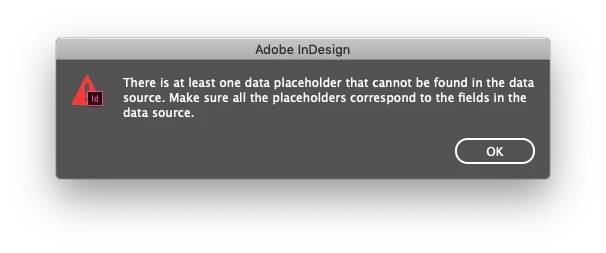
We use data merge frequently, using the same Excel files and InDesign templates over and over. Over the past week or so, our merges have stopped working, and we get this attached error message. We have removed any placeholders in both InDesign and Excel that are not being used. We have tried creating various .csv files from Excel. What could we be doing wrong, our workflow has not changed. Thank you!

 

Correct answer Rishabh_Tiwari

Hi,


Thank you for reaching out and sharing the solution that worked for you. For future reference, you can also try the suggestions shared in this discussion for data merge errors.

Thanks

Rishabh

7 replies

Participant
November 1, 2023

I know this is outdated, but the simple working answer is this:
Window > Interactive > Hyperlinks

Delete ALL of the hyperlinks, and start selecting your data fields again. 
You do not need to create a new document, or go back to your datamerge sheet. Your document has just gotten a littly buggy and needs to be cleaned up from time to time. 

Rishabh_Tiwari
Community Manager
Rishabh_TiwariCommunity ManagerCorrect answer
Community Manager
December 19, 2023

Hi,


Thank you for reaching out and sharing the solution that worked for you. For future reference, you can also try the suggestions shared in this discussion for data merge errors.

Thanks

Rishabh

Participant
January 16, 2022

I had the same issue. The only way I found to trouble shoot this was to go through starting with page/spread number 1 and delete all other pages then turn on preview, if preview worked I would then undo the deletion and continue to the next page and do the same thing untill I found the first page which was throwing an errror. My problem ended up being a field on page 20 and the core issue was that some extra characters had snuck in to one of the header rows of the csv file, once I deleted these in Excel, everything worked again. I had read on other forums you could use the Hyperlink inspector to find errors but the above method was the only way that worked for me (except for remaking the entire document).

Participant
October 5, 2021

I was also getting the same error. There was definitely no unlinked placeholders but I still got the same error as the OP. I even deleted every placeholder in the document (preview button then greys out to confirm I got them all) then added a new textbox with a new placeholder — still wouldn't work.


Thanks to the tip from @Esme5FD3 I ended up deleting all the hyperlinks in the Hyperlinks panel that didn't have a page number. Then trying to turn on merge preview, and it worked! Without having to make a new document!

Participant
August 31, 2021

I faced same error. So I try with very new Indesign file then problem solved. Dont use eye dropper tool even. All need to start from the bigining.

Participant
August 22, 2021

What worked for me was to go to the menu "Window" and then "Interactive" - in the dropdown there is a choice for "Hyperlinks" - select this and a panel will pop up that shows all the hyperlinks in the doc. I had some ghost hyperlinks that were copying over with the formatting when I created a new doc. I deleted all the hyperlinks and tried the data merge again and it worked. Good luck to all!


Participant
October 5, 2021

Thanks for the great lead. There was definitely no unlinked placeholders but it still wouldn't work for me. I even deleted every placeholder in the document (preview button then greys out to confirm I got them all) then added a new textbox with a new placeholder - still wouldn't work.


I ended up deleting all the hyperlinks in the Hyperlinks panel that didn't have a page number. Then trying to turn on merge preview, and it worked! Without having to make a new document!

Participant
September 18, 2025

Thank you! Dear Adobe please fix this headache in future versions.

Participant
April 6, 2021

Data merge panel will (sort of) identify which data placeholders didn't work - the ones used have a page number - if the data item has no page number and you can see that it is in your document then that is a faulty placeholder - relink it.

Inspiring
January 27, 2020

Please check the following scenarios:


Did you (mistakingly or not) change a data column title? Then the data merge panel will tell you which placeholder is not connected properly.


Did you add a new data column in excel with a space? Check the csv file, first line if there is an additional comma at the end. If so clean up that column in excel and export csv again.


Edit: There have been bugs with older InDesign versions and data merge. Try to update if there's an update available.

P-Frites
P-FritesAuthor
Participant
January 27, 2020

We have checked the column headers to make sure they are correct. The panel has not provided any info on which specific placeholder is a problem.


We have even gone back to previous Excel/InDesign file combinations that did work. They no longer work.


We tried using both InDesign 14.0.3 and 15.0.1. I will try loading anyupdates.

Inspiring
January 27, 2020

Please try to remove all data except line 1 (header) and 2 (first record). Export csv again. Does the error appear again?


Additionally. There was a reported bug that could be solved by removing the data source and link it once again (I know that's work but give it a try) and then save a new indesign file(other name).