Known Participant
June 16, 2023
Answered

Placing art into a table

  • June 16, 2023
  • 6 replies
  • 7083 views

Hi y'all,


Kind of a ticky-tack problem, but we use a single table cell to hold art in a document so the art moves along with the text.  I haven't used ID in a while but when I did this in previous versions, the cell would automatically expand to the height of the art.  For example if I placed a 42p0 x 18p0 Photoshop image in the cell, the cell would automatically get taller to accommodate the art size.
Now when I do this, the table size remians the same and I have to resize the table to the height of the art. Alternatively if I simply place the image randomly on a page, cut it, and paste it into the cell, the cell height automatically adjusts like it used to when I used the Place command.

I think the difference now is that InDesign is automatically putting the art in a frame about the size of the cell. This is just a guess but if I'm correct, it explains the behavior. So my question is this:

Is there a way to prevent InDesign from automaticall adding the frame?

Any help would be greatly appreciated!


Rick
This topic has been closed for replies.
Correct answer rob day

I used paste because I tried it and it works, it's simple, and it doesn't interrupt my flow (much).   : )

BTW, why do brackets go inside the period, but qutation marks don't.  JK


Robert,

The script makes the table before the art is inserted. I like your suggestion to size the table cell after placing, but I don't know how to write that script. 


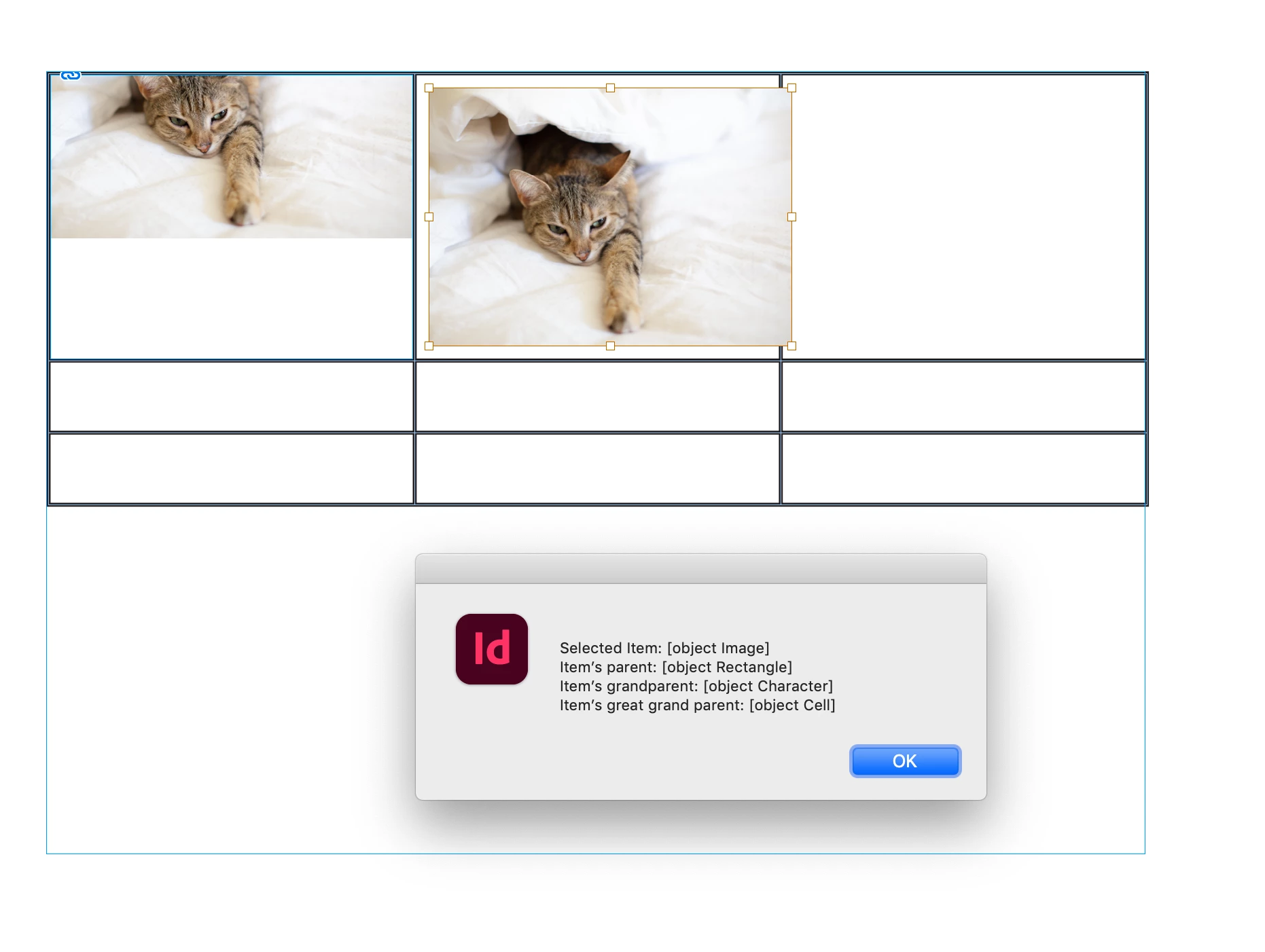
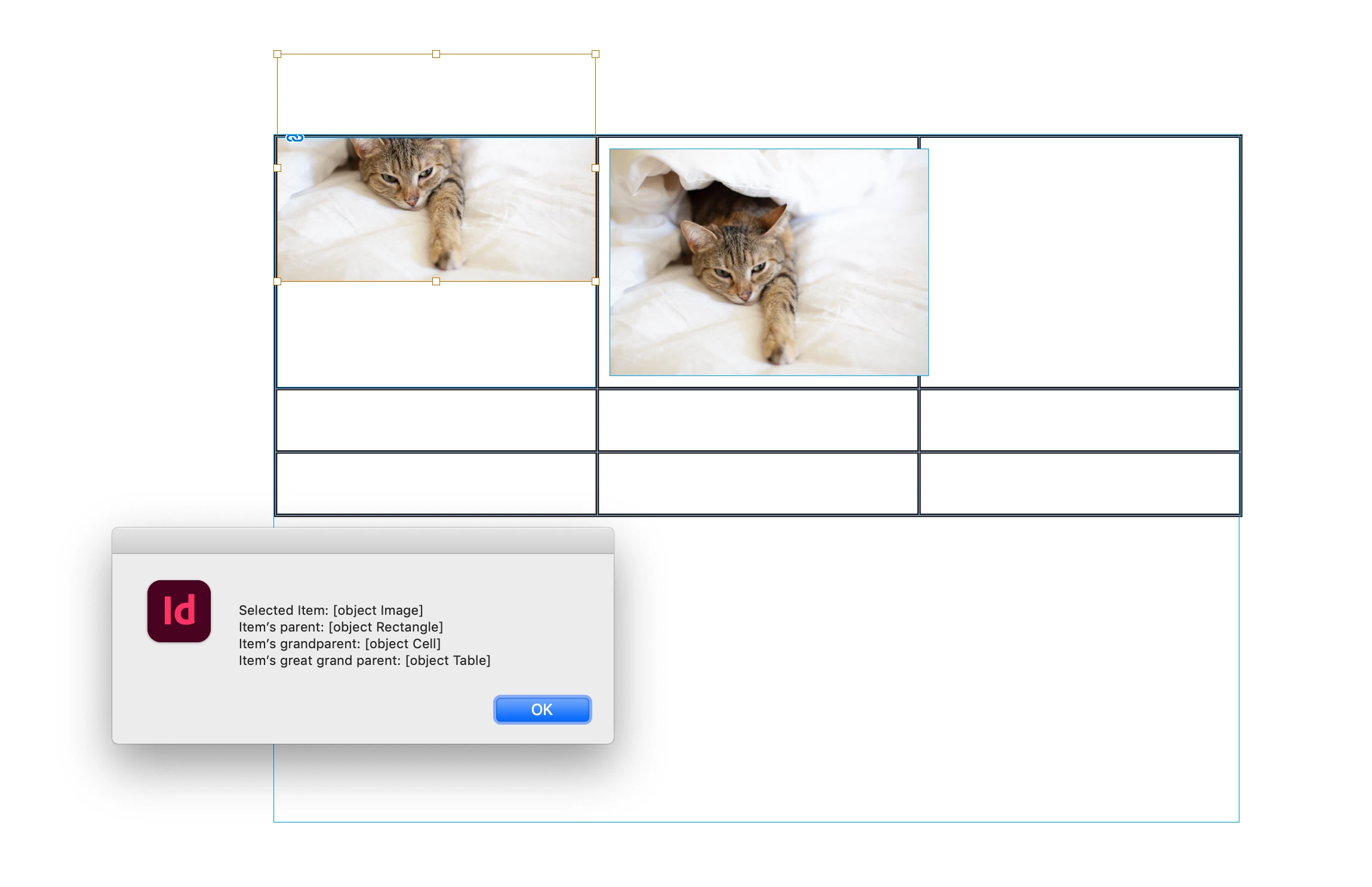
Hi @Richard30359240gq56 , I haven’t taken the time to read through all the posts in this thread, but scripting can help decipher how an image is placed in a table by getting its parents. So using this script with an image selected, I can see an image’s parent is always a container object (Rectangle, Oval, Polygon):


var s = app.activeDocument.selection[0]

alert(
    "\rSelected Item: " + s + "\r" + 
    "Item’s parent: " + s.parent + "\r" +
    "Item’s grandparent: " + s.parent.parent + "\r" + 
    "Item’s great grand parent: " + s.parent.parent.parent + "\r"
)


In a table I can see why these two instances act differently. The image on the left was placed directly into the cell— its parent is a rectangle and its grand parent is the cell:


I pasted the image into the 2nd cell, so it was pasted into the cell’s text insertion point (it’s an anchored object), so the grand parent is a text character, and the great grand parent is the cell:


6 replies

James Gifford—NitroPress
Legend
June 19, 2023

I note that the technical crux of this issue is this:


OP wants to place a graphic in a table cell, and manage its behavior from there.


OP does not want to place a graphic in a graphics frame, and manage it that way.


But... since tables are text elements, a graphic can only be placed in a table cell by inherently placing it as a graphic in a graphics frame anchored in the cell. ID simply works no other way.


So in rejecting all methods that would apply to that "inner box" and give almost limitless control of the graphic, OP insists on working only with the "outer box," which does not. Because that's his method. Disposing of the "outer box" that is limiting all of the control and causing the problems outlined in the first post is not an option, expertise be damned.


So, since there is no solution acceptable to the OP — since all this so-called expertise can't fix the problem his way, against the actual functional structure of ID — I suggest the thread be closed.

Known Participant
June 19, 2023

I agree the post should be closed!  But not because James' obstinate belief that there is only one way to do things. After all, my process used to work, so something in InDesign must have changed. Rather because the work-around is still much faster than James' "right way," and because if what he said were true, the cell wouldn't automatically size if I pasted the image rather than placed it.  But time is money, and my clients appreciate that I'm pretty much the fastest developer. 
 

Robert at ID-Tasker
Legend
June 19, 2023

Cell automatically resizes vertically - because the contents is treated as a text and InDesign is trying to show all of it - even if the contents is a graphics object.


If you set cell's height property to "exactly" - before placing graphics - it then won't resize and you'll get red overset dot. 


So there is nothing "special" in your approach - it's just your way / workaround for doing things - and again - it's not the correct way...


To get the black border - you are nesting one object inside another - when the 1st object can have the same border applied directly to it from the beginning...


Inspiring
June 19, 2023

Has the cell been somehow converted to a Graphic Cell? When placing/pasting an image into a Graphic Cell, the cell doesn't automatically grow to fit the image.

Known Participant
June 19, 2023

Thunder-Lightning,

Thanks for taking the time to make a suggestion! 


While your statement is true, it is not the answer to my problem. The table is made using a script and it's not converted to a graphic cell.  Otherwise, it wouldn't automatically size when I paste a previously pasted image into the cell.


Adobe should only let the original poster mark an answer as correct. But it seems that anybody labeled an "expert" can do it.  Algorhthmic Anarchy!  LOL

Peter Spier
Community Expert
Community Expert
June 19, 2023
quote


Adobe should only let the original poster mark an answer as correct. But it seems that anybody labeled an "expert" can do it.  Algorhthmic Anarchy!  LOL


By @Richard30359240gq56

At one time marking answers as correct was restricted to the OP and moderators, but there has been a change to allow community experts to mark (and unmark) as well. You should not assume, though, that someone actually thought an answer was corect and marked it. There seems to be a bug, perhaps intermittent, which is marking posts correct as well as upvoting them when a community expert posts a response.

If you feel strongly that @Robert at ID-Tasker's answer should not have been marked as correct that can be changed, but it does seem to answer at least the question regarding the necessity of having a container.

Peter Spier
Community Expert
Community Expert
June 16, 2023

I think I'm going to jump in and defend @Richard30359240gq56 here.

You cannot apply a default object style to a graphic when you place it. From day one place graphics haver always reverted to the [None] object style as soon as they hit the page.

Whether it's more work to do this with a table or to apply the object style after placing an inline object is debatable.

Known Participant
June 16, 2023

Thanks Peter. I coudn't agree more.  It's possible for both answers to be correct based on the type of layout used.
I've never had a problem with my method stability, or otherwise. The automatic frames add a couple of keystrokes and a click to my process, that's whay I called it ticky-tack. It's still a more efficient process and better for MY purposes.
James' mileage may vary.

Known Participant
June 16, 2023

Intersting that there's a "Correct" answer.  Since nobody has answered the question and I didn't select any answer as correct.
Can anybody mark an answer as correct?

Let me be clear. So far, NOBODY has provided a "CORRECT" answer.

Not trying to be a jerk, just stating a fact.  No flaming necessary.

Robert at ID-Tasker
Legend
June 16, 2023

Experts can mark replies as "correct" - and the answer doesn't have to be 100% "correct" with the question - it can just describe the right way to do things. 


And, no offence, but your way is not the right way - it may work for you as a "workaround" - but overall, it isn't the correct way to place graphics in the text. 


Again, no offence, but where did you get the idea to use table as a placeholder for a graphic in the text - when you can directly place graphic in the text? 


You can't even have the table anywhere in the text - it will always be "alone" in the new line - where If you place graphic directly(*) in the text - it behaves as a character / glyph - so then you can even apply CharStyle to further modify its location, etc. 


(*) it's not exactly "directly" because any linked file - even when embedded - is always inside "container" - rectangle / oval / polygon - can't exist on its own. 


Known Participant
June 16, 2023

No offence taken. If you place a single cell table, 1x1, on a paragraph line, it is part of the paragraph and moves with the text.  It provides a nice 1pt black frame around the text.

If you place it directly in the text, there's no frame.
The process I use is an extremely efficient way to provide what the customer wants.  It's WAY more efficient than the supposed "Correct" answer.
No offence, but allowing experts to mark their own answer as correct is like having the chickens guard the hen house. It cuts off further discussion and stifles innovation. Worse yet, it allows fanboys to shut down a conversation.

Known Participant
June 16, 2023

Also, is there a way to edit a post to clarify the question?

Robert at ID-Tasker
Legend
June 16, 2023

You can place your art directly in the text - no need for a table.


Then use ObjectStyle to control its behaviour. 


Known Participant
June 16, 2023

Thanks Robert!
The client wants a one point black box around the image.  The table cell is just an easy way to create that box.
Any suggestions?

Willi Adelberger
Community Expert
Community Expert
June 16, 2023

Either make the image frame bigger than the image or expand the stroke of image frame.