

AllmondPrinting
Participating Frequently
November 24, 2025
Question

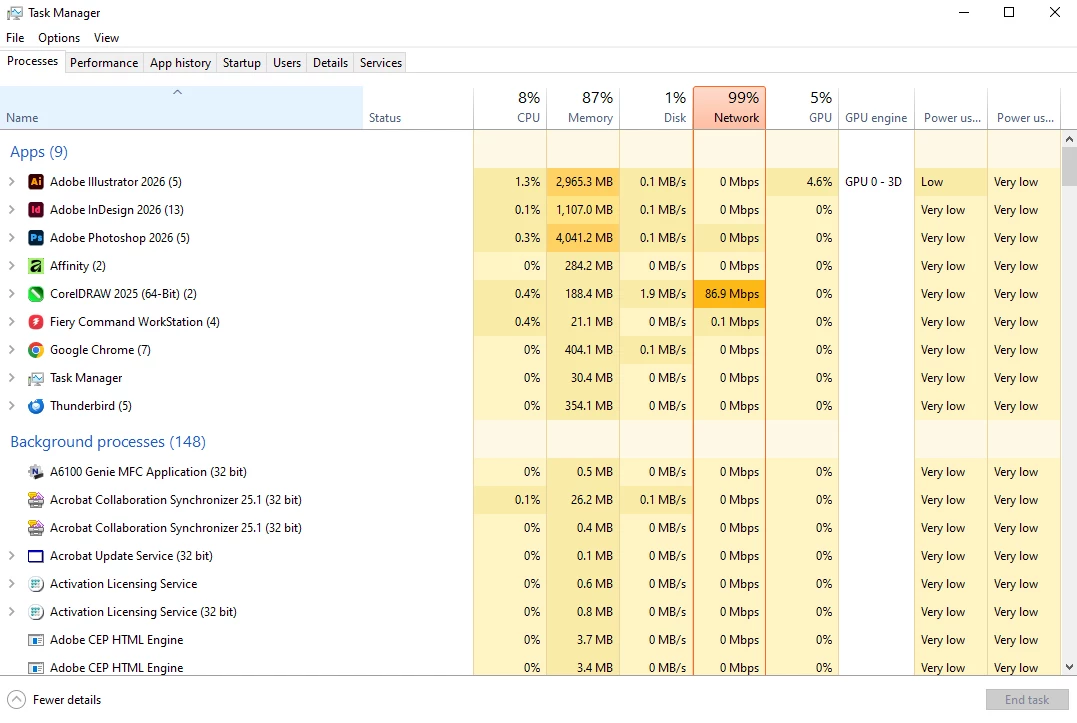
PLEASE fix this massive memory leak in your software!
  • November 24, 2025
  • 1 reply
  • 206 views

There are NO files open in ANY program on my computer, and Illustrator, InDesign, and Photoshop are hogging ALL of my RAM. Since the last update, my computer has been glitchy, so I had a little check this morning and see THIS. We pay entirely too much for this subscription to have it bring our computers to a halt this way. 

1 reply

Community Expert
November 27, 2025

You cannot stop Illustrator, InDesign, and Photoshop from preloading through their own preferences. Adobe moved that behaviour into Creative Cloud background services. If you want to reduce the RAM usage you need to disable the CC helper services.


The usual steps are:

Open the Creative Cloud desktop app

Go to Settings

Turn off File Sync

Turn off CC Libraries

Turn off Cloud Documents

Disable auto updates

Close the CC app completely


In Windows Task Manager, end tasks with names like
Adobe IPC Broker
CCXProcess
Creative Cloud Helper
CoreSync
Adobe Notification Client


These are the ones that keep things loaded even when no Adobe app is open.

After quitting them, RAM use will drop until you launch an Adobe app again. It is not a perfect fix but it is the only way to stop the always on behaviour for now.