danmatalon
Participant
May 30, 2017
Answered

PLEASE HELP - Frustrating "move / position" dialogue box slowing down my work!

  • May 30, 2017
  • 3 replies
  • 404 views

I have been using the same PC with the same version of indesign CS6 for the last two and a half years, and have become accustomed to working rapidly, the tools working how I expect etc.

After the cyber attacks earlier this month, my IT manager installed some updates, and it appears to have messed up some of the settings. My mouse also stopped working and had to be replaced. Now, for some reason, whenever I click on the selection tool now while a frame is selected, I get this dialogue box interrupting my flow, and I have to cancel, deselect the other item and then when everything is deselected, re-click the tool, in order to use it how I would usually expect.
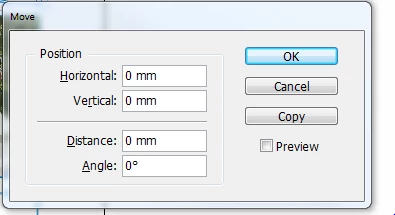
Can anybody tell me how to turn off this function? It's driving me nuts and REALLY slowing me down! I haven't found any answers searching through the forums.

Thanks!

This topic has been closed for replies.
Correct answer Jeff Witchel, ACI

If the above solution does not help, it could be your mouse or your mouse settings. I was having a similar problem on my Mac and culprit was my old favorite mouse. Every time I clicked on the Selection tool the Move dialog would open. (A single click was being interpreted as a double click.) I starting using a brand new mouse and the problem went away.

3 replies

danmatalon
Participant
May 30, 2017

Thank you! I actually put the original mouse back in and it resolved the issue (plus the mouse started working again!)... Clearly a hardware issue. Next time I need to replace the mouse, I'll check the mouse software settings. Thank you all for your answers!

Jeff Witchel, ACI
Community Expert
Jeff Witchel, ACICommunity ExpertCorrect answer
Community Expert
May 30, 2017

If the above solution does not help, it could be your mouse or your mouse settings. I was having a similar problem on my Mac and culprit was my old favorite mouse. Every time I clicked on the Selection tool the Move dialog would open. (A single click was being interpreted as a double click.) I starting using a brand new mouse and the problem went away.

amaarora
Inspiring
May 30, 2017

Hi,

You can start by cleaning your InDesign Cache and preference...Troubleshooting 101: Replace, or "trash" your InDesign preferences

Also, a faster way to get rid of dialog is to press "Esc" key and then resume your work.

-Aman

Eternal Warrior
Inspiring
May 30, 2017

+1