
M.Hasanin
Inspiring
May 4, 2021
Answered

Please Help me fixing old script by Harb

  • May 4, 2021
  • 4 replies
  • 1754 views

Hi Experts,

i use Harb Script found here in the forum and in his website (  ) , here is the code :

"http://in-tools.com/article/scripts-blog/separate-pages-script/"


/*****************************************************
SeparatePages.jsx
An InDesign CS2 javascript by Harbs.
For more scripts and automation tools visit www.in-tools.com.

Will separate all pages to allow for inner bleeds
while preserving the original orientation of the page.
Basic testing done on CS2 ME. (Should work with CS and CS3 also, but untested.)
Use at your own risk!!!
*******************************************************/
aDoc = app.activeDocument;
for (i=0;i<aDoc.pages.length;i++){
	aSide = aDoc.pages[i].side;
	aSide = aSide + "";
	aDoc.pages[i].insertLabel("direction",aSide);
	}
aDoc.documentPreferences.allowPageShuffle = true;
aDoc.documentPreferences.facingPages = false;
aDoc.documentPreferences.allowPageShuffle = false;
aDoc.documentPreferences.facingPages = true;
for (i=0;i<aDoc.pages.length;i++){
	myPage = aDoc.pages[i];
	mySide = myPage.extractLabel("direction");
	if (mySide == "1818653800"){
		myPage.move(LocationOptions.atEnd,myPage,BindingOptions.leftAlign);
		}else{
		myPage.move(LocationOptions.atEnd,myPage,BindingOptions.rightAlign);
		}
	}


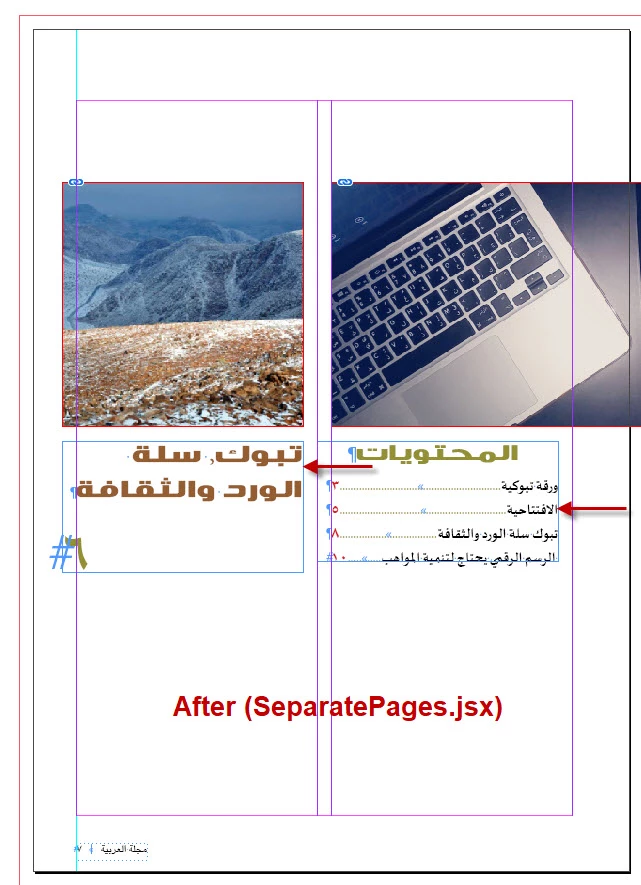
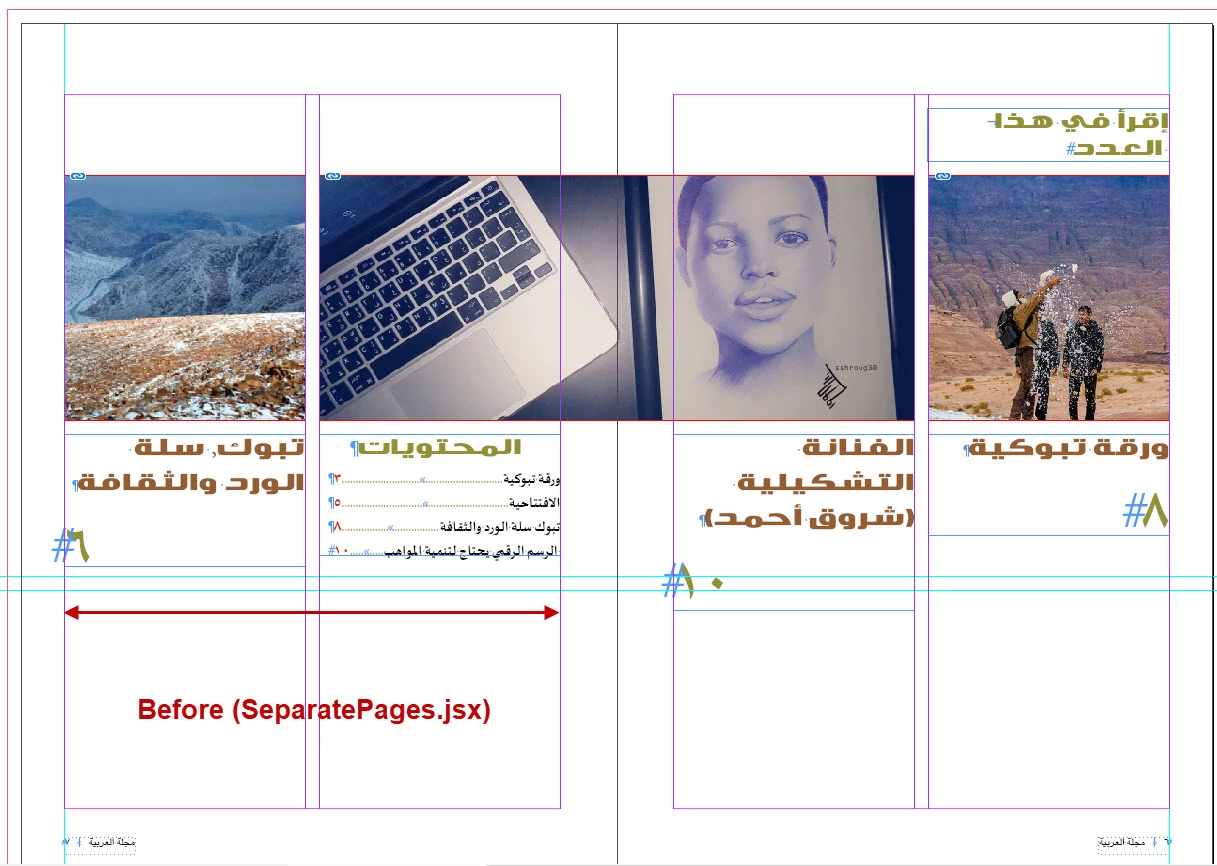
i see after running the script that the splitted pages have items moved to the left (images and text frames), that including images and text frame!, I don't know why, no error messages! but it moves to left, thats mean vandalize the document!

Please can you help me to identify the problem, i still learning javascript so i can't figure where is the problem?, here is screen shots.
Thanks in Advance

Best 

M.Hasanain

This topic has been closed for replies.
Correct answer M.Hasanin

Hi Laubender,

Thanks a lot, I read all the Articles thoroughly!, especially the one with you and kasyan discussing the treatment for shifting items after numbering here (https://community.adobe.com/t5/indesign/bug-in-book-s-update-numbering-feature/m-p/10768770?page=1#M166153), and i found a good solution, i just add the two lines for locking and unlocking items in the document and it works!


/*****************************************************
SeparatePages.jsx
An InDesign CS2 javascript by Harbs.
Updated By : M.Hasanain
Special Thanks to : Kasyan Servetsky  and  Laubender 
For more scripts and automation tools visit www.in-tools.com.

Will separate all pages to allow for inner bleeds
while preserving the original orientation of the page.
Basic testing done on CS2 ME. (Should work with CS and CS3 also, but untested.)
Use at your own risk!!!

*******************************************************/
//-----------------------------------------------------------------------------------------------------
// WARNING: Here we do not bother if some items are already locked before 
// and should stay locked after unlocking all again:
app.documents[0].pageItems.everyItem().locked = true;
//-----------------------------------------------------------------------------------------------------
aDoc = app.activeDocument;
for (i=0;i<aDoc.pages.length;i++){
	aSide = aDoc.pages[i].side;
	aSide = aSide + "";
	aDoc.pages[i].insertLabel("direction",aSide);
	}
aDoc.documentPreferences.allowPageShuffle = true;
aDoc.documentPreferences.facingPages = false;
aDoc.documentPreferences.allowPageShuffle = false;
aDoc.documentPreferences.facingPages = true;
for (i=0;i<aDoc.pages.length;i++){
	myPage = aDoc.pages[i];
	mySide = myPage.extractLabel("direction");
	if (mySide == "1818653800"){
		myPage.move(LocationOptions.atEnd,myPage,BindingOptions.leftAlign);
		}else{
		myPage.move(LocationOptions.atEnd,myPage,BindingOptions.rightAlign);
		}
	}
//-----------------------------------------------------------------------------------------------------
// WARNING: Here we do not bother if some items were already locked before 
// and should stay locked after unlocking all again:
app.documents[0].pageItems.everyItem().locked = false;
//-----------------------------------------------------------------------------------------------------


4 replies

Community Expert
May 5, 2021

Hi M.Hasanain,

now I found this thread from 2016:


Script to move a facing page after itself?
JustyR, Nov 12, 2016
https://community.adobe.com/t5/indesign/script-to-move-a-facing-page-after-itself/td-p/8659149


There is no real news in it, but the one that moving items is nothing new when shifting pages to their own spreads using a script. If you do this "by hand" in the user interface it should work as expected.


Regards,
Uwe Laubender

( ACP )

M.Hasanin
M.HasaninAuthorCorrect answer
Inspiring
May 6, 2021

Hi Laubender,

Thanks a lot, I read all the Articles thoroughly!, especially the one with you and kasyan discussing the treatment for shifting items after numbering here (https://community.adobe.com/t5/indesign/bug-in-book-s-update-numbering-feature/m-p/10768770?page=1#M166153), and i found a good solution, i just add the two lines for locking and unlocking items in the document and it works!


/*****************************************************
SeparatePages.jsx
An InDesign CS2 javascript by Harbs.
Updated By : M.Hasanain
Special Thanks to : Kasyan Servetsky  and  Laubender 
For more scripts and automation tools visit www.in-tools.com.

Will separate all pages to allow for inner bleeds
while preserving the original orientation of the page.
Basic testing done on CS2 ME. (Should work with CS and CS3 also, but untested.)
Use at your own risk!!!

*******************************************************/
//-----------------------------------------------------------------------------------------------------
// WARNING: Here we do not bother if some items are already locked before 
// and should stay locked after unlocking all again:
app.documents[0].pageItems.everyItem().locked = true;
//-----------------------------------------------------------------------------------------------------
aDoc = app.activeDocument;
for (i=0;i<aDoc.pages.length;i++){
	aSide = aDoc.pages[i].side;
	aSide = aSide + "";
	aDoc.pages[i].insertLabel("direction",aSide);
	}
aDoc.documentPreferences.allowPageShuffle = true;
aDoc.documentPreferences.facingPages = false;
aDoc.documentPreferences.allowPageShuffle = false;
aDoc.documentPreferences.facingPages = true;
for (i=0;i<aDoc.pages.length;i++){
	myPage = aDoc.pages[i];
	mySide = myPage.extractLabel("direction");
	if (mySide == "1818653800"){
		myPage.move(LocationOptions.atEnd,myPage,BindingOptions.leftAlign);
		}else{
		myPage.move(LocationOptions.atEnd,myPage,BindingOptions.rightAlign);
		}
	}
//-----------------------------------------------------------------------------------------------------
// WARNING: Here we do not bother if some items were already locked before 
// and should stay locked after unlocking all again:
app.documents[0].pageItems.everyItem().locked = false;
//-----------------------------------------------------------------------------------------------------


Mohammad Hasanin
FRIdNGE
May 6, 2021

I’ve tried Gabe Harbs’ script corrected as I said on InDesign CS6 and CC 2019 on RTL and LTR docs and it works correctly! 


(^/)

Community Expert
May 5, 2021

"Problem Still exist"


Hm. Perhaps try a different value like 0 for all margins.

How did you apply the new margin values? Through master pages?


If value 0 for all margins is not working, I need the InDesign document to tell more.


FWIW: Kasyan Servetsky did an article about a similar problem, shifting items on the page, with a scripting solution:

http://kasyan.ho.ua/indesign/2020/check_pageitems_for_shift/check_pageitems_for_shift.html


Regards,
Uwe Laubender

( ACP )

FRIdNGE
May 5, 2021

Just:


aDoc = app.activeDocument;
for (i=0;i<aDoc.pages.length;i++){
	aSide = aDoc.pages[i].side;
	aSide = aSide + "";
	aDoc.pages[i].insertLabel("direction",aSide);
	}

aDoc.documentPreferences.allowPageShuffle = true;
aDoc.documentPreferences.facingPages = false;

for (i=0;i<aDoc.pages.length;i++){
	myPage = aDoc.pages[i];
	mySide = myPage.extractLabel("direction");
	if (mySide == "1818653800"){
		myPage.move(LocationOptions.atEnd,myPage,BindingOptions.leftAlign);
		}else{
		myPage.move(LocationOptions.atEnd,myPage,BindingOptions.rightAlign);
		}
	}

aDoc.documentPreferences.allowPageShuffle = false;
aDoc.documentPreferences.facingPages = true;


(^/)  The Jedi

M.Hasanin
M.HasaninAuthor
Inspiring
May 6, 2021

Thanks FRIdNGE for the Update, But Actually the Problem is Still Exist!, I found if the Doc are (LTR) so the  Right Hand Pages items need to be Shifted -5mm and if the Doc are (RTL) so the Left Hand Pages items need to be Shifted 5mm!, So the Problem is still exist.

Mohammad Hasanin
Community Expert
May 5, 2021

Hi M. Hasanain,

this is a known bug with InDesign.


Solution:

Before running the script, set the inner and outer margin values of all pages to the exact same amount.


Regards,
Uwe Laubender

( ACP )


//EDITED

M.Hasanin
M.HasaninAuthor
Inspiring
May 5, 2021

Thank you a lot, Can this be done by code?

Mohammad Hasanin
Peter Kahrel
Community Expert
Community Expert
May 5, 2021

Did you ask Harbs?

M.Hasanin
M.HasaninAuthor
Inspiring
May 5, 2021

Hi Mr.Peter,

Yes, I Wrote on the Script page

http://in-tools.com/article/scripts-blog/separate-pages-script/

Mohammad Hasanin