Participating Frequently
June 21, 2023
Answered

please help me write a script for the following command

  • June 21, 2023
  • 6 replies
  • 446 views

Good idea!


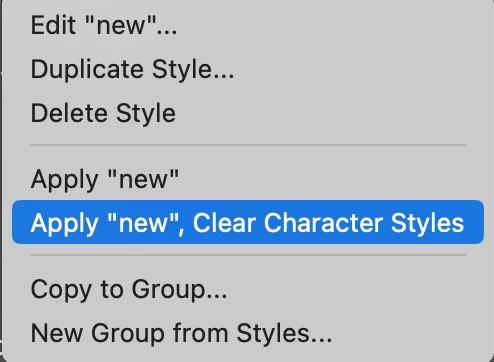
Can someone please help me write a script for the following command: apply "name of paragraph style", clear character style. so i can make for this script a shortcut.


Thank you!

This topic is closed to new replies. Start a new post to keep the conversation going.
Correct answer m1b

Okay, got it. I think the following script may do what you want, but it also clears all character level overrides in the selected text or text frames. See if it does what you need.

- Mark

/**
 * Attempts to reproduce the function of the menu action
 * `Apply "^1" then Next Style, Clear Character Styles`
 * on the select text or text frame.
 * Known limitations: this script, unlike the above function,
 * also removes *any* character-level overrides from the text.
 * @discussion https://community.adobe.com/t5/indesign-discussions/please-help-me-write-a-script-for-the-following-command/m-p/13883054
 */
function main() {

    var doc = app.activeDocument,
        items = doc.selection;

    for (var i = 0; i < items.length; i++)
        clearCharacterOverrides(doc, items[i], false);

}

app.doScript(main, ScriptLanguage.JAVASCRIPT, undefined, UndoModes.ENTIRE_SCRIPT, 'Clear Character Overrides');


/**
 * Clears character overrides
 * retaining paragraph style.
 * @7111211 m1b
 * @version 2023-06-22
 * @9397041 {Document} doc - an Indesign document.
 * @9397041 {Text|TextFrame} text - any Indesign object with texts.
 */
function clearCharacterOverrides(doc, text) {

    if (!text.hasOwnProperty('texts'))
        return;

    text = text.texts[0];

    if (!text.isValid)
        return;

    // apply [None]
    text.paragraphs.everyItem().applyCharacterStyle(doc.characterStyles[0]);
    text.clearOverrides(OverrideType.ALL);

};

6 replies

m1b
Community Expert
Community Expert
June 21, 2023

So when you run the script it shows you a menu of all the paragraph styles to choose from?

- Mark

Participating Frequently
June 21, 2023

no, it should just execute the command in blue, on my text selected.


My selected text already has a paragraph style, but also has a character style which conflicts with the paragraph style and I want to clear it, the only way is to open each time the paragraph style menu, right click on the style and press on the command. and I want a script to do that and then i'll add a key shortcut to that script.


Thank You!

m1b
Community Expert
m1bCommunity ExpertCorrect answer
Community Expert
June 21, 2023

Okay, got it. I think the following script may do what you want, but it also clears all character level overrides in the selected text or text frames. See if it does what you need.

- Mark

/**
 * Attempts to reproduce the function of the menu action
 * `Apply "^1" then Next Style, Clear Character Styles`
 * on the select text or text frame.
 * Known limitations: this script, unlike the above function,
 * also removes *any* character-level overrides from the text.
 * @discussion https://community.adobe.com/t5/indesign-discussions/please-help-me-write-a-script-for-the-following-command/m-p/13883054
 */
function main() {

    var doc = app.activeDocument,
        items = doc.selection;

    for (var i = 0; i < items.length; i++)
        clearCharacterOverrides(doc, items[i], false);

}

app.doScript(main, ScriptLanguage.JAVASCRIPT, undefined, UndoModes.ENTIRE_SCRIPT, 'Clear Character Overrides');


/**
 * Clears character overrides
 * retaining paragraph style.
 * @7111211 m1b
 * @version 2023-06-22
 * @9397041 {Document} doc - an Indesign document.
 * @9397041 {Text|TextFrame} text - any Indesign object with texts.
 */
function clearCharacterOverrides(doc, text) {

    if (!text.hasOwnProperty('texts'))
        return;

    text = text.texts[0];

    if (!text.isValid)
        return;

    // apply [None]
    text.paragraphs.everyItem().applyCharacterStyle(doc.characterStyles[0]);
    text.clearOverrides(OverrideType.ALL);

};