Inspiring
June 25, 2014
Answered

Pls correct my script for script label creation

  • June 25, 2014
  • 2 replies
  • 506 views

Hi,

I want to add the script label name in Masterpages only which was in 'Text thread' options. Is this possible by script?

This is my code

var myTextFrame=app.selection[0];

myTextFrame.label="textpage";

var myNextFrame=myTextFrame.nextTextFrame;

while(myNextFrame !=null)

{

    myNextFrame.label="textpage";

    myNextFrame=myNextFrame.nextTextFrame;


}

Instead of first line I want to create this script label "textpage" for master page 'text thread' text frame only

Instead of first line I want to create this script label "textpage" for master page 'text thread' text frame only. How to change my script pls help me?

FYI:
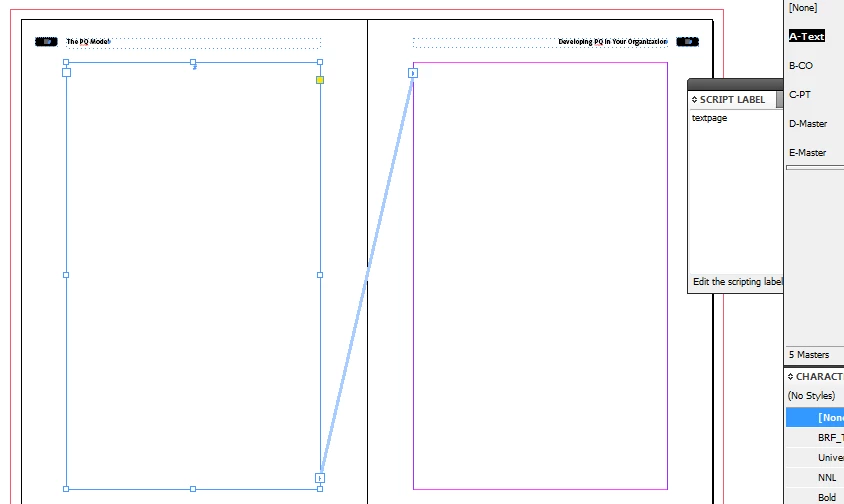
by

hasvi

This topic has been closed for replies.
Correct answer Chinnadk

Hi Hasvi,

Try this.

var doc = app.activeDocument;

var mspreads = doc.masterSpreads;

for(var i =0;i<mspreads.length;i++)

{

        if(mspreads.textFrames.length>1)

        {

                var txfmlength = mspreads.textFrames;

                for(var j=0;j<txfmlength.length;j++)

                {

                        if(txfmlength.nextTextFrame != null)

                        {

                            txfmlength.label="textpage"; 

                            }

                        if(txfmlength.previousTextFrame !=null)

                        {

                                txfmlength.label="textpage"; 

                            }

                    }

            }

    }

Regards,

Chinna

2 replies

Chinnadk
ChinnadkCorrect answer
Legend
June 25, 2014

Hi Hasvi,

Try this.

var doc = app.activeDocument;

var mspreads = doc.masterSpreads;

for(var i =0;i<mspreads.length;i++)

{

        if(mspreads.textFrames.length>1)

        {

                var txfmlength = mspreads.textFrames;

                for(var j=0;j<txfmlength.length;j++)

                {

                        if(txfmlength.nextTextFrame != null)

                        {

                            txfmlength.label="textpage"; 

                            }

                        if(txfmlength.previousTextFrame !=null)

                        {

                                txfmlength.label="textpage"; 

                            }

                    }

            }

    }

Regards,

Chinna

hasviAuthor
Inspiring
June 26, 2014

Hi chinna,

thanks for your excellent work.

by

hasvi

Community Expert
June 25, 2014

@hasvi – I don't know if I understand you right. Do you want to label every text frame of a story with the same label value? As a starting point you want to work with a selected text frame of that story?

If yes, select a text frame, could be any, and run that snippet:

var textContainersOfStoryArray = app.selection[0].parentStory.textContainers;

for(var n=0;n<textContainersOfStoryArray.length;n++){

    textContainersOfStoryArray.label = "textpage";

    };

Or do you mean you want to label the primaryTextFrame of the applied master spread, if you selected something on a "normal" page?

That would be:

//Object selected on "normal" page:

var myPrimeryTextFrame = app.selection[0].parentPage.appliedMaster.primaryTextFrame;

myPrimeryTextFrame.label = "textpage";

Uwe