Participating Frequently
April 17, 2020
Question

PNGs, PSDs wrong displayed in PDF export
  • April 17, 2020
  • 7 replies
  • 1618 views

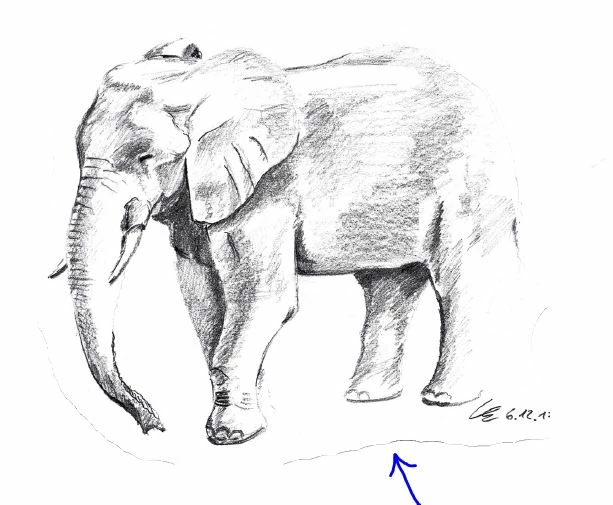
Hey, I am doing my design portfolio and therefore need to place a lot of drawings in Indesign. I normally crop these pictures in Photoshop and blur the shape a bit, so that I can fit them in better (I have tried placing them as PNGs as well as PSDs). This normally works out without any problems. But I recently have the problem that when I open the exported PDF in Adobe Acrobat there is somekind of dark shadow along the shape of the cropped pictures. I have tried various export options, normal PDFs and interactive PDFs but the problem always occurs, but only if I open the PDF in Acrobat. If I open it for example with Microsoft Edge the problem doesn't occur. Do you know how I can solve this problem??


Thanks in advance! Regards Leon

This topic has been closed for replies.

7 replies

rob day
Community Expert
Community Expert
April 19, 2020

Also, if you don’t want to turn off Downsampling, turn on the bottom white background layer in your PSD—it doesn’t seem like you need the transparency in InDesign.


rob day
Community Expert
Community Expert
April 19, 2020

The problem is being caused by your Export>Compression setting—if it is set to Downsample Images the downsampling affects the pixels on the edge of the transparency mask. Here is a default PDF/X-4 export, which downsamples images with an effective resolution over 450ppi. AcrobatPro’s Output Preview shows the edge pixels and their CMYK values:


But if I turn off Downsampling there is no pixel interpolation, and the edge pixels export and read as white 0|0|0|0:


LeonE98Author
Participating Frequently
April 19, 2020

Thank you so much! This really does solve the problem! Do you know if these settings are also possible for interactive PDFs? I can not find any precise settings there and with the setting "jpeg2000(lossless)" the problem still occurs...

rob day
Community Expert
Community Expert
April 19, 2020

Why do you need the transparency? It seems like you just need a white background. If that’s the case either flatten the PSD or turn on the white background that you have turned off in your PSD.

Randy Hagan
Community Expert
Community Expert
April 18, 2020

I'm assuming that you're scanning your sketches into Photoshop, and expecting that by saving the right format you won't have to do cleanup of the media edges. You may be mistaken on this — certainly with your sketched elephant example, and perhaps with other art you're processing through Phososhop as well.


Working with your elephant sketch example, you may well find that using Photoshop's Eraser tool to clean up that edge is worth more than trying to apply layer masks or more sophisticated tools. I'm a fan of old-fashioned clipping masks myself, but those can be challenging when applying them around areas you want to drop away like the rear haunches of your elephant. For print, greyscale TIFF format (.tif) files let you handle clipping masks easily without too much hassle.


Nice sketching, by the way. I wish I had those skills; you should be proud of yours.


Good luck,


Randy

Geоrge
Legend
April 18, 2020

>> PNGs

My strong opinion - Don't use it nor PNG, nor GIF with InDesign (resave to .psd)

My very strong opinon - Don't use it EPS-files too (resave to .ai). 

I know, that you will find here heretics and fanatics who's will say that I'm don't right. I don't care it because used to many bugs with that evil formats of file and cut them from my practise. 

Remember, never say you can't do something in InDesign, it's always just a question of finding the right workaround to get the job done. © David Blatner
Community Expert
April 18, 2020

Absolutely nothing wrong with PNG or GIF or EPS in Indesign for print or web or interactive. 

There are definitely wrong ways to go about it - same with PSD or any file format. 


Although EPS is an archaic format - and whereas .ai is better converting all your EPS files to AI is redundant and only should be done on ad hoc basis if you have having issues.

LeonE98Author
Participating Frequently
April 18, 2020

Thats also my point of view, isn' t it the purpose of Indesign to place pictures of different formates and text combined? Apparently I have already replaced all PNGs by PSDs (jsut to try it) but nothing changed. What irritates me is that it seems to be a problem between Indesign and Acrobat... The display failure varies with the zoom. On some levels it occurs and others it disappears. My first intention was that it must be some problem with the transparency level, but I tried almost every option in Indesign but couldnt solve the problem... Any further Ideas?

Community Expert
April 18, 2020

Acrobat is probably the best to view your PDF - but  you can't dictate what PDF viewer people are using either. And not all PDF viewers are entirely equal.

Plus Acrobat has several display options for the PDF which each user can have different settings.


Consider not using PDF and use an online service like Adobe Portfolio - or Squarespace - or if you can do a Wordpress site.

That would  be far better than sending out PDFs.

rob day
Community Expert
Community Expert
April 17, 2020

Can you share the PSD via DropBox or your CC account?

Derek Cross
Community Expert
Community Expert
April 17, 2020

In Photoshop you can add a layer mask and paint out those edges, then save as a PDF or JPG and Place the image in InDesign.

LeonE98Author
Participating Frequently
April 18, 2020

Thanks a lot for your answer Derek_Cross! I can not arrange all the picture if they have a rectangular formate, therefore jpg is no option. But I have tried to export the drawing as a pdf from photoshop which seems to solve the problem! Since I work with a very old version of Photoshop I think I can not work with layer masks yet...

Scott Falkner
Community Expert
Community Expert
April 19, 2020

ow old? Layer masks have been a feature for over 20 years.