Participating Frequently
December 28, 2020
Answered

PostScript printing skips pages

  • December 28, 2020
  • 4 replies
  • 691 views

I have a 520 pages book typeset in InDesign as multiple files book. Upon typographer's request, I  exported it to a grayscale PDF (rather thank CMYK). I failed doing this job through the normal PDF export, but this is a matter of another post. Then I tried another way: I printed the book as a PS file, with CMYK-to-grayscale color conversion. What amazed me is that after the PS esport the resulting file presented random gaps in the pages. Instead of 520 pages there were only 135. When I retried the same procedure the resulting pages were 135 again. (I must specify that the PS->PDF conversion was made by MacOS, not by Adobe, so maybe MacOS is the one to blame about this issue).
This topic has been closed for replies.
Correct answer rob day

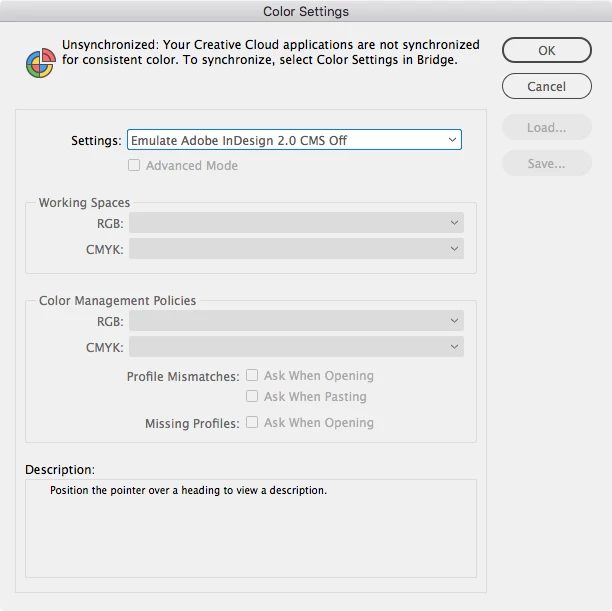
If you have Edit>Color Settings set to Emulate Adobe InDesign 2.0 CMS Off, there will not be an option to choose a grayscale destination when you export.


4 replies

Dave Creamer of IDEAS
Community Expert
Community Expert
December 28, 2020

A reminder that you can convert after-the-fact in Acrobat Pro.

David Creamer: Community Expert (ACI and ACE 1995-2023)
rob day
Community Expert
Community Expert
December 28, 2020

 I failed doing this job through the normal PDF export, 


For a grayscale Export you have to set the Output tab to Convert to Destination—not Convert to Destination (Preserve Numbers)—when you scroll through the Destination profile list there will be Grayscale profiles to choose from. Also make sure you don’t have Color Management set to Off in the Color Settings dialog:


Participating Frequently
December 31, 2020

Thank you very much!

What do you mean by the following?

Also make sure you don’t have Color Management set to Off in the Color Settings dialog
rob day
Community Expert
rob dayCommunity ExpertCorrect answer
Community Expert
December 31, 2020

If you have Edit>Color Settings set to Emulate Adobe InDesign 2.0 CMS Off, there will not be an option to choose a grayscale destination when you export.


BobLevine
Community Expert
Community Expert
December 28, 2020

What do you mean the PS to PDF was done by Mac OS? You should absolutely be able to get grayscale out of InDesign and you can doublecheck it in Acrobat.


What version of InDesign are you using?

Derek Cross
Community Expert
Community Expert
December 28, 2020

Why aren't you using conventional (reliable and proven) methods of producing PDFs for print?

Participating Frequently
December 28, 2020

I was not able to produce a grayscale PDF by the traditional export procedure. Then the typographer suggested me this alternative way. I feel stupid, but I am not able to obtain a PDF converted into grayscale color space... Any suggestions? (I am not a professional user)

Steve Werner
Community Expert
Community Expert
December 28, 2020

Here are instructions for exporting a grayscale PDF. They were written for InDesign CS6 but also work on InDesign CC:


https://creativepro.com/finding-export-pdf-to-grayscale-in-indesign-cs6/