



adding ppd to printers
Participating Frequently
Feb 8, 2021 6:07 PM UTC
Answered

PPD for InDesign 2021

I have been trying unsuccessfully to get the PPD to work with InDesign 2021. Not sure what I'm doing wrong or if it's not supported at all. My IT guy suggest I reach out to the community to see if anyone has any answers. I am running Mac OS 10.15.7 (Catalina). Thank you in advance!

rob day
rob dayCorrect answer
Community Expert
Feb 8, 2021 7:37 PM UTC

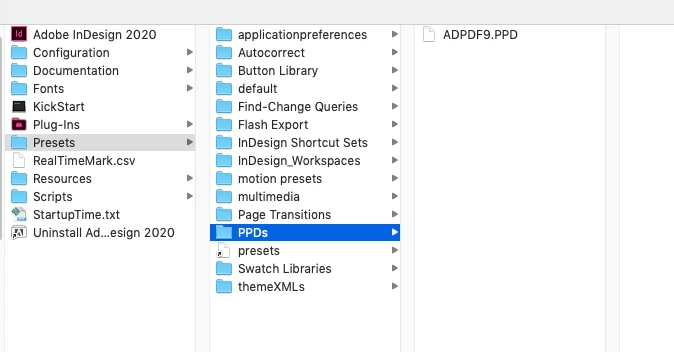
You’ll need to install it in the InDesign application folder. Quit ID and in the Presets folder make a folder named PPDs (name is case sensitive). Move the ADPDF9.PPD folder inside of the PPDs folder:


30 replies

Mike Witherell
Community Expert
Community Expert
Apr 28, 2025 1:29 PM UTC

That elusive PPD file is available here, near the bottom of the page:

ADPDF9.ppd

Translate
Mike Witherell
Participant
Jun 29, 2026 7:46 PM UTC

Way down the page

Translate
deenas69190555
Participant
May 1, 2024 2:15 PM UTC

I don't see it noted in this topic so I'll add; if you do not have a PPD folder in your Presets folder you need to create it. Call it "PPDs" typed exactly or it won't work 😉

You're welcome

Translate
Dave Creamer of IDEAS
Community Expert
Community Expert
Jun 13, 2025 4:19 PM UTC

Actually, making the folder was mentioned in 2021 in the correct answer.


Translate
David Creamer: Community Expert (ACI and ACE 1995-2023)
Scott.Olling
Known Participant
Feb 1, 2023 10:21 PM UTC

I have come back to this type of answer to this question every few months now because I keep losing my PPD folder with the InDesign updates. I guess I have to mention this over in ADD THIS FEATURE ADOBE FOR THE LOVE OF ALL THAT'S PAGEWORTHY to get it fixed.

Translate
rob day
Community Expert
Community Expert
Feb 2, 2023 3:08 PM UTC

There’s zero chance that the Adobe PDF 9 PPD is going to be included in an upgrade install. Also, there could be any number of third party plugins, fonts, scripts, PPDs, swatches, that would be lost on an upgrade when you choose to remove the older version. I always archive the current application folder before upgrading, so I have a backup of the files I’ve added.

Translate
rob day
Community Expert
Community Expert
Feb 8, 2021 6:48 PM UTC

For what printer? Is the printer a Postscript printer? 

Translate
adding ppd to printers
Participating Frequently
Feb 8, 2021 7:14 PM UTC

I am trying to make a color separated file. I don't know the technological terms, but in InDesign I go to file > print > and the printer dialog box I choose printer > Postscript file and then the pull down for the PPD which was ADPDF9.PPD. I have the PPD installed in Library > Printers > PPDs folder.

Thank you!

Translate
rob day
Community Expert
rob dayCommunity ExpertCorrect answer
Community Expert
Feb 8, 2021 7:37 PM UTC

You’ll need to install it in the InDesign application folder. Quit ID and in the Presets folder make a folder named PPDs (name is case sensitive). Move the ADPDF9.PPD folder inside of the PPDs folder:


Translate