clarty
Participant
June 12, 2026
Question

Preflight error: color spaces not allowed

  • June 12, 2026
  • 2 replies
  • 11 views

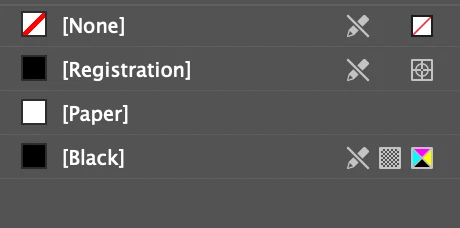
Hi, I’m working with a lot of tables in a document. These tables contain some graphics that are grayscale. The issues is not with the images, but the preflight keeps telling me multiple tables have the “Content uses RGB” error. I have double checked the graphics, even deleted them, but the error persists on the table. None of the swatches are color, they’re all black in different tints. Pictures of the preflight error, the preflight profile, and the swatches attached. 


2 replies

rob day
Community Expert
Community Expert
June 12, 2026

Hi ​@clarty , What is the entire Preflight panel showing (Window > Output >Preflight)? There could be an unnamed RGB color, not defined as a Swatch,  used somewhere in the table. The Preflight panel should list the object throwing the error and its page number. Even an invisible (a space, em space, en space, etc.) would get listed as errors.


clarty
clartyAuthor
Participant
June 13, 2026

It just says “Table” and it selects the entire table. These are my preflight, color, and swatches panels.


Community Expert
June 13, 2026

It’s probably the white fill in the cell. It looks like it’s set to RGB white - select your entire table, and set the fill to paper or none. 

None is better, in my opinion. 

It’s one of those that could trip up a printing task with a sorta false alarm.

You could try the Swatches panel and the top right click the 3 lines and then use the Add Unnamed Swatches, if RGB white is added, then delete it and replace it with either paper or none - none is my preference most of the time.

Also check the strokes of the Table, sometimes they are RGB black if brought in from Word. Again replace RGB black with pure black.

Mike Witherell
Community Expert
Community Expert
June 12, 2026

If you ultimately export to a PDF, does this even matter? The Preflight > Color > Colorspaces and Modes not allowed could have the disclosure triangle spun open to see what is going on in there.

BTW, the preflight historically favors a printing press CMYK outcome which doesn’t always make sense in a PDF Export reality.

Mike Witherell
clarty
clartyAuthor
Participant
June 12, 2026

This is what appears when i export PDF. I’m guessing it’s just an error that I must ignore, and there’s nothing to be done and ultimately doesn’t matter?

I can’t find the The Preflight > Color > Colorspaces and Modes not allowed where I can look for the disclosure triangle.

Thank you!

m1b
Community Expert
Community Expert
June 12, 2026

The disclosure triangle is in your screenshot: