

Janus Bahs Jacquet
Inspiring
March 6, 2023
Answered

Preflight profile: Allow only spot colours AND [Paper]

  • March 6, 2023
  • 2 replies
  • 2209 views

I have a few different preflight profiles that I use whenever I make documents for print. The one I use the most is for CMYK printing, and in this profile, under “Color Spaces and Modes Not Allowed”, I check Spot Color to make sure no Pantone or spot colours slip through and cause trouble further down the line. This works well.


Occasionally, I need to do the opposite: when I make documents that are to be printed with Pantone ink (and only Pantone ink – no CMYK inks will be loaded in the printer), I use a profile that has every option except Spot Color checked.


That also works fairly well, except that text in such documents will often be white (on a spot-coloured background), which in printing terms simply means no ink at all. Using the [Paper] swatch is the semantically correct way to achieve this, but since this special cannot be set up as a spot colour (it can only be a process colour defined in HSB, Lab, CMYK or RGB, nothing else), my preflight profile always complains about white text.


I would argue that this is incorrect behaviour since the [Paper] swatch is specifically for elements that are explicitly not going to translate to any printer ink. But InDesign does what it does, so arguing won’t get me far.


Is there some way to make sure that a preflight profile accepts only spot colours in a document, but always discounts the [Paper] swatch from its calculations?
This topic has been closed for replies.
Correct answer rob day

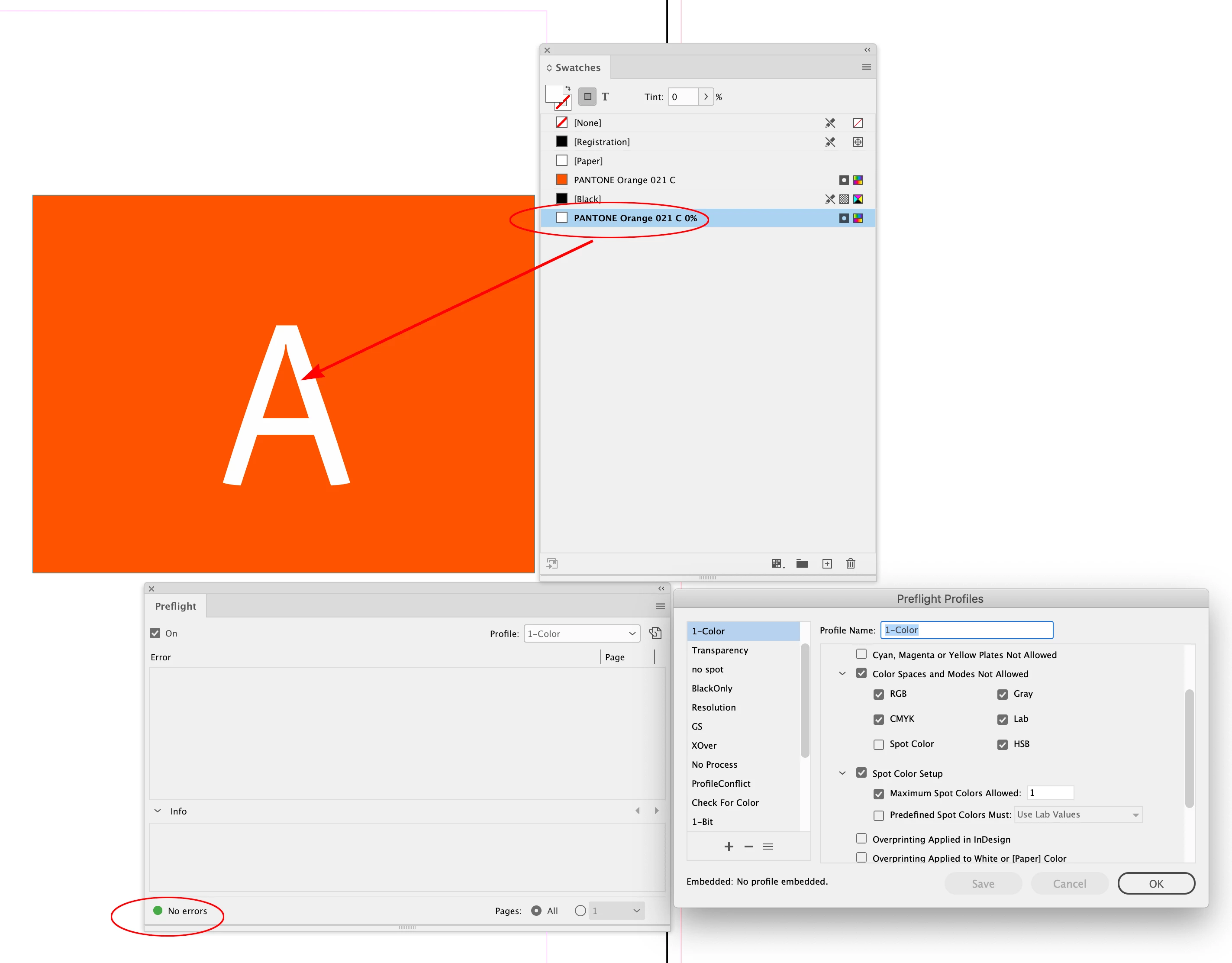
Hi @Janus Bahs Jacquet , I don’t think there is a perfect solution, but one option would be to define a 0% Tint Swatch of the Spot color when you are setting up the document, and always use that swatch for white:


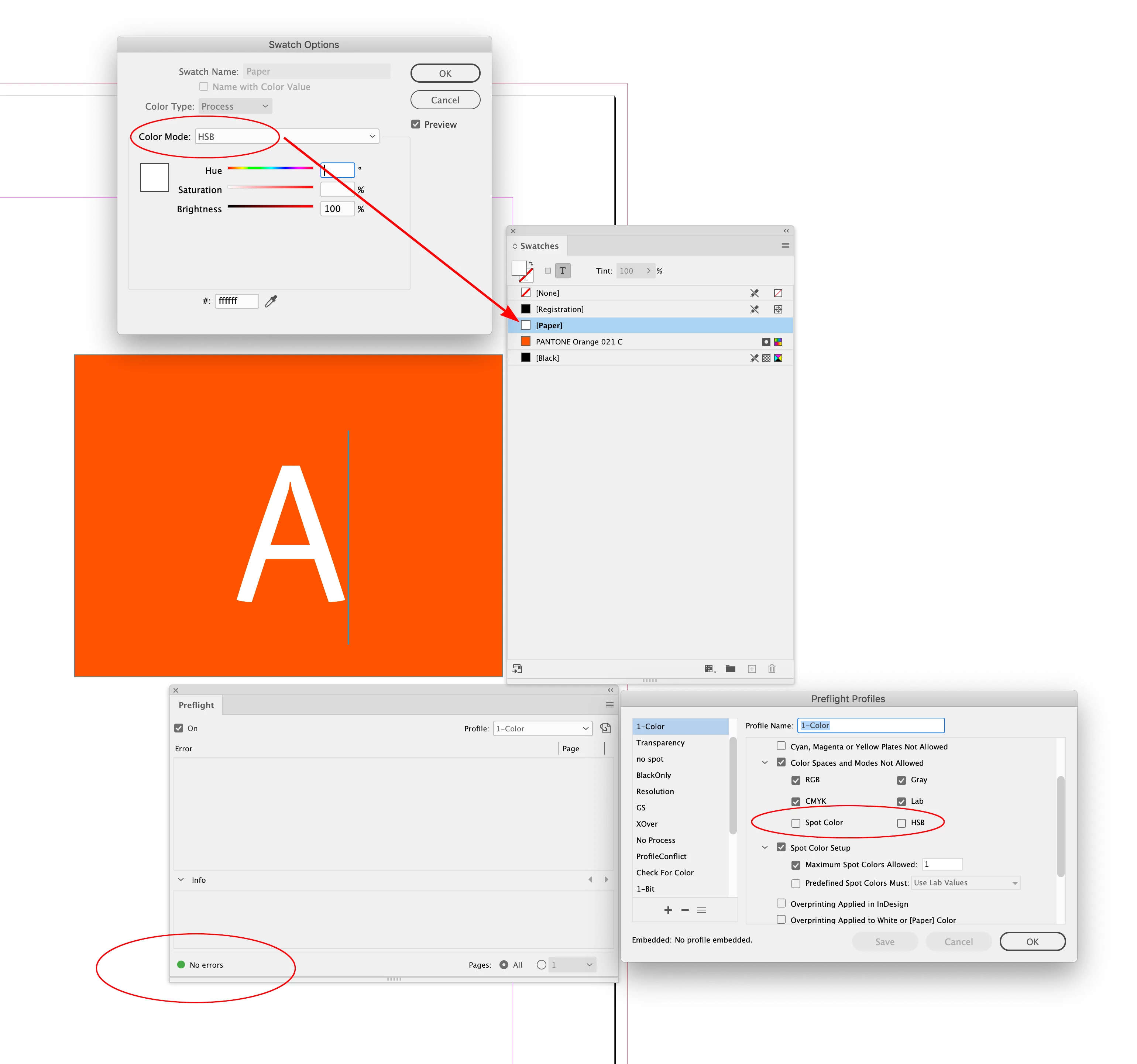
Or, if you are like me you never make HSB swatches (which are really RGB colors with a different icon attached), in that case you could define the [Paper] swatch as HSB and allow Spot and HSB color spaces:


2 replies

Legend
March 7, 2023

My few cents worth. This is more than a preflight issue. It you add text in white then it must put something specific in the output (typically, in a PostScript file for printing, or a PDF). Let's suppose it's a PDF and the wgite colour is CMYK based. Then, when the PDF is printed or processed, the colours may be analysed. They will find you used CMYK. This may have technical or cost implications (you might be charged for the unused process plates). I'd never thought of this before, but it is a nasty trap waiting, because neither PDF nor PostScript actually has a "no colour" option for generating "no ink", ie punching out white holes/text in a background. A clipping path could be used for shapes, but that would be catastrophic for text...

rob day
Community Expert
Community Expert
March 7, 2023

Hi @Test Screen Name , In the case of a spot color only document, I’m not sure there is a problem. A 0% Tint swatch of the spot color would inspect as the spot color, not CMYK in AcrobatPro. Here I’ve exported to PDF/X-1a, which forces all color to either CMYK or Spot and the white character inspects as 0% of the Separation plate:


PDF/X-4 with no color conversion outputs the same:


rob day
Community Expert
rob dayCommunity ExpertCorrect answer
Community Expert
March 6, 2023

Hi @Janus Bahs Jacquet , I don’t think there is a perfect solution, but one option would be to define a 0% Tint Swatch of the Spot color when you are setting up the document, and always use that swatch for white:


Or, if you are like me you never make HSB swatches (which are really RGB colors with a different icon attached), in that case you could define the [Paper] swatch as HSB and allow Spot and HSB color spaces:


Janus Bahs Jacquet
Inspiring
March 6, 2023

Using a 0% tint could work, but I suspect it might lead to other issues. For example, if it’s a document with three Pantone colours and the fake [Paper] swatch is a 0% tint of a fourth, would it cause the file to have four separation layers that the printer would then have to manually fix if the machine is only loaded with three? I believe an advantage of the [Paper] swatch here is that it doesn’t result in an extra separation layer, or at least is automatically converted to no-ink zones when the printer rips the file.


The latter option is the best I have been able to come up with as a workaround too (except using Lab instead of HSB – I never use either in InDesign), but I haven’t actually sent anything off to the printer with this workaround yet, so I don’t know if it might cause some other type of unforeseen issue further down the line.

rob day
Community Expert
Community Expert
March 6, 2023

The latter option is the best I have been able to come up with as a workaround too (except using Lab instead of HSB – I never use either in InDesign)


Since CS6 the Pantone Solid Ink Spot libraries have been defined as Lab, so you would have to watchout for that. Other Spot libraries like Toyo and ANPA also. Usually you want spots to be defined as Lab so the document’s CMYK and RGB profiles don’t affect the preview.


The latter option is the best I have been able to come up with as a workaround too (except using Lab instead of HSB – I never use either in InDesign)


You should be able to catch that by adding a Max Spot Colors Allowed rule