rudytj
Known Participant
May 15, 2024
Answered

preflight snippet help

  • May 15, 2024
  • 3 replies
  • 183 views
i need a bit of help with this snippet...
i wrote this as part of a preflight script to check for RGB and spot colors
on some (NOT ALL) files that had offending colors, it still flags as having an incorrect swatch even after i have corrected the issue... but gives no name in the alert. could someone look it over to see where i am missing something?
var myDoc = app.activeDocument;
var rgbSwatchExists = false;
var spotColorsPresent = false;
var offendingColors = []; // Array to store names of offending colors
var allSwatches = myDoc.colors.everyItem().getElements();
for (var i = 0; i < allSwatches.length; i++) {
if (allSwatches[i].space === ColorSpace.RGB) {
rgbSwatchExists = true;
offendingColors.push(allSwatches[i].name); // Store name of RGB color
}
}
for (var j = 0; j < myDoc.colors.length; j++) {
var color = myDoc.colors[j];
if (color.model == ColorModel.SPOT) {
spotColorsPresent = true;
offendingColors.push(color.name); // Store name of spot color
}
}
if (rgbSwatchExists || spotColorsPresent) {
var message = "RGB or spot colors swatches are present:\n";
for (var k = 0; k < offendingColors.length; k++) {
message += "+ " + offendingColors[k] + "\n";
}
var userResponse = confirm(message + "\nDo you want to continue?");
if (!userResponse) {
exit();
}
}

This topic has been closed for replies.
Correct answer rob day

but gives no name in the alert


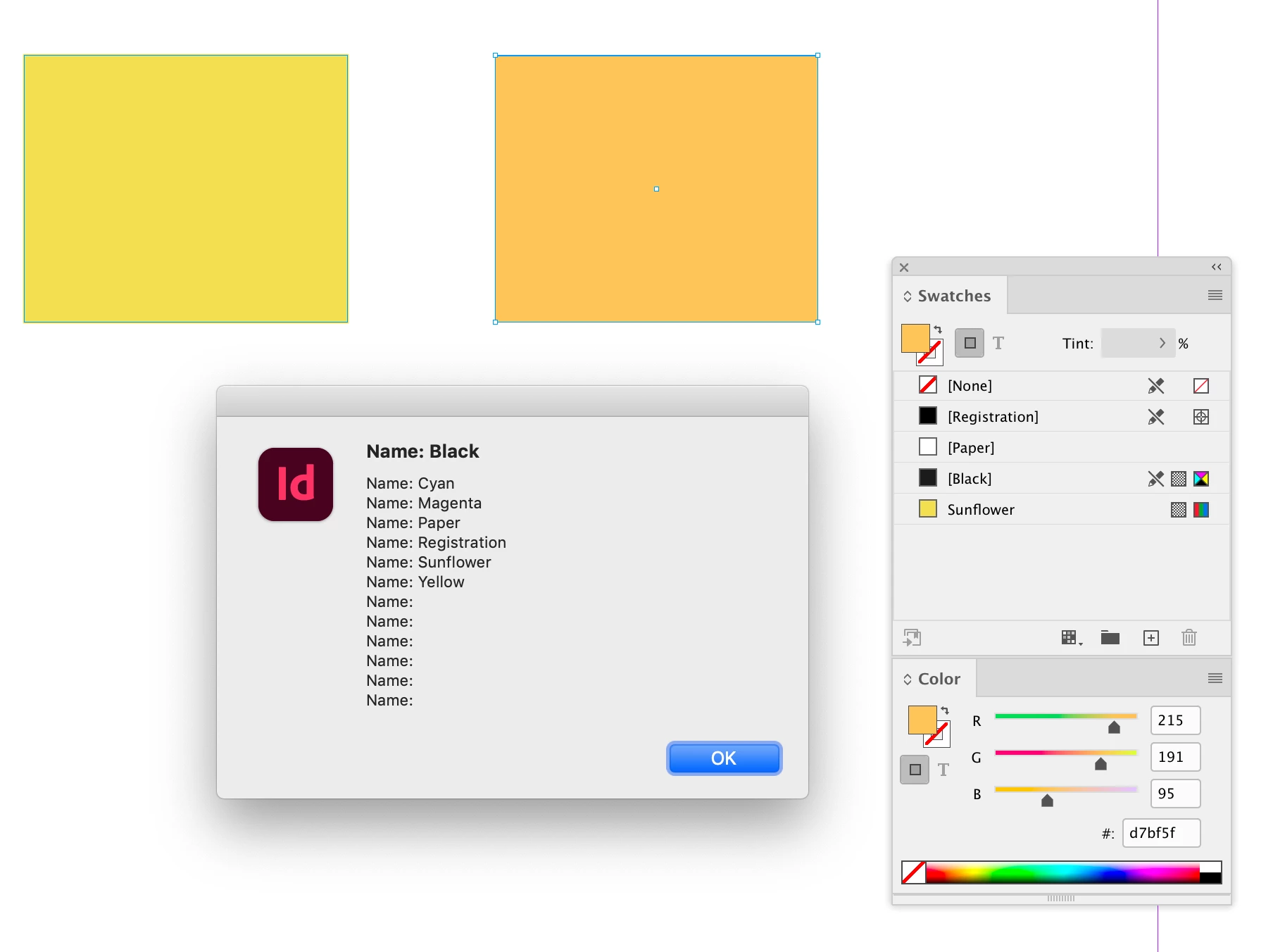
Hi @rudytj, You are getting a collection of colors, which would return unnamed colors— swatches always have a name, but there still could be unnamed RGB colors used. You can see this gets unnamed colors:


var myDoc = app.activeDocument
var allSwatches = myDoc.colors.everyItem().getElements();
var s = ""
for (var i = 0; i < allSwatches.length; i++){
    s += "Name: " + allSwatches[i].name + "\n"
};  

alert(s)


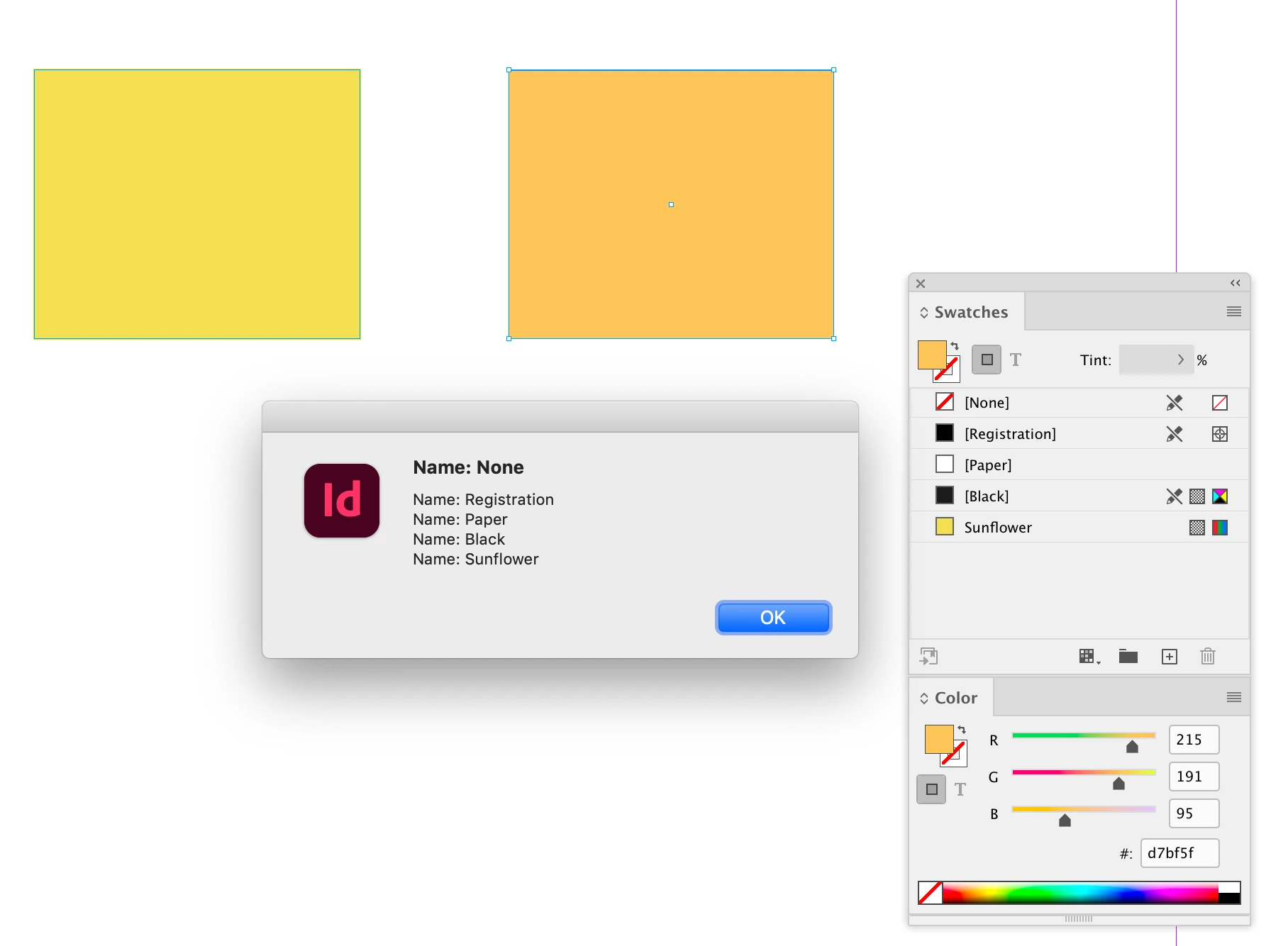
While this returns only named swatches:


var myDoc = app.activeDocument
var allSwatches = myDoc.swatches.everyItem().getElements();
var s = ""
for (var i = 0; i < allSwatches.length; i++){
    s += "Name: " + allSwatches[i].name + "\n"
};  

alert(s)


3 replies

rob day
Community Expert
Community Expert
May 16, 2024

Also, getting the RGB and Spot swatches doesn’t mean they are used in the document.


You can script InDesign’s built-in preflight, for example this would get the pages where RGB or Spot Colors are used:


var doc = app.activeDocument;

//add a preflight profile 
try {
    var tp = app.preflightProfiles.add({name:"Check RGB"});
}catch(e) {
    var tp = app.preflightProfiles.itemByName("Check RGB")
}

//add a rule
try {
    var rr = tp.preflightProfileRules.add("ADBE_Colorspace");
}catch(e) {
    var rr = tp.preflightProfileRules.itemByName("ADBE_Colorspace")
}  

rr.flag = PreflightRuleFlag.returnAsError; 
rr.ruleDataObjects.itemByName("no_rgb").properties = {dataType:RuleDataType.BOOLEAN_DATA_TYPE, dataValue:true};
rr.ruleDataObjects.itemByName("no_spot").properties = {dataType:RuleDataType.BOOLEAN_DATA_TYPE, dataValue:true};

//turn on and get preflight results
var pf = app.preflightProcesses.add(doc, tp);
pf.waitForProcess();
var pr = pf.processResults;

var message = "There are RGB or Spot Colors on the following pages:\n"
if (pr != "None"){
    var er = pf.aggregatedResults[2];
    for (var i = 2; i < er.length; i++){
        message += er[i][2] + "\n"
    };   
}

//remove the profile
tp.remove();
doc.preflightOptions.preflightOff = true


var userResponse = confirm("Do you want to continue?\n" + message);
if (!userResponse) {
    exit();
}


Robert at ID-Tasker
Legend
May 15, 2024
rob day
Community Expert
rob dayCommunity ExpertCorrect answer
Community Expert
May 15, 2024

but gives no name in the alert


Hi @rudytj, You are getting a collection of colors, which would return unnamed colors— swatches always have a name, but there still could be unnamed RGB colors used. You can see this gets unnamed colors:


var myDoc = app.activeDocument
var allSwatches = myDoc.colors.everyItem().getElements();
var s = ""
for (var i = 0; i < allSwatches.length; i++){
    s += "Name: " + allSwatches[i].name + "\n"
};  

alert(s)


While this returns only named swatches:


var myDoc = app.activeDocument
var allSwatches = myDoc.swatches.everyItem().getElements();
var s = ""
for (var i = 0; i < allSwatches.length; i++){
    s += "Name: " + allSwatches[i].name + "\n"
};  

alert(s)