but as they come from different sources I am afraid that they don't have a single common profile. |
Working with CMYK images that have been converted to different destination profiles is never ideal, and I'm guessing you are about to get conflicting advice here.
CMYK-to-CMYK conversions can be problematic because CMYK spaces have different color gamuts—for example if the image started as sRGB, was converted to an uncoated CMYK space, then converted to ISOcoated_V2_eci by you, the color would still be inside the uncoated CMYK space's limited color gamut because conversions preserve color appearance—some of the original sRGB color that might have been printable on a coated sheet was lost on the first conversion.
From InDesign you can choose to either force the CMYK-to-CMYK conversion at export or assign your ISOcoated_V2_eci profile and leave the image CMYK values unchanged—you don't have to handle that choice in Photoshop. Your document's Color Management Policy determines how the images will be handled (the policy is saved with the document when it is created).
So this setting would assign your ISOcoated_V2_eci profile to all placed CMYK images and their color appearance might change in the layout:
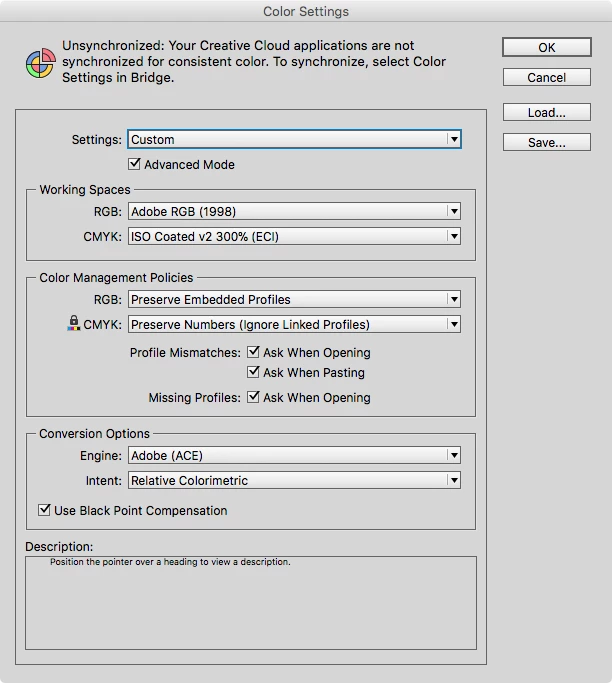
If the CMYK Policy was set to Preserve Embedded Profiles, images with embedded profiles that conflict with ISOcoated_V2_eci can get converted on export by choosing Document CMYK as the Destination in the Export>Output tab.
You can also change the policy on a case by case basis by selecting an image and choosing Object>Image Color Settings.

 AdChoices