
Participant
October 4, 2017
Answered

Preparing file for print

  • October 4, 2017
  • 2 replies
  • 1428 views

In short I need to prepare a file for print.

I'm using Indesign on a Mac & I need to apply the following settings on exporting the file as a PDF;

  1. The PDF is PDF/X-1a: 2001 compliant I have done this
  2. The ink density is below 300%
  3. The Output Intent of the PDF is ISO_Coated_V2_300%_eci - I have downloaded the .icc file but do not know how to install/apply it to the program.

InDesign knowledge is fairly basic so any pointers of where to click or screen shots would be greatly appreciated.

Thanks in advance.
This topic has been closed for replies.
Correct answer Andy_Baz

You need to install the color profile to you Mac's hard drive in the colorsync profiles folder. The path is something like:

MacintoshHD/users/<<username>>/library/colorsync/profiles/

Once installed you may need to restart inDesign.

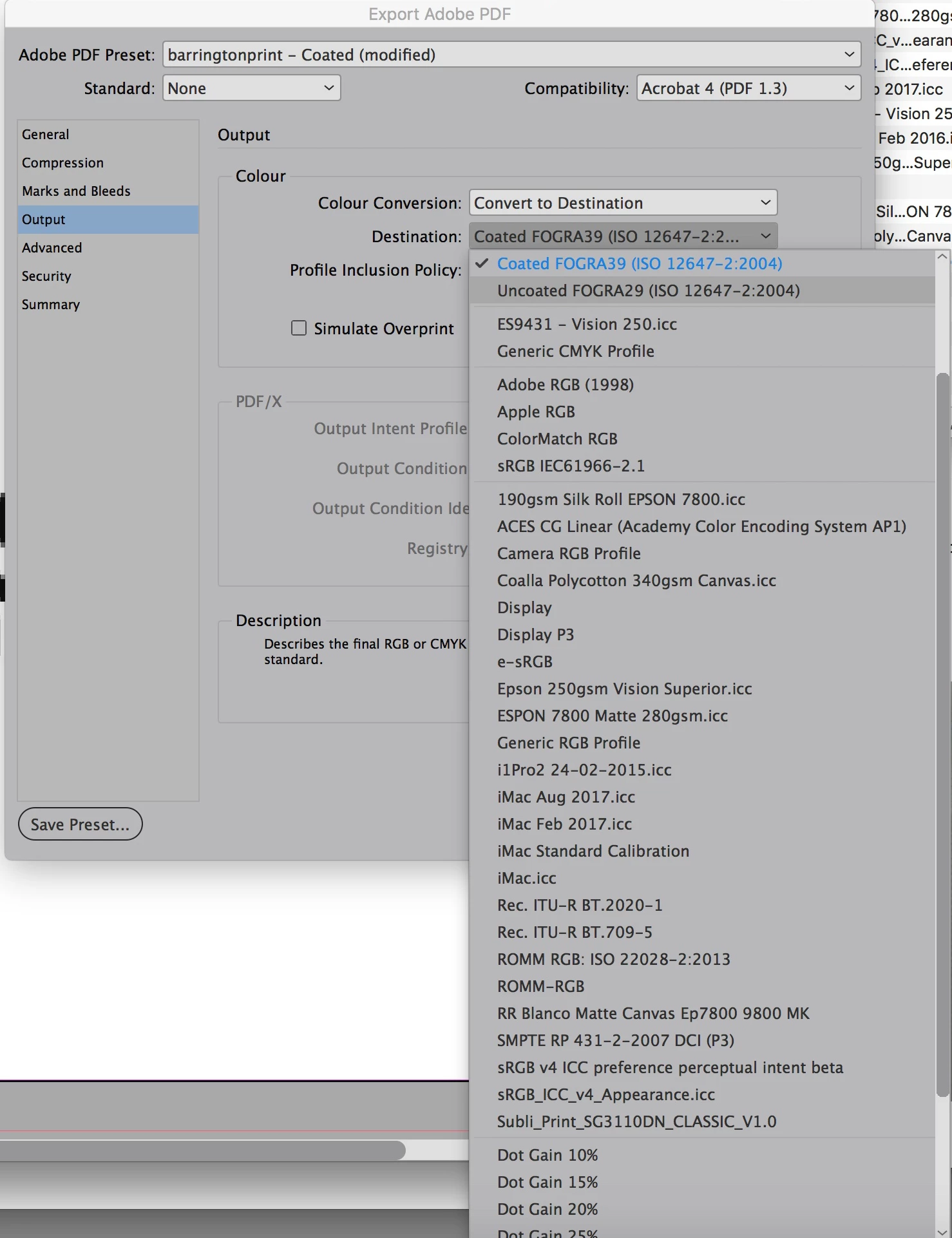
Once loaded back up export pdf and in the settings window enter your usual settings but on the Output Tab and select convert to destination and underneath that select the correct profile. (see below)

Im not 100% sure but this profile should then convert anything over 300% density to below and be suitable for use as intended.

2 replies

Andy_BazCorrect answer
Inspiring
October 4, 2017

You need to install the color profile to you Mac's hard drive in the colorsync profiles folder. The path is something like:

MacintoshHD/users/<<username>>/library/colorsync/profiles/

Once installed you may need to restart inDesign.

Once loaded back up export pdf and in the settings window enter your usual settings but on the Output Tab and select convert to destination and underneath that select the correct profile. (see below)

Im not 100% sure but this profile should then convert anything over 300% density to below and be suitable for use as intended.

fgibbAuthor
Participant
October 4, 2017

Excellent, thank you!

rob day
Community Expert
Community Expert
October 4, 2017
  1. The Output Intent of the PDF is ISO_Coated_V2_300%_eci - I have downloaded the .icc file but do not know how to install/apply it to the program.

You also should assign the profile to the document--ideally before you start the page layout because the profile affects color appearance. If you assign the new profile via Edit > Assign Profiles then the default PDF/X-1a preset will include the required output intent without converting any of your document's CMYK swatches.

Andy's export setting would not include an output intent because the Standard is set to None.

fgibbAuthor
Participant
October 4, 2017

UPDATE: I have successfully installed the .icc file.