
Primary text frames in master pages are not linked continously
Hello,
I have a really frustrating problem and found no help by using google search.
I hope sombedoy can explain me what I am doing wrong and how to fix it.
Goal
A) Goal is to create a catlog (250 pages +) which is able to expans when getting new products in the future.
B) There should be one title page. (Page 1)
C) Each product is explained by 4-8 product images. One image per page. (Page 2-9)
D) On page 2 should appear a short text description (Query: xls table)
Done Steps
- I created an A4 document (following called "target") with 3 master pages -> B) C) D)
- Master D) got a primary textframe for floating text.
- (Test: Placed the xls query. worked fine. xls content flows over several pages with the master page B) )
- Than I placed and ordered new Images (50 pages) in an external indd file.
- After ordering and placing process I moved the pages into my target file.
- By drag and drop I assigned master pages to the moved/imported pages.
- And here is my problem:
Issue
I expected that the content flows as tested throug the masterpages with the primary text frame.
But what happns is thet after 6 successfully flowing pages blanc pages were generated which show the table content.
Checking threading shows that the master pages with primary text frames after page 6 are not conntected.
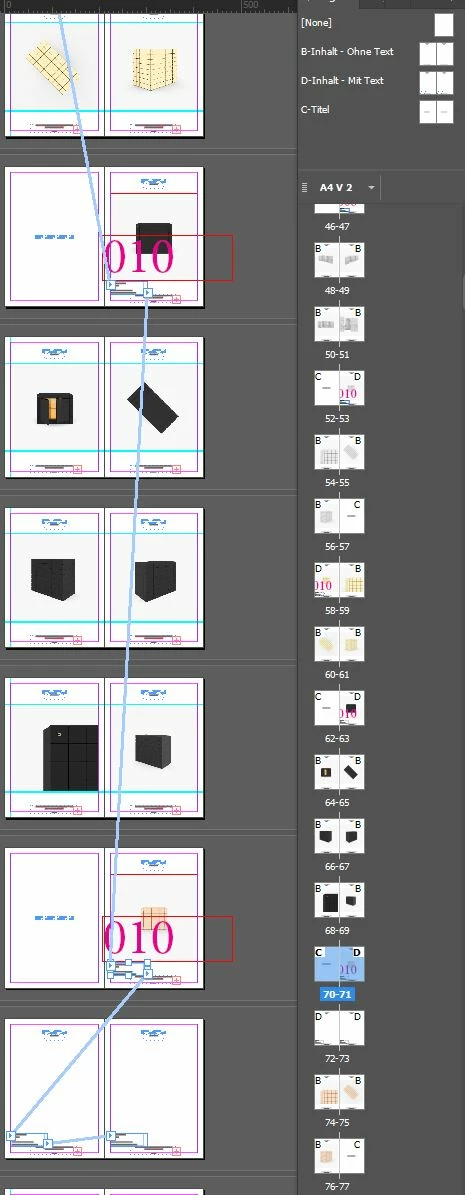
In google search I found similar sounding issus and I tryied
- to merge alterneate layouts
- duplicated all pages and deleted old
- unchecked/ checket text-autoflow options
I really looking forward to hear ideas how to convince indesign to float text in the following textframes of marked masterpage pages.
Win7, Indesign 15.01
 AdChoices