
Known Participant
November 11, 2019
Answered

Primary textFrame creates duplicate textframe in document

  • November 11, 2019
  • 3 replies
  • 1660 views

Hello...


I use a document with primary textframes option enabled. I happen to insert a new page or delete page during typesetting. When I perform these actions, I notice Indesign creates additional textframes beneath the every primary textFrames. And this occurs only on Verso page (left facing page). I can understand those new frames are from master pages, but I dont want them to be created in the document. Also when I reapply master pages to those body pages, I can get rideoff from these textframes.


I would like to know, is this bug in Indesign or my method is wrong.


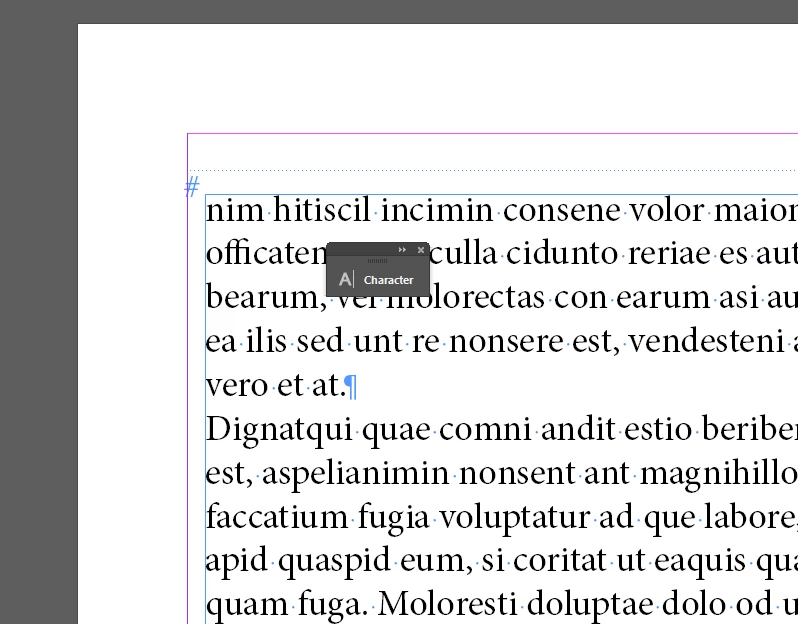
Please find the screengrab


This topic has been closed for replies.
Correct answer Frans v.d. Geest

I've downloaded your We Transfer example. There is indeed a Primary Text frame on the Master Page, That's good. As I remove the Text from the frames, I can place new text in it. No problem.

So I guess I was wrong at first, and here is what someone else as well described and what you should take care off:

1. If you want to delete old text, as said here, do NOT delete the frames on the pages! Just insert the Text cursor in the Text, select all text (Mac: cmnd A, PC Ctrl-A) and now delete the text in the frames, keeping the frames! Then just place the new text in the frames;

2. When keeping the frames, just insert your cursor in the frame and place the text. If you did NOT place your cursor in a text frame first then DO NOT HOLD ANY MODIFIER KEY like SHIFT etc. but simply click on the Primary Text frame to place text in that existing frame.


3 replies

Frans v.d. Geest
Community Expert
Community Expert
November 12, 2019

This is in Dutch, but can be helpful to understand the difference:

https://vimeo.com/showcase/3403405/video/128396542
Password to watch: IDBasis

Known Participant
November 12, 2019

Thank you, I will look at it.

Frans v.d. Geest
Community Expert
Frans v.d. GeestCommunity ExpertCorrect answer
Community Expert
November 12, 2019

I've downloaded your We Transfer example. There is indeed a Primary Text frame on the Master Page, That's good. As I remove the Text from the frames, I can place new text in it. No problem.

So I guess I was wrong at first, and here is what someone else as well described and what you should take care off:

1. If you want to delete old text, as said here, do NOT delete the frames on the pages! Just insert the Text cursor in the Text, select all text (Mac: cmnd A, PC Ctrl-A) and now delete the text in the frames, keeping the frames! Then just place the new text in the frames;

2. When keeping the frames, just insert your cursor in the frame and place the text. If you did NOT place your cursor in a text frame first then DO NOT HOLD ANY MODIFIER KEY like SHIFT etc. but simply click on the Primary Text frame to place text in that existing frame.


Randy Hagan
Community Expert
Community Expert
November 11, 2019

Respectfully, I would suggest considering your foremost SOP. If your policy is causing you considerable difficulty, and consistently, dramatically and negatively affecting your workflow, there's no shame in honestly re-evaluating your SOP.


But if you're determined not to lower the water here, the other option is to raise the bridge. Rather than inserting/deleting content by the page, I'd suggest doing revisions by the content within your existing pages. Because if you add a new page with a primary text frame, you're always going to get a primary text frame. That's the underlying concept — literally — at the base of your pagination issue. And it's always going to put your existing content in a separate text frame over the top, as you're experiencing. And you will continue to experience this if you continue with this practice.


So if you're deleting content from your document, don't delete the page; delete the content. Then delete your unnedded page(s) from the end of the document. If you're adding content to the document, add the content within the existing primary text frame(s), then click on the overset box on the last existing page, create an additional page at the end of the document and Shift-click onto the leading text box of your new page's master text frame to fill that frame and, as needed, create additional page(s) and thread the content into subsequent master text frame(s).


And please be sure to carefully proof your documents. Because as you are manually choosing insertion/deletion points for your content within the existing primary text frames for every revision, you will be risking insertion/deletion of content at the wrong point(s) of your document. And additional revisions to right those wrongs.


Frankly, the more you explain your workflow, the more important I think it is for you to consider manual control of your pagination/layout process of InDesign. But that's your/your organization's call; and if you're determined to maintain your documentation with primary text frames, this is the best way I can think of making that work for you.

Frans v.d. Geest
Community Expert
Community Expert
November 11, 2019

>"then click on the overset box on the last existing page, create an additional page at the end of the document and Shift-click onto the leading text box of your new page's master text frame to fill that frame and, as needed, create additional page(s) and thread the content into subsequent master text frame(s)."


No, no and no! If there is a Primary Text frame (but in your case there is not, see above) then holding shift would produce an extra second frame on top...!

If you have a Primary Text frame (with the PTF icon) and insert pages, just click on the overset red + sign and then click with the loaded cursor on the Primary Text frame on the new page, but do NOT hold shift! The Shift place method is for when you NOT use Primary Text frames...

Randy Hagan
Community Expert
Community Expert
November 11, 2019

Thank you. My mistake. I stand corrected.

Randy Hagan
Community Expert
Community Expert
November 11, 2019

For what it's worth, this is a common issue with long documentation with InDesign.


Fortunately, it's also an easy one to fix.


This is literally an either/or situation. Either use the Primary Text Frame option to place a single, primary text frame between the margins of every page of your InDesign document, or do not use primary text frames and lay out your long documents from the document pages, placing the copy on the first page, clicking in the overset box for that frame, then Shift-clicking to place the text on the second page and autoflowing to create subsequent pages to the end of the threaded frames. My personal preference is to take control and use InDesign's autoflow functions to lay out my long documents, but either of these options are acceptable solutions.


Do not create text frames on master pages to thread text into documents. Especially if you've already created primary text frames for your document. As you've discovered, that creates the text frame layering issues you're experiencing, and is fraught with peril.


Hope this helps,


Randy

Known Participant
November 11, 2019

Randy, Thank you for the response. 


I would like to make it clear, our foremost SOP is to built the document with PrimaryTextframe, and moreover the document we work mostly revises stage(inserting page or deleting the page), which already been created with primary textframe. I'm looking for any option to control this issue in this stage.


I also attached an dummy document for the reference. See page no. 12, from this page you can see duplicate frames, since I inserted new page on page 11.


https://wetransfer.com/downloads/408fa0df137e652c07db3c348ed8b63820191111160634/5a9f438ed98652da27591c68d558674d20191111160634/ab0e80


Thank you

Nesan J


Frans v.d. Geest
Community Expert
Community Expert
November 11, 2019

If it really was a Primary Text Frame you should see the special icon on the left upper corner of the text frame. In your screenshot it is not visible: that is a normal text frame placed on the master page... and that is not the same thing as a primary text frame!