
Known Participant
March 5, 2025
Answered

Print Booklet to PDF messing up the fonts

  • March 5, 2025
  • 6 replies
  • 5596 views

I have customer supplied pdfs that I have been setting up in printer spreads for my production department. I place the pdf pages in InDesign and then when I do print booklet, the exported pdf has messed up fonts. See screenshots below showing the supplied pdf vs the printer spreads pdf. It's like it's bolding some of the font and it shouldn't be. It is incosistent as well within words. Any idea why this is happening and how to fix it?? 


Please help!!!
Correct answer Brad @ Roaring Mouse

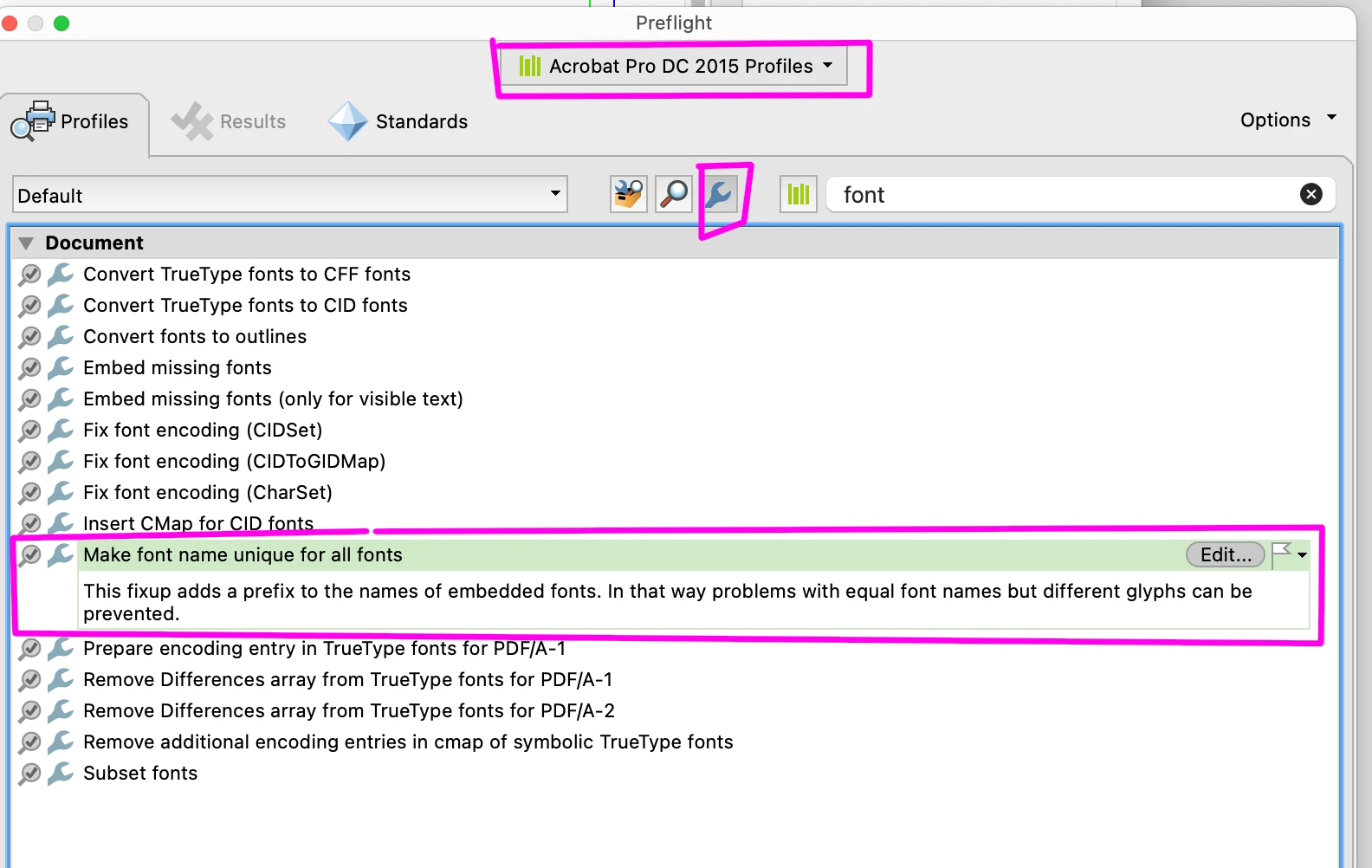
@tiffanykustwan11 : I have a potential fix for you.

Run this fixup in Acrobat's Preflight on the supplied PDF, then try Print Booklet with that. It worked for me here.

6 replies

Brad @ Roaring Mouse
Community Expert
Brad @ Roaring MouseCommunity ExpertCorrect answer
Community Expert
March 8, 2025

@tiffanykustwan11 : I have a potential fix for you.

Run this fixup in Acrobat's Preflight on the supplied PDF, then try Print Booklet with that. It worked for me here.

reproo2773183
Inspiring
March 11, 2025

Brad,

have to say this is inspired.


There is a discussion here

https://community.adobe.com/t5/indesign-discussions/variable-fonts/m-p/10956586#M177364

from a good few years back.


Since Variable fonts are not part of PDF 2.0, which still isn't really out in the wild, it looks like PDF creators have to convert the fonts as they make a pdf into something akin to Multiple Master, I'd imagine this "something" really doesn't play nicely with postscript.


I've seen client results similar to this but never been able to reproduce through my PDF Workflow.

Brad @ Roaring Mouse
Community Expert
Community Expert
March 6, 2025

If you are placing PDFs from different sources, my guess is there are conflicts happening with the embedded subset, but it's hard to nail that down without seeing the files. Are there two PDFs on a particular spread that's messing up that you can share? (wither DM or otherwise).


If you place this one PDF on a new page of its own in  a new document, does it print/export properly?

Community Expert
March 7, 2025

Conflicting subsets can be resolved by exporting/printing with 0% subset.

Dave Creamer of IDEAS
Community Expert
Community Expert
March 7, 2025

I would really like to hear from the OP about using export as a test. Creating a PDF with the booklet features requires going through PostScript, whereas export does not. It could be a font or subset "refrying" issue. 


David Creamer: Community Expert (ACI and ACE 1995-2023)
Community Expert
March 5, 2025

Here is something to try when exporting the printer spread PDF:

Export > Advanced > Subset fonts when percent of characters used is less than > change value to 0%

Known Participant
March 6, 2025

what program are you referencing for these steps??

Peter Spier
Community Expert
Community Expert
March 6, 2025

InDesign. That change to the export settings will embed the entire font, but I personally don't think that's where the problem is. Are you able to select that bolder type in Acrobat using the type touchup tool?

Worth testing, though.

What do you see if you do that and check its properties compared toyjr type that looks correct?

Peter Spier
Community Expert
Community Expert
March 5, 2025

If you HAVE TO create printers spreads in InDesing, perhaps you'd do better using a script to impose them, then export as PDF/X-4.

I have two that Dave Saunders wrote years ago that I used to use regularly, and there are some others, including commercial products with more features if you do a google search.

Robert at ID-Tasker
Legend
March 5, 2025

Nice... 


Why do you have to use InDesign's booklet? 


Can't you use options in your printer - or Acrobat? 


Dave Creamer of IDEAS
Community Expert
Community Expert
March 5, 2025

Or a professional imposition app or Acrobat Plugin.

I've used Quite Imposing a while back but there are others out there. Not sure if this would solve your problem, so use a trial/demo version first.

Of course, if you are printing to an in-house digital press, they should have some sort of imposition software included.


David Creamer: Community Expert (ACI and ACE 1995-2023)
Dave Creamer of IDEAS
Community Expert
Community Expert
March 5, 2025

Check to see if the fonts are embedded in the PDF and what program created the PDF. 

Acrobat Pro>File>Properties...>Description and Fonts tab.

Also check to see if the fonts were outlined.


David Creamer: Community Expert (ACI and ACE 1995-2023)
Known Participant
March 5, 2025

I run a preflight on the supplied customer files in Acrobat Pro. The fonts show as all being Embedded Subsets.

Dave Creamer of IDEAS
Community Expert
Community Expert
March 5, 2025

And the program that created the PDF?

If you want to message me and upload the ad, I can test it.


David Creamer: Community Expert (ACI and ACE 1995-2023)