Participant
February 5, 2021
Question

printing at wrong size
  • February 5, 2021
  • 2 replies
  • 1326 views

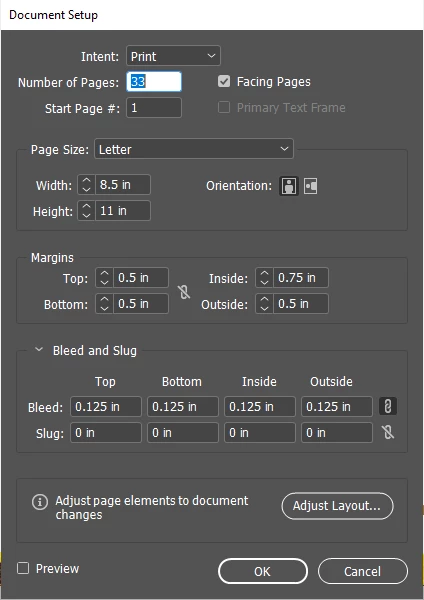
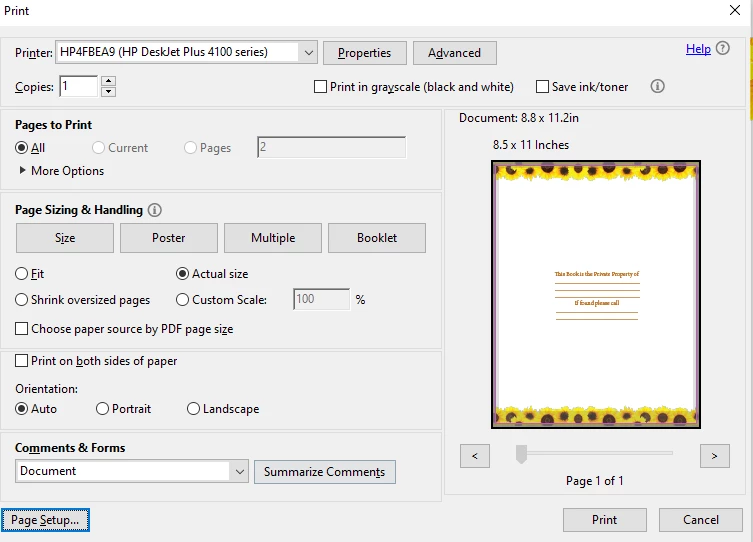
Please help me figure out why my document is not printing at the correct size. Document is set up at letter size 8.5x11 but when I try to print its the wrong size. In adobe it lists the size as 8.8x11.2 so even with my bleed set up page does not print to the edge.  As well as page being incorrectly sized the bottom border is not printing as well. If you look at the print preview its greyed out at the bottom. 

This topic has been closed for replies.

2 replies

Community Expert
February 6, 2021

You're trying to print onto A4 paper - using bleed.

Bleed is only useful when the paper is larger than required- you then include trim marks so that you can trim the page to the crop/trim marks to make it the size you want.

Bleed acts as a safety zone in case of slight shift in trimming, so even a slight trimming error wouldn't be noticed.


And then you have to find out if the printer you are using can print to the page edge - if it can you don't need to include the bleed. 

If it can't - and most desktop printers cannot - then it's been restricted by the Printers own margins.


Raye87Author
Participant
February 8, 2021

Thank you, I turned off the bleed and that made it alittle better, however it is still greying out the bottom of the page. If you see the screen shot I added its grey over the flowers at the bottom and it doesn't print that part even though the page size is corrected. 


Geоrge
Legend
February 6, 2021

Probably, you are need to go into printer settings and chose checkbox about printing without edges. 


P.S. I do never print from InDesign and prefer to use Acrobat Pro for print exported PDF's from ID.

Remember, never say you can't do something in InDesign, it's always just a question of finding the right workaround to get the job done. © David Blatner