
Participant
August 15, 2022
Answered

Printing booklet in indesign without a duplex printer

  • August 15, 2022
  • 3 replies
  • 854 views

Good evening,

I have followed several posts and am of the understanding that in order to print a booklet in indesign without a duplex printer one would need to select even and odd pages in the indesign print dialogue box.


I have an Epson L1350 and not the one in the screen shot. I had followed a similar post and the person answering the question had said to select, "printer", in indesign under the print dialogue box. My issue is that I don't have the option, "printer". I only have the four tabs at the bottom not all 5.


How would i be able to find this so I can select even and odd pages in my printing of the booklet?


Many thanks, Claire.
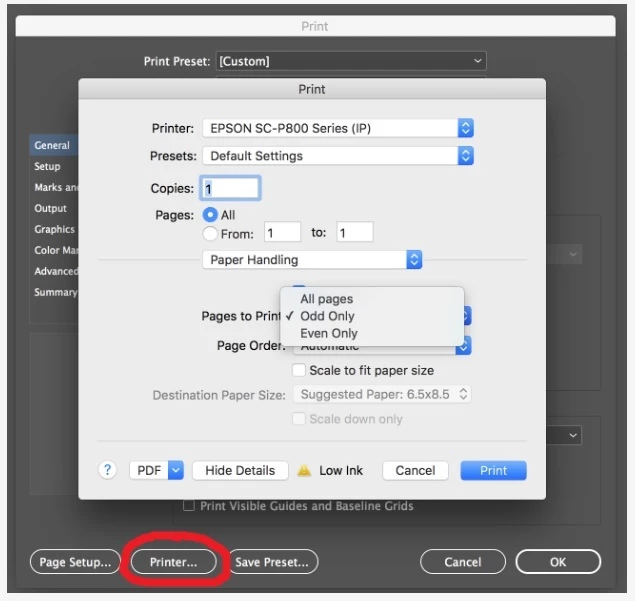
 

This topic has been closed for replies.
Correct answer Jumpenjax

I just chooses print instead of print booklet. Then set the printer options to print booklet. Works for me every month. I hope it helps you.

3 replies

James Gifford—NitroPress
Legend
August 15, 2022

Again, my understanding is that you need to print 2-sided with a non-duplex printer. Doing the pages in two runs is an old standard procedure; you can no doubt find how-to and tutorial videos that will show you how to work out the print process and how to "work and turn" the print stack in between passes.


Did this for probably a decade before getting my first fancy-dancy duplex printer. 🙂


Jumpenjax
Community Expert
JumpenjaxCommunity ExpertCorrect answer
Community Expert
August 15, 2022

I just chooses print instead of print booklet. Then set the printer options to print booklet. Works for me every month. I hope it helps you.

Lee- Graphic Designer, Print Specialist, Photographer
hammer0909
Community Expert
Community Expert
August 15, 2022

I think you might be overthinking this. To select even and odd pages, you would simply choose "all pages". Your post is confusing becuase you do in fact have the Printer button. You circled it in your screen shot. Now once the next dialot box opens, that shows you options for YOUR PRINTER. You've already indicated that the screenshot you provided is not the printer you are trying to use. Not sure why but OK. I've attached a screen shot of my printer showing the "two sided" option which is duplexing on my printer. This is what you're looking for on your printer.

James Gifford—NitroPress
Legend
August 15, 2022

I think the point is that the OP does NOT have a printer that duplexes, and therefore needs to print one page side first and then the other.


That's why she should select "Odd only" and print all pages, then put the stack in the printer (probably with the blank side up, can't find the printer model info to check) and print all even pages. It can take an experiment or two to figure out which way to turn and present the paper stack for second-side printing. Best to try it with one sheet first, to get the orientation right. Also need to watch page/print order for the second pass, so that pages 3-4 end up on the back of pages 1-2, etc.