

Vraja Devi Dasi
Inspiring
December 11, 2018
Answered

Printing setting....RGB to CMYK

  • December 11, 2018
  • 3 replies
  • 3241 views

Hey there friends!

I've been working on a book and sent it to be printed but I got this message:

After checking the text file we found all the text and pictures are in RGB mode and with ICC profile. Please share the new pdf

without profile and CMYK images 

does that mean I need to change every single image settings to CMYK? And what else?

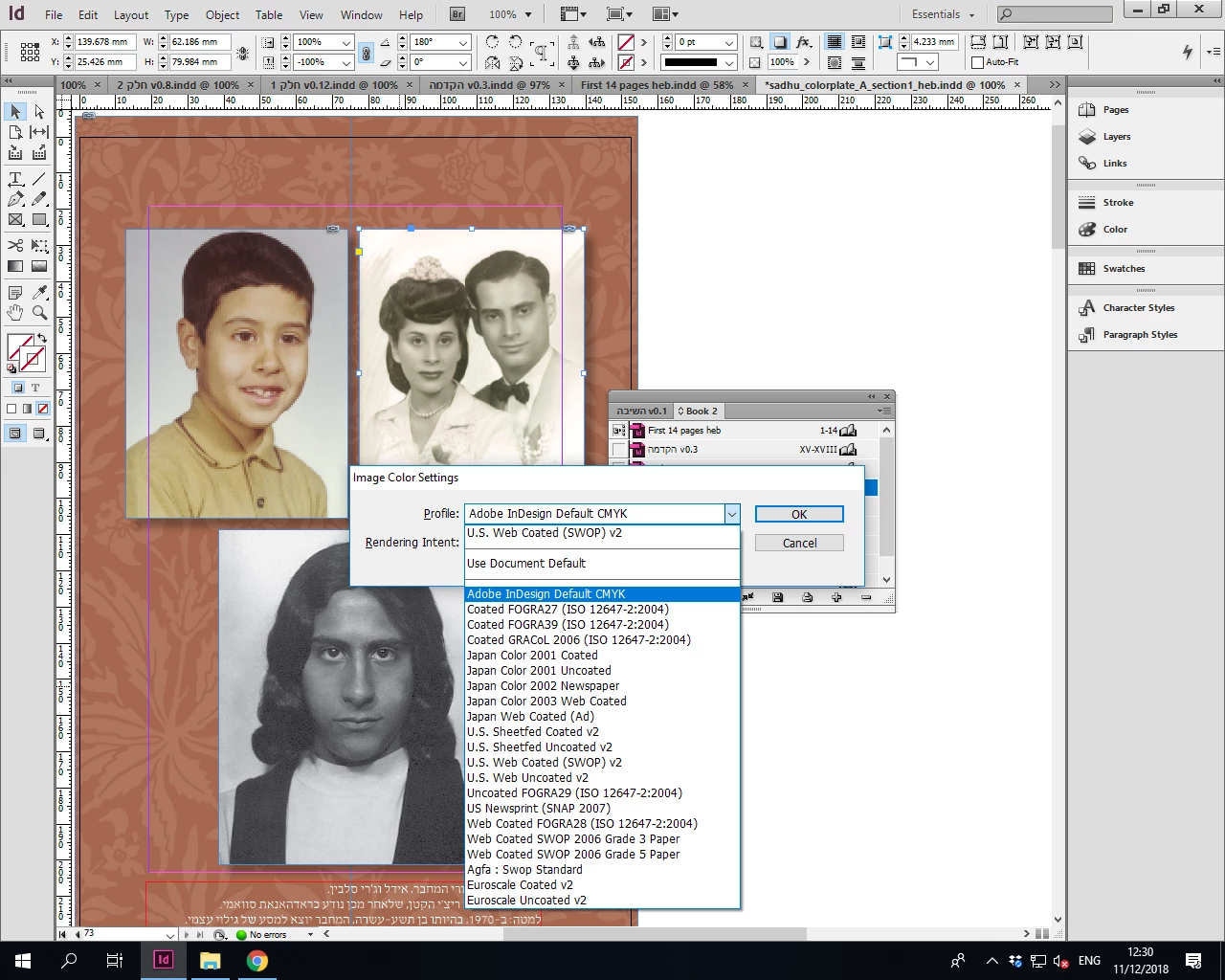
I right-clicked on the image, in the opening menu I selected Graphics -> Image Color Setting, then two drop down menus opened: Profile and Rendering Intent

in Profile I chose Adobe Indesign Default CMYK.
    This topic has been closed for replies.
    Correct answer rob day

    I right-clicked on the image, in the opening menu I selected Graphics -> Image Color Setting, then two drop down menus opened: Profile and Rendering Intent

    in Profile I chose Adobe Indesign Default CMYK.
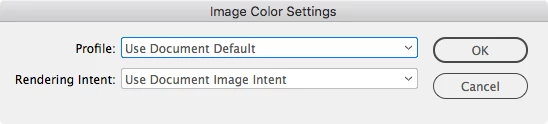
    Don't set the Image Color Setting to Adobe InDesign Default CMYK—for CMYK images you should leave or set it to Use Document Default.

    Please share the new pdf

    without profile and CMYK images

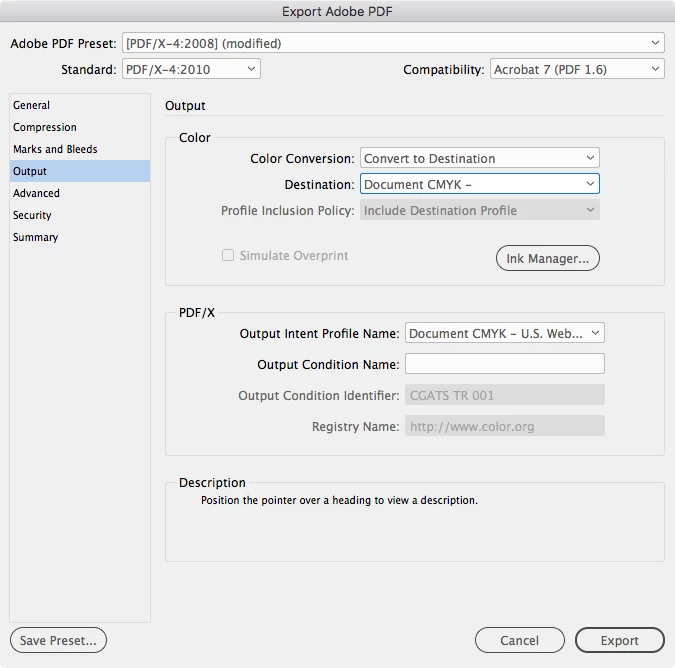
    It seems like your printer wants a PDF with CMYK—everything converted or left as document CMYK with no profiles embedded. Set your PDF Export Output tab like this:

    The PDF/X-4 preset does not include profiles with Document CMYK color objects, even though the grayed out Profile Inclusion Policy shows Include Destination Profile.

    Alternatively you can use the PDF/X-1a preset with no changes, which only allows Document CMYK, but it will flatten your drop shadows. That's may or may not cause problems—it wont be a problem if the output device is high resolution

    3 replies

    rob day
    Community Expert
    rob dayCommunity ExpertCorrect answer
    Community Expert
    December 11, 2018

    I right-clicked on the image, in the opening menu I selected Graphics -> Image Color Setting, then two drop down menus opened: Profile and Rendering Intent

    in Profile I chose Adobe Indesign Default CMYK.
    Don't set the Image Color Setting to Adobe InDesign Default CMYK—for CMYK images you should leave or set it to Use Document Default.

    Please share the new pdf

    without profile and CMYK images

    It seems like your printer wants a PDF with CMYK—everything converted or left as document CMYK with no profiles embedded. Set your PDF Export Output tab like this:

    The PDF/X-4 preset does not include profiles with Document CMYK color objects, even though the grayed out Profile Inclusion Policy shows Include Destination Profile.

    Alternatively you can use the PDF/X-1a preset with no changes, which only allows Document CMYK, but it will flatten your drop shadows. That's may or may not cause problems—it wont be a problem if the output device is high resolution

    Vraja Devi Dasi
    Inspiring
    December 11, 2018

    Hey everyone! Thank you so much for your help,

    First Derek Cross , I couldn't find that export pdf to print, I did find export to print but that just did the package and not the pdf.

    So I went to File->Adobe PDF Preset and created a new one, that brought me to the menu you mentioned,

    So then I went back to the book and did - export to PDF and automatically it opened the new preset I defined.

    I did what you said:

    select PDF/X-4, as single pages (not spreads) and tick Use Document Bleed Settings. This will convert your RGB to CMYK color mode.

    hopefully, it would be fine, I'll let you know soon

    Derek Cross
    Community Expert
    Community Expert
    December 11, 2018

    I would also recommend that you tick Crop Marks, which you'll find under the Marks and Bleeds tab.

    Derek Cross
    Community Expert
    Community Expert
    December 11, 2018

    Unless you've been given a different spec by your printer, select Export Book to Print PDF from the Book fly-out menu and select PDF/X-4, as single pages (not spreads) and tick Use Document Bleed Settings. This will convert your RGB to CMYK color mode.

    rob day
    Community Expert
    Community Expert
    December 11, 2018

    select PDF/X-4, as single pages (not spreads) and tick Use Document Bleed Settings. This will convert your RGB to CMYK color mode.

    Hi Derek, with PDF/X-4 you would have to explicitly set the Output tab's Destination to Document CMYK to ensure all of the color is CMYK.

    More importantly, if the OP sets the images to Adobe InDesign Default CMYK, the image will be reassigned the Photoshop 5 Default CMYK profile.

    In that case there might be two significant problems: the original CMYK values could change in appearance because of the new profile assignment. And, if the document is exported to the default PDF/X-4 preset (No Color Conversion), the images will include a profile assignment because the new image profile might conflict with the document's CMYK assignment.

    This is not what the printer wants because it will likely force a CMYK-to-CMYK conversion at output—there will be both a color appearance change and a CMYK value change.

    Derek Cross
    Community Expert
    Community Expert
    December 11, 2018

    I thought he stated they were already in RGB.

    Derek Cross
    Community Expert
    Community Expert
    December 11, 2018

    Presumably you sent your printers a PDF – how did you produce it?

    Vraja Devi Dasi
    Inspiring
    December 11, 2018

    After I add all the files to a book I selected all the files in it and export the book as pdf

    vinny38
    Legend
    December 11, 2018

    You don't have to change anything to your document...

    It all depends of your PDF export settings.

    Please share a screenshot of the PDF export window, with "Output" tab selected, like this:

    By the way, I'm surprised your printer asks for no ICC at all... But maybe he has his reasons...