
tinas39366092
Inspiring
July 25, 2025
Answered

problem creating index post starting with a number

  • July 25, 2025
  • 2 replies
  • 890 views

I have earlier been able to create indexes of keywords starting with a number, such as "1734 års lag". Now it doesn't work either in CC2025, CC2024 or CC2022. Indesign crasches as I hit ok in the add index post dialog.
I also tried to just select "års lag", an then add the "1734" manually in the dialog, but with the same result.
I have restarted programs and computer. Working in Sonoma 14.5 on a macbook pro, 2021.
What is the problem?  
Correct answer Peter Kahrel

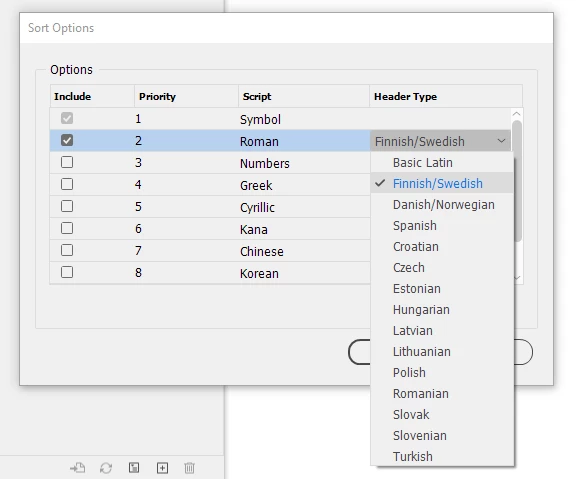
I'm working with the document now, and suddenly noticed another strange thing with the index. The Swedish letters å and ö, which are to be sorted at the end of the alphabet, now sorts at the end of a, in the case of å, and the ö word at the end of o. BUT: when the Swedish letter is the second letter of the word, it's sorted correctly! 


Did you set the sort order to Swedish?


2 replies

Peter Kahrel
Community Expert
Community Expert
July 25, 2025

I don't see that problem on Windows.


You can try deleting the preferences (restart InDesign holding down the (Mac equivalent of) Ctrl+Alt+Del


If that doesn't work, delete InDesign's caches. On my Windows PC they're in

C:\Users\Peter\AppData\Local\Adobe\InDesign\Version 20.0\en_GB\Caches

I don't know what the Mac equivalent would be.

tinas39366092
Inspiring
July 25, 2025

Hi, and thank you for answering! However, I'm sorry to say neither deleting preferences nor cache folder did the trick. Any other suggestions?

Harshika Verma
Community Manager
Community Manager
July 25, 2025

Hi there,

Thank you for trying the suggestion shared by our expert. Would you mind sharing a screen recording of the issue for better investigation? Please also share the version of InDesign installed on your machine.


We will be happy to assist you further.


Thanks,

Harshika

tinas39366092
Inspiring
July 25, 2025

And yes, I have tried a new fresh document, with the same result!