
Participant
January 24, 2025
Question

Problem with alignment left justify in Epubs file (Indesign)
  • January 24, 2025
  • 3 replies
  • 822 views

Hello Everyone,

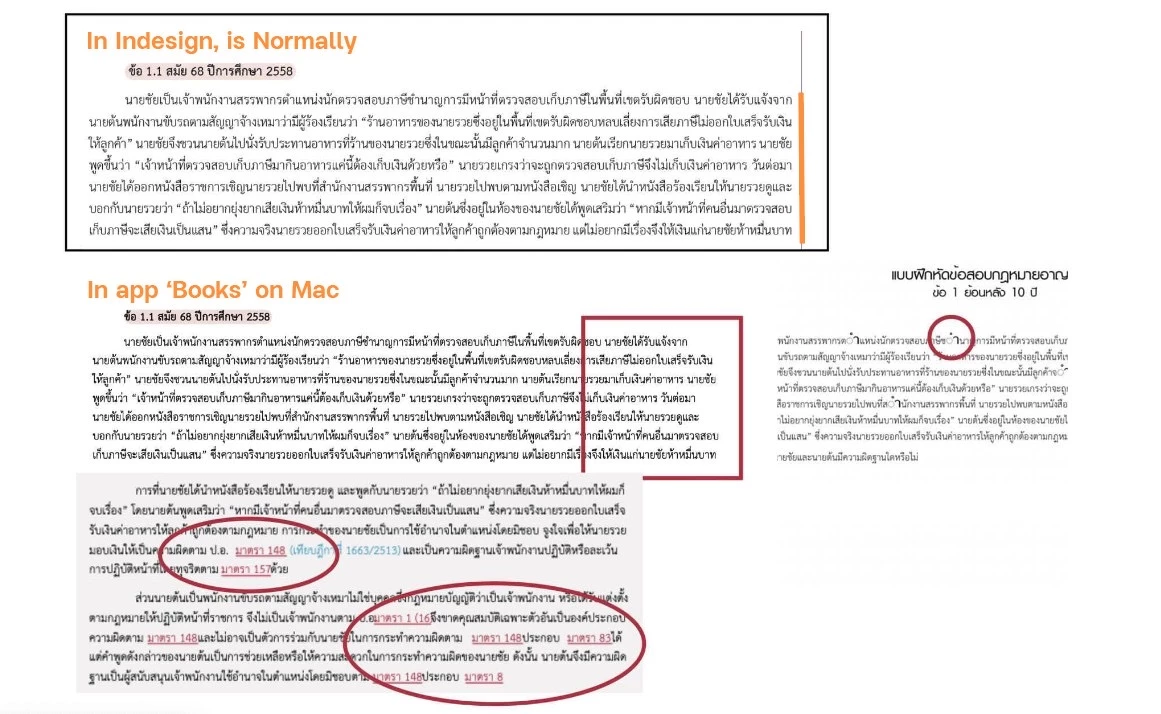
I would like to ask. Because I have a problem with aligning text in the Epub fix-layout file (Indesign program).


Setting  Text Paragraph to Alignment is Left Justify, and it will display normally in the program.


But when Preview Epub in the program or Export.

Open in the "Books" app, the text will be aligned to the left. Some spaces between words are stuck, some are overlapping, and some words are cut off strangely (as shown in the attached image and circled in red).


I'm not sure if I made a mistake somewhere, so I would like to ask if there is a way to fix it.


Please help.

Thank you 🙂

3 replies

Participant
January 24, 2025

Thanks for reply. I understand.

But I only want the text to be alignment text is Left Justify.


I saw some people can do this. If you know how to fix it please tell me. Thanks.

Inspiring
January 24, 2025

Make sure that the font you are using is OTF or TTF, not postscript. And take any tracking or kerning off in the source InDesign file. Then try exporting again to see what happens. 

Inspiring
January 24, 2025

The InDesign fixed-layout export positions each word individually. And that position is abolute — not matter the word spacing. So if, say, the embedded fonts aren't working as expected, then you will have display issues. What's very likely happening here is that you have tracking applied in the InDesign layout. Tracking doesn't preserved as expected in HTML and CSS and will throw off how the content displays. 

Finally, I would strongly suggest that given the amount of text in your examples, that fixed-layout isn't the right format for this EPUB. FXL is meant for image-heavy content like graphic novels, manga, and children's picture books only. It's not a very nice reading experience for text-heavy content. 

James Gifford—NitroPress
Legend
January 24, 2025

Is there some FXL mode or model that does not position words using absolute methods?

Inspiring
January 24, 2025

In a way, yes. InDesign's FXL export applies spans with positioning information at the word level. This is a bonkers ways to do it and almost inevitably leads to rendering issues, no matter the reading system. It's much more agile to apply positioning CSS at the <div> or <p> level — far fewer display issues as a result. And better for accessibility as well. There are plugins and scripts that allow for this kind of export — CircularFlo, most notably. This blog post may be of interest. 

Robert at ID-Tasker
Legend
January 24, 2025