Inspiring
May 4, 2021
Answered

Problem with Avenir Lt Std open type fonts

  • May 4, 2021
  • 5 replies
  • 12918 views

Dear all,


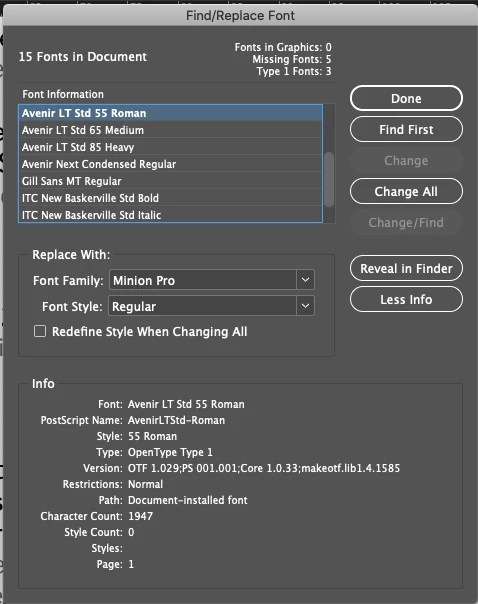
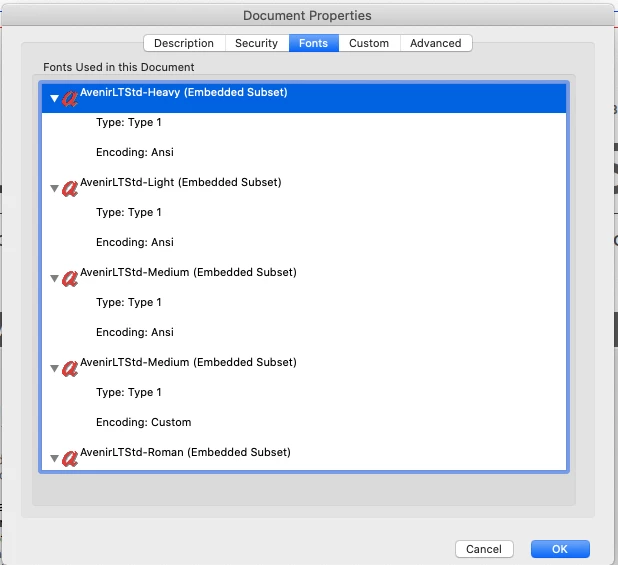
We have applied AvenirLTStd-Heavy, AvenirLTStd-Light, ... for a document but when we look at the Find Font panel we can see font type as both OTF and Type 1. Whereas on the PDF output font details shows Type 1. Is there any reason behinds this?


Regards

Augustine

This topic has been closed for replies.
Correct answer jmlevy

Because these are not PostScript type 1 fonts, but OpenType (PostScript “flavour”) fonts

https://www.typotheque.com/help/opentype_fonts/opentype_flavours_truetype_and_postscript

5 replies

Community Expert
May 5, 2021

Hi Augustine,

so did the document need three Type-1 fonts now?

Or was it a false alarm with the blue message bar?


Thanks,
Uwe Laubender

( ACP )

jmlevy
Community Expert
Community Expert
May 4, 2021

It is definitively an OpenType font: see the “O” (for OpenType)?

and here, below

and the name is enough to be sure : it ends with “Std” and only OpenType fonts name end with “Std” (or “Pro”)

Community Expert
May 4, 2021

Yes, and if the three Avenir styles were flagged as Type-1 fonts we would see a bug with that new annotation bar.


Regards,
Uwe Laubender

( ACP )

Inspiring
May 5, 2021

Thanks for your time Laubender

Community Expert
May 4, 2021

Hi Augustine,

just check the other fonts listed in the panel.

I do not think that this message is addressing the three Avenir styles listed.


But please, correct me if I'm wrong!


Regards,
Uwe Laubender

( ACP )

Community Expert
May 4, 2021

Hi Augustine,

that's no issue at all.

It's an OpenType font with outlines for the glyphs drawn internally with Type 1 curve technology.


Regards,
Uwe Laubender

( ACP )

Inspiring
May 4, 2021

Hi Laubender,


Thanks for your reply.


But if that is the case why does InDesign says the below. 


Regards

Augustine

jmlevy
Community Expert
jmlevyCommunity ExpertCorrect answer
Community Expert
May 4, 2021

Because these are not PostScript type 1 fonts, but OpenType (PostScript “flavour”) fonts

https://www.typotheque.com/help/opentype_fonts/opentype_flavours_truetype_and_postscript

Joely10623436
Community Expert
Community Expert
May 4, 2021

I can't see the problem… as long as the PDF/Output is fine.


i guess somehow, somebody used the Typ1 as well as the OT in the document. Just select and REPLACE all.


good luck.