
Participating Frequently
January 23, 2021
Answered

Problem with centering things

  • January 23, 2021
  • 5 replies
  • 3954 views

Hi I am having an issue where the red align line seems somewhat "imprecise" - when I try and center an image or a text box in the middle of the frame it allows for a little bit of wiggle room so that the red lines appear even when I move the image/text box a few pixels. Obviously I want the perfect center - and the fact that I'm not totally sure what the center is, is problematic. The red center alignment vertical and horizontal lines should only appear and magnet when you are at the perfect center. The red lines shouldn't remain when you move the image a bit around it. Anyone else experience this problem? is there a fix?
Thanks!!
This topic has been closed for replies.
Correct answer Barb Binder

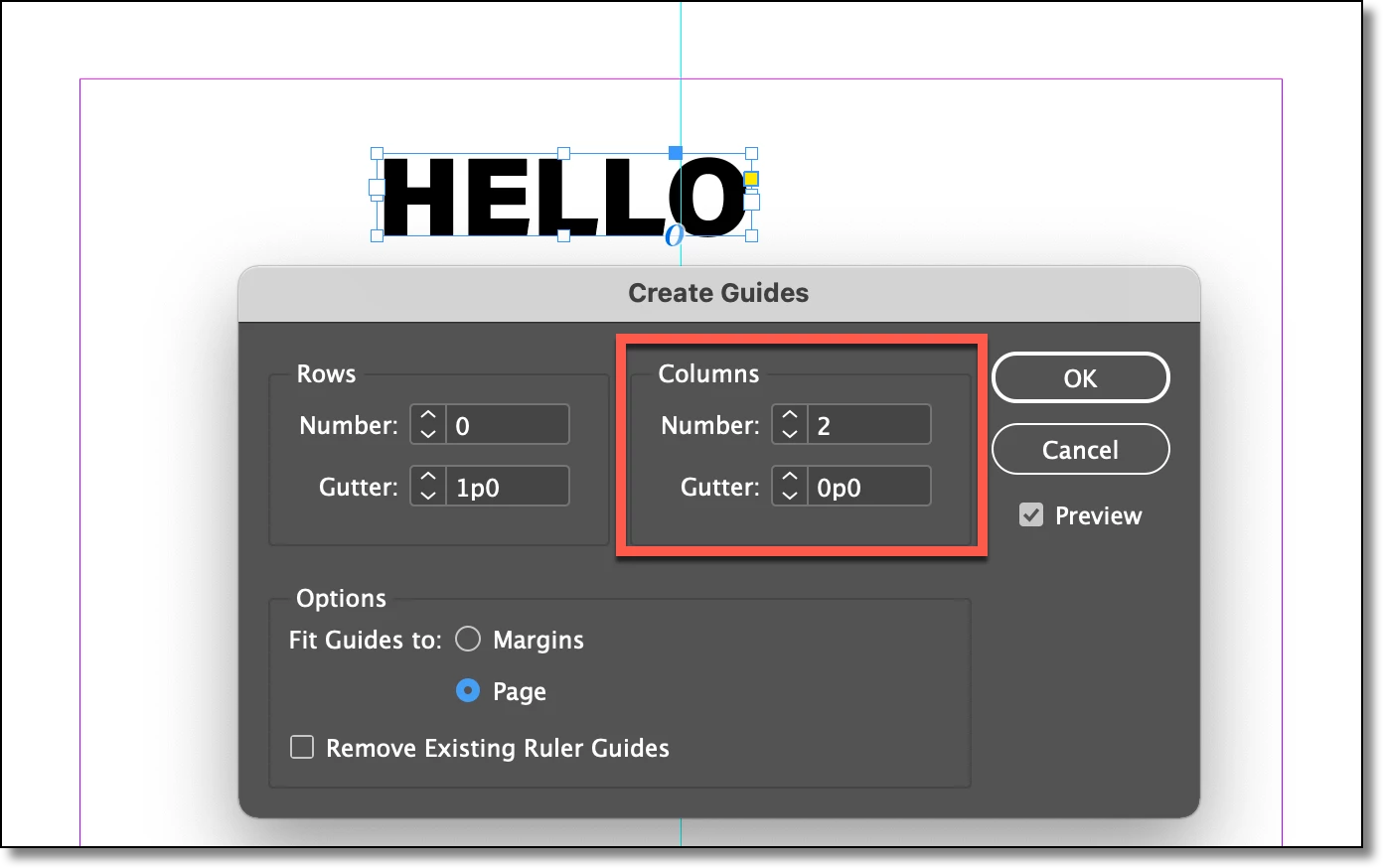
My alternative workflow will center a frame on the page without using the Smart Guides. You can see this when you add a ruler guide at the center of the page and select the frame. You will see that the ruler guide bisects the top and bottom sizing handles on the frame. The ruler guide provides visual confirmation—you don't need it after you trust the process.


I added a ruler guide to the center of the page:

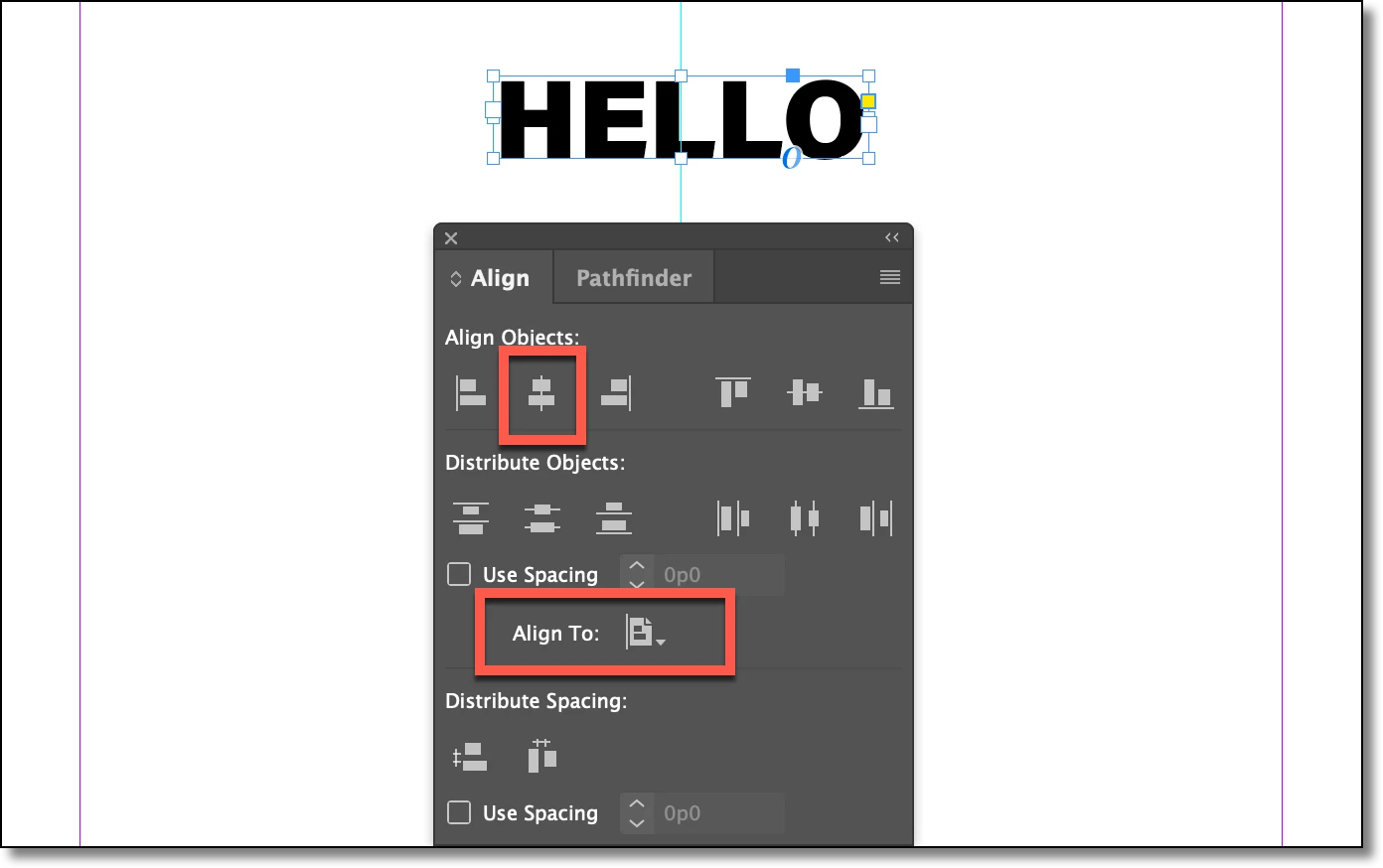
And aligned the frame to the center of the page:


Also, you are one patch behind. I don't know what's causing the guides issue and I actually have not experienced it before, but I do recommend updating to the current patch. It will fix other problems.


~Barb

5 replies

Barb Binder
Community Expert
Barb BinderCommunity ExpertCorrect answer
Community Expert
January 25, 2021

My alternative workflow will center a frame on the page without using the Smart Guides. You can see this when you add a ruler guide at the center of the page and select the frame. You will see that the ruler guide bisects the top and bottom sizing handles on the frame. The ruler guide provides visual confirmation—you don't need it after you trust the process.


I added a ruler guide to the center of the page:

And aligned the frame to the center of the page:


Also, you are one patch behind. I don't know what's causing the guides issue and I actually have not experienced it before, but I do recommend updating to the current patch. It will fix other problems.


~Barb

~Barb at Rocky Mountain Training
TᴀW
Legend
January 24, 2021

It's been like this since they introduced smart guides way back. I've always had a problem with it, and I think I also logged a bug about it a long time ago.

The solution is not to entirely rely on smart guides but to do what @Barb Binder has suggested, and use the various aligning buttons to perfectly align things. It won't fix the guides issue, but at least you'll get your object placed exactly where you want.

Visit www.id-extras.com for powerful InDesign scripts that save hours of work — automation, batch tools, and workflow boosters for serious designers.
Barb Binder
Community Expert
Community Expert
January 24, 2021

Hi @marc-edouardl46756546:


What version of InDesign? Which operating system? I can't replicate this on Mac OS 11.1 and InDesign 16.0.1.


Here's an alternative until this is resolved: select the frame set Align to: Align to Page and then click Align Horizonal Centers. 

~Barb


~Barb at Rocky Mountain Training
Participating Frequently
January 24, 2021

Hey!

I have Mac OS 11.0.1 and InDesign 16.0.


I just tried what you suggested and it hasn't solved the problem either...


Really appreciate your help...


Barb Binder
Community Expert
Community Expert
January 23, 2021

That isn't normal. Did you try resetting preferences or rebuilding the cache?

https://www.rockymountaintraining.com/adobe-indesign-resetting-preferences-and-deleting-the-cache/


~Barb

~Barb at Rocky Mountain Training
Participating Frequently
January 24, 2021

Hi!

Thanks for checking in. I just reset the preferences and rebuilt the caches, as described on that link you sent. I'm testing with a text box if it fixed the problem, and I am still having the issue. I tried changing the live screen drawing to see if that was affected but the problem persistsed whether on immediate, delayed, or never. I also tested with an image box and the same problem persisted...


Participating Frequently
January 23, 2021

Here's an example. If you look at "EL" of "HELLO" you'll notice how the red centering still appears even though "HELLO" is in 3 different placements.