
Known Participant
February 12, 2021
Answered

Problem with line-drawing in interactive pdf

  • February 12, 2021
  • 2 replies
  • 1223 views

I have an indesign file which I would like to export to an interactive pdf. When I open the pdf there is a problem with the line-drawing. The lines look "jagged". When I export exactly the same file as a pdf for print the result is much better. What can I do to get the same quality in the interactive pdf? I already played with the resolution but it does not help. I think it is also not an adobe reader problem. The first image is the interactive pdf, the second one is the normal pdf for print
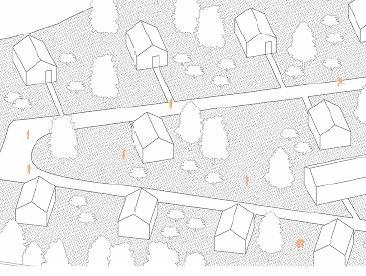
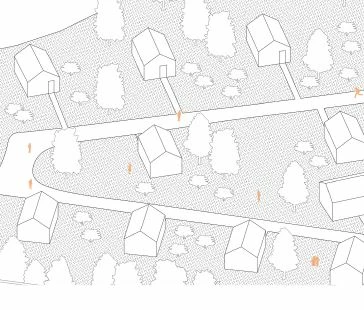


This topic has been closed for replies.
Correct answer Dave Creamer of IDEAS

If your only interactivity is jump buttons, you can use a print PDF.

2 replies

JR Boulay
Community Expert
Community Expert
February 13, 2021

It sounds like a downsample issue.


Since you cannot avoid downsampling when using "Interactive PDF" export you should try to export as a "Print PDF" using these settings :

- no downsampling

- ZIP compression (lossless compression)

- convert all objects to RGB


See these screenshots (in French):


Acrobate du PDF, InDesigner et Photoshopographe
Known Participant
February 13, 2021

thanks for your reply, but I would like to export it as an interactive pdf, because I would like to use buttons and "jump" to different pages in the document. I think this is not possible in a pdf for print, right?

Dave Creamer of IDEAS
Community Expert
Dave Creamer of IDEASCommunity ExpertCorrect answer
Community Expert
February 14, 2021

If your only interactivity is jump buttons, you can use a print PDF.

David Creamer: Community Expert (ACI and ACE 1995-2023)
JonathanArias
Legend
February 12, 2021

are you placing a vector file? or an image?

Known Participant
February 12, 2021

an image

JonathanArias
Legend
February 12, 2021

ok, next questions:

  1. what is the size and resolution of that image? .png, .jpg format?
  2. what is the size of the frame holding that image in indesign? 
  3. please show a screenshot of the export setting you are using for exporting interactive .pdf