
Inspiring
Nov 11, 2026 12:15 PM UTC
Answered

Problem with Missing WinSoft Component When Opening a File
Hello everyone,

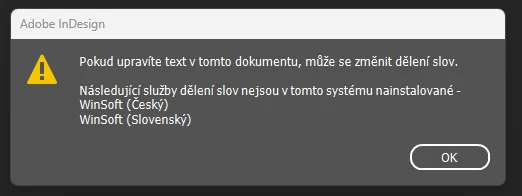
I'm experiencing an issue with hyphenation. Whenever I open previously created InDesign documents, I get a warning message indicating that the WinSoft hyphenation component is missing.

This issue started after upgrading InDesign to version 2027.

The problem can be resolved manually by changing the dictionary from WinSoft to Hunspell, but this has to be done individually for each document, which is quite annoying.

Does anyone know how to get rid of this problem, or alternatively, how to restore the missing WinSoft dictionary?

Jan5C25Correct answer
Inspiring
Nov 11, 2026 2:22 PM UTC

@BobLevine 

Dear Bob,

The files I'm working with are very old, possibly around 10 years old.

In any case, downgrading to the previous version, build 21.6, turned out to be a successful solution.

It's just a shame that I'll now have to reconvert the files I opened yesterday in the newer version so that they are compatible with this older version of InDesign.

14 replies

Participating Frequently
Nov 13, 2026 8:34 PM UTC

I was able to fix a problem like this on my end. I barely use hyphenation and so I was confused when this dialog popped up after I had upgraded to InDesign 2027. I made sure all text blocks in the file did not have hyphenation turn on. I also made sure the file’s Hyphenation under the Dictionary section in Preferences was set to Hunspell. Then I exported the file as an IDML, restarted the program after that and re-opened the file to save as an INDD. Now the pop-ups are gone.

Translate
BobLevine
Community Expert
Community Expert
Nov 11, 2026 12:57 PM UTC

I’m curious, how old are these files you’re trying to open. I haven’t heard Winsoft mentioned in quite some time.

Also, try running those files through an export to IDML and open those.

Translate
Jan5C25Author
Inspiring
Nov 11, 2026 1:28 PM UTC

Yes, this solution works, but for me it would mean re-exporting most of the files I have created so far. There are hundreds of them, possibly even more.

I might try downgrading InDesign instead. Some time ago, I managed to avoid a very annoying bug in Photoshop by reverting to an earlier version.

Translate
BobLevine
Community Expert
Community Expert
Nov 11, 2026 2:08 PM UTC

Again, how old are these files? What version did they last work properly in?

Translate
Abhishek Rao
Community Manager
Community Manager
Nov 11, 2026 12:48 PM UTC

Hi ​@Jan5C25, 


Thanks for reporting this and sorry for the experience. 

Adding to the expert suggestion, since the issue started after upgrading to InDesign 2027 (22.0), could you please check Preferences > Dictionary, select Czech and Slovak individually, and set the Hyphenation provider to Hunspell for both languages? Then restart InDesign and check whether the warning still appears when opening your older documents.

Reference: Adobe — Change dictionary preferences.

Could you also create a new document, add some Czech or Slovak text, save it, and reopen it to check whether the warning appears there as well to help us determine whether the issue is specific to documents created in earlier versions.

Additionally, could you confirm your operating system, and whether you're using the standard or Middle Eastern version? 


Thanks for your patience and cooperation!

Abhishek

Translate
Jan5C25Author
Inspiring
Nov 11, 2026 1:06 PM UTC

I have tested this procedure, but unfortunately, it seems that the dictionary change is not applied to other documents when they are opened. The change only takes effect in the document in which it was made.

Translate
Abhishek Rao
Community Manager
Community Manager
Nov 12, 2026 12:17 PM UTC

Hi ​@Jan5C25,


Thanks for your patience and for sharing the detailed information.

I wanted to let you know that we've logged a bug for this issue, and our product team is investigating it further.

We'll keep you updated here in the thread as soon as we have more information or any progress to share.

Thanks again for reporting this and helping us improve InDesign!

Best,
Abhishek

Translate
leo.r
Community Expert
Community Expert
Nov 11, 2026 12:24 PM UTC

Just to make sure: are you using the ME (Middle Eastern) version of InDesign? WinSoft is known for providing Hebrew/Arabic support for InDesign (although it could be involved in other localizations as well).

Translate
Jan5C25Author
Inspiring
Nov 11, 2026 12:55 PM UTC

I am currently using version 2027, build 22.0 x64, as part of the Czech localization of Adobe Creative Cloud.

Translate