Participant
January 24, 2019
Answered

Problem with Roman text within Arabic Indesign

  • January 24, 2019
  • 2 replies
  • 628 views

Hi,

I'm creating an Arabic document using the Arabic version of InDesign. It's working well when the copy is only Arabic, but in sentences that have a date or brandname that needs to stay written in Roman characters, the copy rearranges itself in what visually looks like the wrong order. It therefore doesn't match the copy document I'm working with from the translation company. Any advice on how to fix this would be much appreciated.

Thanks.
This topic has been closed for replies.
Correct answer Zaid Al Hilali

It would be better to post a screenshot of the problem you're facing.

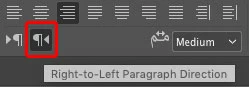
Generally, make sure to keep Paragraph Direction as Right to Left from the Paragraph Panel

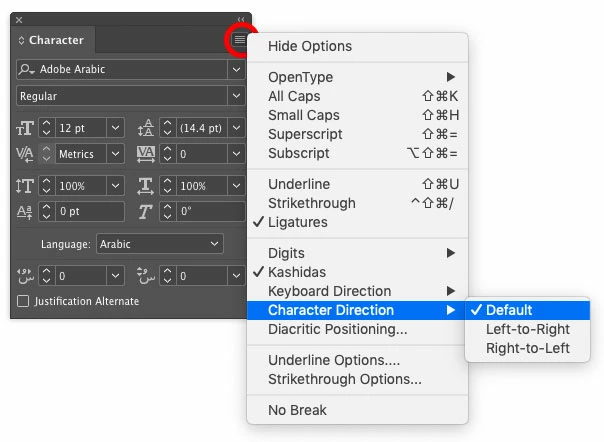
Then leave your Character Direction as "Default" from he Character Panel fly-out menu…

Here are discussions that may relate to this topic

Re: Mixing Arabic and English text in Adobe InDesign - Numbered Lists

Re: One paragraph contains Arabic and multi-language problem

2 replies

Zaid Al Hilali
Community Expert
Zaid Al HilaliCommunity ExpertCorrect answer
Community Expert
January 25, 2019

It would be better to post a screenshot of the problem you're facing.

Generally, make sure to keep Paragraph Direction as Right to Left from the Paragraph Panel

Then leave your Character Direction as "Default" from he Character Panel fly-out menu…

Here are discussions that may relate to this topic

Re: Mixing Arabic and English text in Adobe InDesign - Numbered Lists

Re: One paragraph contains Arabic and multi-language problem

Srishti_Bali
Legend
January 24, 2019

Hi Lizzie,

Does that help if you go to Paragraph panel and choose Left to Right typing?

Adobe World-Ready Composers

For more details please check this help article: Arabic and Hebrew features in InDesign.

Regards,

Srishti